How to Protect Laptop from Hackers : Complete Security Guide for Beginners and Professionals. In today’s digital world, laptops store personal photos, business data, passwords, and financial information. Unfortunately, cybercriminals constantly look for ways to exploit weak systems. Learning How to Protect Laptop from Hackers is no longer optional—it is essential for personal safety, privacy, and data security.
Hackers use multiple techniques such as malware, phishing attacks, unsecured Wi-Fi networks, and outdated software to gain unauthorized access. This Laptop Hacking Prevention Guide for Beginners explains exactly how hackers access laptops and what you can do to stop them effectively.
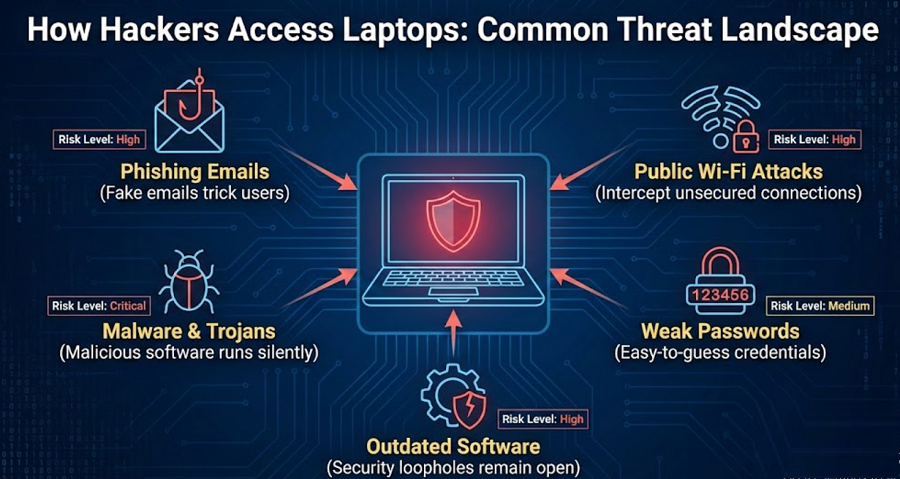
How Hackers Access Laptops: Understanding the Threat Landscape
Before applying protection strategies, it’s important to understand how cybercriminals break into systems. Most laptop hacking incidents occur due to simple mistakes that users overlook.
Common Laptop Hacking Techniques
| Hacking Method | How It Works | Risk Level |
|---|---|---|
| Phishing Emails | Fake emails trick users into sharing passwords | High |
| Malware & Trojans | Malicious software runs silently | Critical |
| Public Wi-Fi Attacks | Hackers intercept unsecured connections | High |
| Weak Passwords | Easy-to-guess credentials | Medium |
| Outdated Software | Security loopholes remain open | High |
Understanding how hackers access laptops allows you to proactively protect laptop from hacking before serious damage occurs.
How to Protect Laptop from Hackers and Malware Effectively
One of the most important steps in learning How to Protect Laptop from Hackers is safeguarding your system against malware. Malware includes viruses, ransomware, spyware, and keyloggers that steal sensitive data.
Essential Malware Protection Measures
- Install a reputable antivirus with real-time protection
- Enable automatic malware definition updates
- Avoid downloading cracked software or unknown files
- Scan external USB devices before opening them
These actions significantly prevent laptop hacking and protect your system from silent cyber threats.
Best Ways to Secure Your Laptop from Hackers Using System Settings
System-level security plays a critical role in laptop safety. Proper configuration can block unauthorized access even if hackers attempt to exploit vulnerabilities.
Key Laptop Security Best Practices
| Security Feature | Why It Matters | Recommended Setting |
|---|---|---|
| Firewall | Blocks unauthorized network access | Enabled |
| System Updates | Fixes security vulnerabilities | Automatic |
| Secure Boot | Prevents malicious boot loaders | Enabled |
| Account Lockout | Stops brute-force attacks | Enabled |
Following these laptop security best practices helps secure laptop from cyber attacks at both hardware and software levels.
How to Protect Laptop from Hackers Using Strong Authentication
Weak passwords are among the most common causes of laptop breaches. A single compromised password can expose your entire system.
Smart Authentication Techniques
- Use passwords with at least 12 characters
- Combine symbols, numbers, and uppercase letters
- Enable two-factor authentication (2FA)
- Use password managers to store credentials securely
Strong authentication ensures better laptop privacy protection and limits unauthorized access attempts.
Laptop Security Tips to Prevent Hacking on Public Wi-Fi
Public Wi-Fi networks in cafes, airports, and hotels are a hacker’s playground. Many users unknowingly expose their laptops to cyber threats when connecting to unsecured networks.
Safe Browsing on Public Networks
| Risk | Hacker Exploits | Protection Method |
|---|---|---|
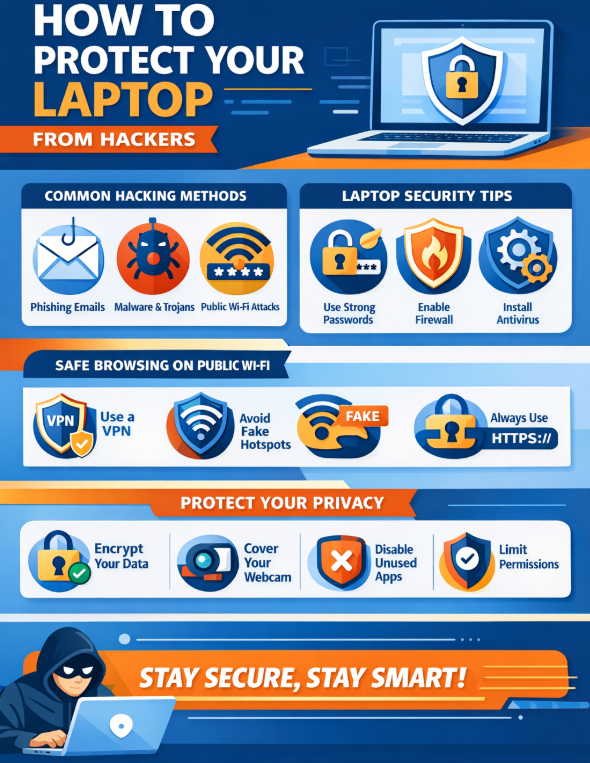
| Data Interception | Man-in-the-middle attacks | VPN usage |
| Fake Hotspots | Evil twin networks | Verify network name |
| Session Hijacking | Cookie theft | HTTPS websites |
Using a trusted VPN and avoiding sensitive logins are critical Laptop Security Tips to Prevent Hacking in public environments.
How to Make Your Laptop Hacker-Proof with Privacy Controls
Privacy settings often remain ignored, yet they play a major role in laptop security. Misconfigured permissions allow apps and services to access sensitive information.
Important Privacy Measures
- Disable unused apps and background services
- Restrict camera and microphone access
- Encrypt your hard drive (BitLocker or FileVault)
- Regularly review app permissions
Applying these steps strengthens laptop privacy protection and reduces data exposure risks.
How to Protect Laptop from Hackers Through User Awareness
Technology alone is not enough. Human behavior often determines whether an attack succeeds or fails.
User Habits That Prevent Laptop Hacking
- Never click suspicious email links
- Verify software sources before installation
- Avoid sharing login credentials
- Lock your laptop when unattended
Developing safe digital habits is one of the Best Ways to Secure Your Laptop from Hackers long-term.
Advanced Laptop Hacking Prevention Guide for Beginners
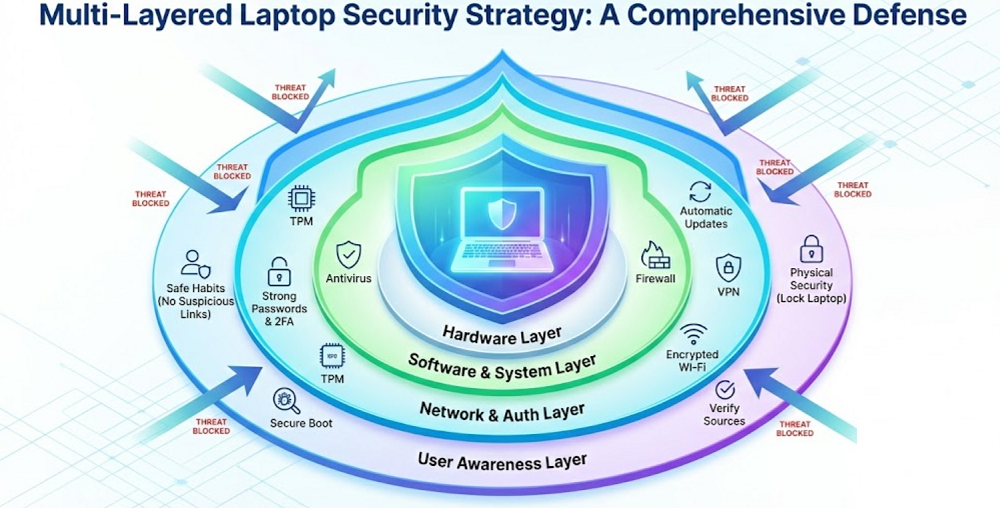
If you want advanced protection, combining multiple security layers is the best approach.
Multi-Layer Laptop Security Strategy
| Security Layer | Tools Used | Benefit |
|---|---|---|
| Hardware | TPM, Secure Boot | Prevents firmware attacks |
| Software | Antivirus, Firewall | Blocks malware |
| Network | VPN, DNS protection | Stops data leaks |
| User | Awareness training | Prevents social engineering |
This layered approach helps prevent laptop hacking even against sophisticated cyber attacks.
How to Protect Laptop from Hackers: Final Thoughts
Mastering How to Protect Laptop from Hackers requires a combination of strong passwords, updated software, malware protection, privacy controls, and safe browsing habits. Hackers constantly evolve their techniques, but proactive security measures can keep your laptop safe and resilient.
By following this guide, you can confidently secure laptop from cyber attacks, safeguard personal data, and maintain complete digital privacy and beyond.
Frequently Asked Questions (FAQ)
❓ Can hackers access my laptop when it’s turned off?
No, but if malware was installed earlier, it may activate once the laptop is powered on and connected to the internet.
❓ Is antivirus software enough to protect my laptop?
Antivirus is essential, but combining it with firewalls, VPNs, and strong passwords provides complete protection.
❓ How often should I update my laptop?
Enable automatic updates. Regular updates fix security vulnerabilities hackers often exploit.
❓ Are Windows laptops more vulnerable than others?
Any operating system can be hacked if security measures are weak. Proper configuration ensures safety.