Best Cybersecurity Tips For Beginners. The internet has become part of our daily routine. We shop online, manage bank accounts, work remotely, and store personal memories in cloud platforms. But here’s the uncomfortable truth—cyber threats are increasing every single year. Many people think hackers only target big companies. In reality, beginners and regular internet users are often the easiest targets.
If you’re new to digital security, this beginner guide to cybersecurity will help you understand the cybersecurity basics for beginners and develop strong habits to stay protected online.
This guide explains the Best Cybersecurity Tips For Beginners, along with practical online security tips, easy protection methods, and real-life strategies to protect personal data online.
Why Cybersecurity Matters Today
Cybersecurity is no longer just a technical topic for IT professionals. Everyone who uses the internet should understand basic cybersecurity practices.
Think about it.
Your phone stores personal photos, your email contains private conversations, and your browser saves passwords.
Without proper data privacy protection, cybercriminals can access your identity, banking information, and personal files.
Developing digital security awareness is the first step toward building a secure digital environment and ensuring long-term online identity protection.
Common Cyber Threats Beginners Should Know
| Cyber Threat | What It Means | Possible Risk |
|---|---|---|
| Phishing | Fake emails or messages pretending to be trusted companies | Stealing passwords and financial information |
| Malware | Malicious software installed unknowingly | Data theft and device damage |
| Password Attacks | Hackers guessing or cracking passwords | Account takeover |
| Public WiFi Attacks | Hackers intercept data on unsecured networks | Privacy and financial risks |
| Identity Theft | Using stolen personal information | Fraud and financial loss |
Understanding these threats improves cyber threats awareness and helps beginners recognize potential dangers before it’s too late.
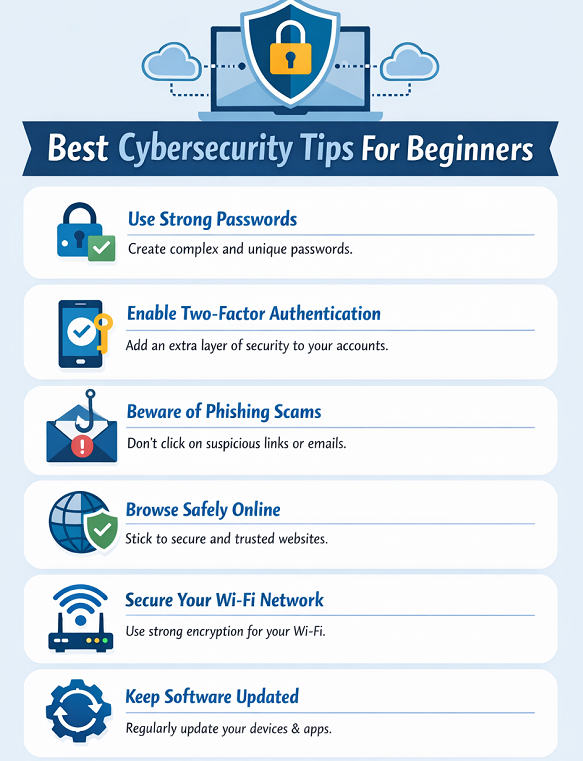
Best Cybersecurity Tips For Beginners
1. Use Strong Passwords (Password Security Best Practices)
Let’s start with the obvious—but often ignored—rule.
Weak passwords are the number one cause of hacked accounts.
Follow these password security best practices:
- Use at least 12 characters
- Combine uppercase, lowercase, numbers, and symbols
- Avoid personal details like birthdays
- Never reuse the same password
A password like Summer2024 might feel safe, but it’s surprisingly easy to crack.
Instead, use something complex like:
S!mpleSecure#48
This is one of the most important cybersecurity tips for beginners.
2. Enable Two-Factor Authentication
Another simple but powerful security measure is two-factor authentication security.
This means logging in requires:
- Your password
- A verification code sent to your phone or app
Even if hackers steal your password, they still cannot access your account without the second verification step.
Most platforms like email, banking apps, and social media support this feature.
It’s honestly one of the easiest cybersecurity safety tips anyone can implement.
Password Strength Comparison
| Password Example | Strength Level | Estimated Crack Time |
|---|---|---|
| 123456 | Very Weak | Seconds |
| Password123 | Weak | Minutes |
| MyDog2024 | Moderate | Hours |
| S!mpleSecure#48 | Strong | Years |
This table highlights why password security best practices matter for long-term cyber threat prevention.
3. Follow Safe Browsing Habits
Another essential part of the Best Cybersecurity Tips For Beginners is developing safe browsing habits.
Many malware infections happen because users click suspicious links.
Before clicking anything online, ask yourself:
- Does the website look legitimate?
- Is the URL correct?
- Does it use HTTPS encryption?
Practicing safe browsing habits significantly improves network security fundamentals and protects your online activity.
4. Learn Phishing Attack Prevention
Phishing emails are getting smarter. Sometimes they look exactly like official messages from banks or online services.
Signs of phishing include:
- Urgent language (“Your account will be closed immediately”)
- Suspicious links
- Unexpected attachments
- Slightly misspelled website addresses
Understanding phishing attack prevention is a key part of internet safety tips for beginners.
When in doubt, never click the link. Instead, go directly to the official website.
5. Install Antivirus and Follow Malware Protection Tips
Viruses, spyware, and ransomware are common threats. Without proper protection, a single download can compromise your entire system.
Here are some practical malware protection tips:
- Install reliable antivirus software
- Keep software updated
- Avoid pirated software downloads
- Scan external USB drives
These actions strengthen cyber threat prevention and improve your secure digital environment.
Essential Cybersecurity Tools for Beginners
| Tool Type | Purpose | Example Usage |
|---|---|---|
| Antivirus Software | Detects malware and viruses | Protects system from malicious files |
| Password Manager | Stores strong passwords securely | Prevents password reuse |
| VPN | Encrypts internet traffic | Safe browsing on public WiFi |
| Firewall | Blocks suspicious network activity | Prevents unauthorized access |
Using these tools supports strong basic cybersecurity practices and improves data privacy protection.
6. Secure Your WiFi Network
Many people forget about their home network.
Leaving your WiFi unsecured allows strangers to access your internet—and potentially your devices.
Follow these secure WiFi network tips:
- Change the default router password
- Enable WPA3 or WPA2 encryption
- Hide your WiFi network name
- Update router firmware
These steps strengthen network security fundamentals and create a safer home network.
7. Keep Software and Systems Updated
Software updates often include security patches.
Ignoring updates is basically leaving your door unlocked for hackers.
Update regularly:
- Operating systems
- Browsers
- Antivirus programs
- Mobile apps
Regular updates support digital security awareness and improve your overall online identity protection.
8. Protect Personal Data Online
Many cyber attacks succeed because users share too much information.
Be careful about posting:
- Address
- Phone number
- Personal documents
- Travel plans
Practicing data privacy protection is essential to protect personal data online.
Sometimes the smartest personal cybersecurity tip is simply sharing less.
9. Avoid Public WiFi Risks
Free WiFi at cafes, airports, or hotels might seem convenient. But it can also expose your data.
Hackers sometimes create fake networks with names like:
“Free Airport WiFi”
Once connected, they can monitor your activity.
Follow these online security tips:
- Avoid logging into banking apps
- Use a VPN
- Turn off file sharing
This strengthens your secure digital environment.
10. Build Cybersecurity Awareness
One overlooked aspect of cybersecurity is education.
The more you learn about digital threats, the easier it becomes to identify suspicious activity.
Developing cyber threats awareness improves your ability to:
- Recognize phishing emails
- Detect malware attacks
- Avoid scam websites
This is why cybersecurity education is a key part of any beginner guide to cybersecurity.
Final Thoughts: Building Long-Term Cybersecurity Habits
Staying safe online is not about installing one tool or changing a password once. It’s about building consistent habits.
The Best Cybersecurity Tips For Beginners are actually simple—strong passwords, software updates, cautious browsing, and basic security awareness.
But these small actions dramatically reduce your risk.
By following these cybersecurity tips for beginners, you create a safer secure digital environment, improve digital security awareness, and strengthen your online identity protection.
Cyber threats will continue evolving. The good news? With the right knowledge and a few smart habits, staying secure online becomes much easier.
FAQ: Best Cybersecurity Tips For Beginners
1. What are the most important cybersecurity tips for beginners?
The most important cybersecurity tips include using strong passwords, enabling two-factor authentication security, updating software regularly, and practicing safe browsing habits.
2. How can beginners protect personal data online?
Beginners can protect personal data online by avoiding suspicious links, limiting personal information shared online, and using antivirus software.
3. Why is two-factor authentication important?
Two-factor authentication security adds an extra layer of protection. Even if someone steals your password, they still need the verification code to access your account.
4. What are common cyber threats beginners face?
Common threats include phishing emails, malware infections, weak passwords, and public WiFi attacks.
Understanding these risks improves cyber threats awareness.
5. What is the easiest cybersecurity habit to start with?
The easiest habit is following password security best practices and enabling security features like two-factor authentication.