Best Free AI Video Editing Tools. In the digital age, video content has become the most powerful medium for communication, entertainment, and marketing. From YouTube creators to TikTok influencers and businesses running ad campaigns, everyone is turning to video to connect with audiences. However, traditional video editing requires both time and skill, which not every creator has. This is where AI Video Editing Tools are transforming the landscape.
Artificial intelligence has made video editing faster, smarter, and more accessible than ever. With free AI video editors, even beginners can create professional-looking videos with minimal effort. Whether you need automatic trimming, background music suggestions, subtitles, or special effects, AI handles the heavy lifting.
In this article, we’ll explore the best free AI video editing tools, their features, pros, and limitations, and help you decide which one suits your needs best.
Why Use AI Video Editing Tools?
Before jumping into the list of editors, let’s understand why AI-powered video editing software has become so popular.
Time Efficiency – AI can automatically cut, trim, and enhance videos in minutes.
Beginner-Friendly – No need for advanced editing skills.
Content Optimization – AI can suggest the right transitions, captions, or even background music.
Cross-Platform Use – Most AI video editor online free options work directly in browsers.
Social Media Ready – Perfect for TikTok, Instagram Reels, YouTube Shorts, and more.
Top 5 Best Free AI Video Editing Tools:
Here are some of the top free AI video editors you should try:
1.Pictory AI:
Pictory is ideal for turning long text or video into short, shareable clips. It’s popular among YouTubers and marketers.
Key Features:
•Automatic text-to-video generation
•Video highlights and summaries
•Captions and subtitles added with AI
2.Runway ML:
Runway offers one of the most advanced AI video editing apps. It’s great for creators who need AI-driven effects and transitions.
Key Features:
•AI-based background removal
•Video inpainting (removes unwanted objects)
•Motion tracking and AI effects
3.Wisecut:
Perfect for podcasters and educators, Wisecut transforms raw video into polished content with little effort.
Key Features:
•Automatic silence removal
•Subtitle and voice-over generation
•AI background music suggestions
4.Kapwing AI Editor:
Kapwing is a versatile online AI video editor free and accessible from any device.
Key Features:
•AI subtitle generator
•Automatic resizing for different platforms
•Collaboration tools for teams
5.Magisto:
Magisto is powered by Vimeo and is one of the best free AI video editing tools without a watermark for quick content creation.
Key Features:
•Smart templates for business videos
•AI-powered video storyboarding
•Auto color correction and enhancement
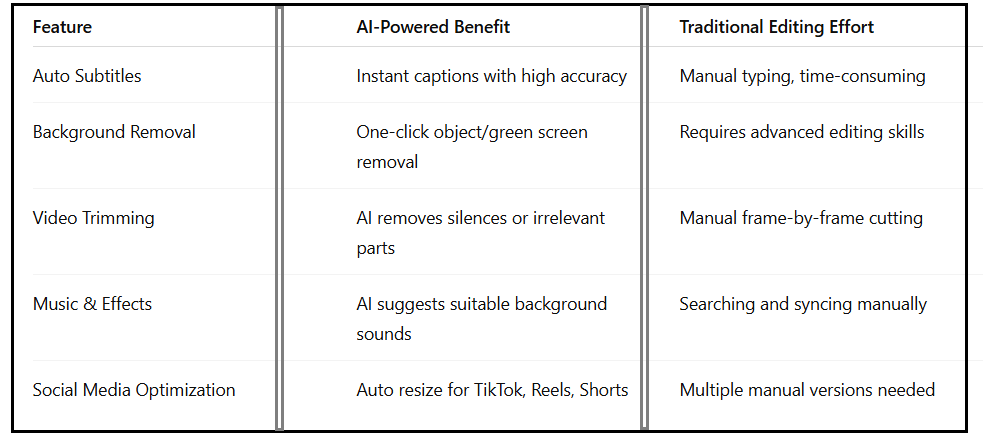
Comparison Between Best Free AI Video Editing Tools:
Features to Look for in Free AI Video Editors:
When choosing the best AI video editing apps, consider these factors:
•Ease of Use:
Look for tools with drag-and-drop editing.
•Output Quality:
Ensure the final video has HD quality.
•Free Plan Limitations:
Some free AI video editors add watermarks or limit exports.
•Platform Support:
Decide between desktop software or AI video editor online free platforms.
•AI Capabilities:
Choose depending on whether you need captions, trimming, or effects.
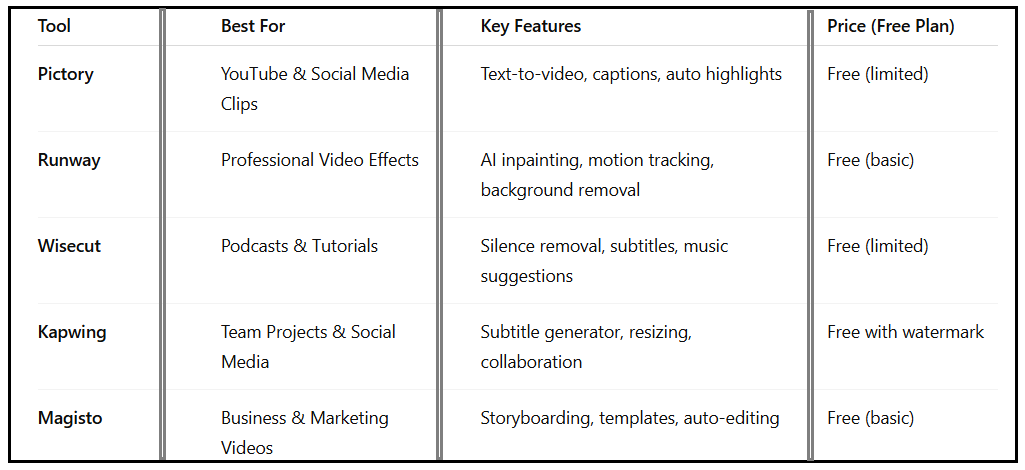
AI Video Editing Features Comparison:
How AI Video Editing Tools Help Content Creators?
•For content creators, AI tools for video creators are game-changers. From YouTube to Instagram, video editing with AI reduces the workload and boosts productivity.
•YouTubers can save hours by using AI tools for YouTube video editing to generate subtitles and cut long footage.
•TikTok & Reels creators can use the best free video editing AI tools to automatically create short-form content.
•Businesses benefit from best AI video editing apps that create ads with ready-made templates.
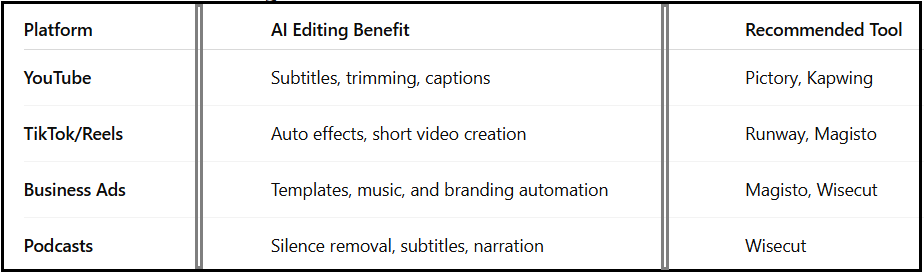
AI Video Editing for Different Platforms:
Advantages of Using Best Free AI Video Editing Tools:
•Saves Time & Effort – AI automates repetitive tasks.
•Beginner-Friendly – No steep learning curve.
•Boosts Creativity – Allows focus on storytelling rather than technical editing.
•Accessible Anywhere – Many tools are online AI video editor free platforms.
•Cost-Effective – Most offer free plans for creators on a budget.
Limitations of Free AI Video Editors:
While these tools are powerful, the free versions often come with:
-Watermarks on videos
-Export limitations
-Restricted editing features
-Limited storage and cloud usage
For professional use, upgrading to premium plans is often worth it.
Final Thoughts on AI Video Editing Tools:
The rise of AI Video Editing Tools has made professional-quality editing accessible to everyone. Whether you’re a YouTuber, social media creator, or business owner, these best free AI video editing tools can save you time, money, and effort.
From online AI video editor free platforms like Kapwing to advanced apps like Runway, you can choose the one that matches your needs. If you’re a beginner, start with free versions and upgrade as your content grows.
Frequently Asked Questions (FAQ)
1.Are AI video editing tools really free?
Yes, many offer free plans, but advanced features may require a subscription.
2.What is the best free AI video editor without a watermark?
Magisto and some versions of Wisecut provide watermark-free editing in their free plans.
3.Can AI video editors replace professional editing software?
For basic editing and content creation, yes. However, professionals may still prefer tools like Adobe Premiere or Final Cut Pro for advanced projects.
4.Which AI video editor online is best for YouTubers?
Pictory and Kapwing are excellent for YouTubers as they offer captioning, trimming, and resizing features.
5.Are AI video editing apps safe to use?
Most trusted AI video editing apps are safe, but always check privacy policies before uploading sensitive content.