Best Two-Factor Authentication Apps. Let’s be honest—passwords alone don’t cut it anymore. Even strong ones get leaked, reused, or phished. That’s exactly why Best Two-Factor Authentication Apps have moved from “nice to have” to absolutely essential.
If you’ve ever received a suspicious login alert or worried about identity theft prevention, you already know the feeling. Two-factor authentication adds that extra wall between attackers and your data. And no, it’s not just for tech experts anymore. Anyone with an email, social account, or bank app should care.
In this guide, I’ll walk you through how two-factor authentication apps work, what actually matters when choosing one, and which apps are worth trusting in real life—not just on paper. Along the way, we’ll touch on secure digital authentication, modern cybersecurity best practices, and why 2FA fits perfectly into a zero-trust security model.
Why Best Two-Factor Authentication Apps Matter More Than Ever
Cyberattacks today aren’t loud. They’re quiet. A leaked password here, a fake login page there—and suddenly your account is gone.
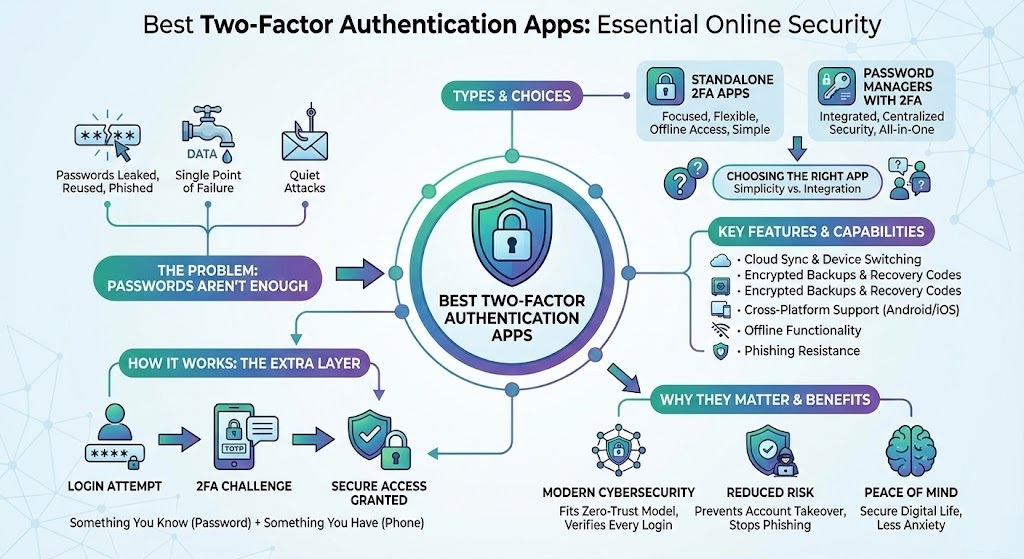
That’s where 2FA security apps step in. They require something you have (your phone) in addition to something you know (your password). Even if someone steals your password, they’re stuck without the second factor.
Most multi-factor authentication tools rely on a time-based one-time password (TOTP) that refreshes every 30 seconds. Others use push approvals or encrypted backups. Either way, this extra step dramatically improves online account protection.
How Two-Factor Authentication Apps Actually Work
At their core, these apps act as a one-time password (OTP) generator. When you log in, the app creates a temporary code synced with the service you’re accessing.
Here’s the simplified flow:
- You enter your username and password
- The service asks for a second factor
- Your authenticator app generates a unique code
- You’re verified through secure login verification
Some apps also support QR code authentication, which makes setup ridiculously easy—scan once, and you’re protected.
Key Features to Look for in the Best Two-Factor Authentication Apps
Before jumping into comparisons, it helps to know what truly matters beyond flashy interfaces.
Must-Have Capabilities
- Cloud sync authenticator support for device switching
- Encrypted backups and backup codes for 2FA
- Cross-platform support
- Strong offline functionality
- Built-in resistance to phishing attacks
The best account security apps don’t just generate codes. They actively reduce risk through smarter design.
Best Two-Factor Authentication Apps for Android and iPhone Users
Here’s a practical comparison of popular options based on real-world use—not marketing promises.
Platform & Compatibility Comparison
| App Type | Android Support | iOS Support | Cloud Sync | Offline Access |
|---|---|---|---|---|
| Authenticator-focused apps | ✔ | ✔ | Limited | ✔ |
| Cross-device authenticators | ✔ | ✔ | ✔ | ✔ |
| Password manager with 2FA | ✔ | ✔ | ✔ | Partial |
If you’re searching for an authenticator app for Android, flexibility and offline access matter more than bells and whistles. Meanwhile, an authenticator app for iPhone often shines with smoother system integration.
Best Two-Factor Authentication Apps for Maximum Security
When people ask me what separates average tools from the Best Two-Factor Authentication Apps, the answer is simple: balance.
You want security—but not at the cost of daily frustration.
Security Feature Comparison
| Security Feature | Basic 2FA Apps | Advanced 2FA Apps |
|---|---|---|
| Time-based OTP | ✔ | ✔ |
| Encrypted cloud backup | ✖ | ✔ |
| Phishing protection apps features | ✖ | ✔ |
| Device recovery | Limited | Advanced |
| Zero-trust compatibility | Partial | Strong |
Advanced apps align better with secure authentication methods and long-term identity theft prevention strategies.
Password Managers vs Standalone 2FA Apps
This is where opinions differ—and honestly, that’s okay.
Some users prefer a standalone authenticator. Others swear by a password manager with 2FA. Both approaches work, but they serve different lifestyles.
Standalone vs Integrated 2FA
| Feature | Standalone 2FA Apps | Password Managers with 2FA |
|---|---|---|
| Simplicity | High | Medium |
| Centralized security | Medium | High |
| Learning curve | Low | Moderate |
| Secure digital authentication | Strong | Very Strong |
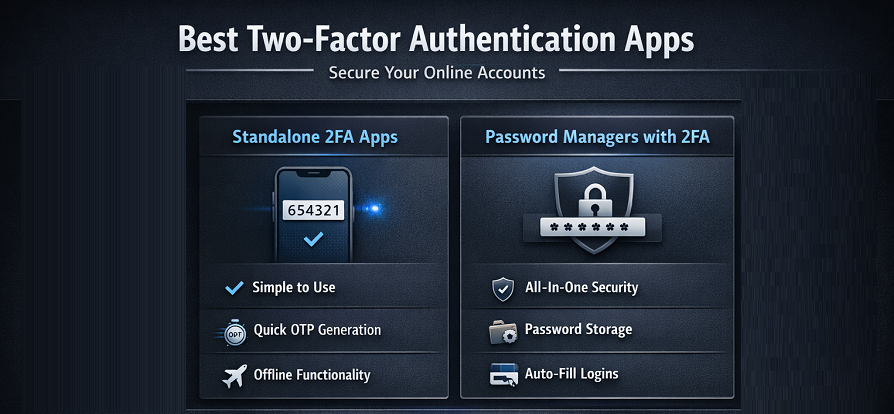
If you hate juggling apps, an all-in-one solution makes sense. If you value minimalism, standalone two-factor authentication apps still get the job done.
Real-World Experience: What Actually Feels Secure
Here’s something most reviews won’t tell you.
The “best” app isn’t always the one with the most features. It’s the one you won’t disable out of annoyance.
I’ve seen users turn off 2FA because restoring access felt impossible. That’s why features like backup codes for 2FA and cloud recovery aren’t optional—they’re essential.
The Best Two-Factor Authentication Apps understand human behavior. They protect you without punishing you.
Best Two-Factor Authentication Apps and Phishing Resistance
Phishing is still the #1 attack method worldwide. Fake emails. Fake login pages. Very real consequences.
That’s why modern phishing protection apps integrate smarter verification flows. Even if you enter your password on a fake site, the attacker can’t complete the login without your dynamic TOTP code.
This is where secure login verification truly shines.
How 2FA Supports a Zero-Trust Security Model
In a zero-trust security model, nothing is trusted by default—not devices, not networks, not even previous logins.
Best Two-Factor Authentication Apps reinforce this idea by:
- Verifying each login attempt
- Limiting session hijacking
- Enforcing layered secure authentication methods
It’s not paranoia. It’s modern cybersecurity best practices.
Choosing the Right App for Your Needs
Ask yourself:
- Do I switch phones often? → Look for a cloud sync authenticator
- Do I manage many accounts? → Consider advanced multi-factor authentication tools
- Do I want simplicity? → Stick with classic 2FA security apps
There’s no universal winner—only the right fit.
Conclusion: Are Best Two-Factor Authentication Apps Worth It?
Absolutely. And not in a vague, marketing way.
The Best Two-Factor Authentication Apps dramatically reduce your risk of account takeover, improve online account protection, and make digital life safer without constant anxiety.
They’re not perfect. Occasionally annoying? Sure. But compared to losing access to your email or bank account, it’s a small price to pay.
In today’s threat landscape, using 2FA isn’t overkill—it’s common sense.
Frequently Asked Questions (FAQ)
❓ Are two-factor authentication apps safe to use?
Yes. Reputable account security apps use encrypted storage and proven cryptographic standards for secure digital authentication.
❓ What happens if I lose my phone?
That’s where backup codes for 2FA and cloud recovery features save you. Always enable them.
❓ Do I need 2FA if I already use strong passwords?
Yes. Passwords alone don’t stop phishing or data breaches. 2FA adds a critical second layer.
❓ Can 2FA apps work offline?
Most two-factor authentication apps generate TOTP codes offline, which is surprisingly useful when traveling.