Difference Between Data Backup and Data Sync. Data loss doesn’t knock before entering. One wrong click, a ransomware attack, or a sudden hardware failure—and years of files can disappear. That’s why people often talk about backup and sync as if they’re the same thing. But they’re not.
Understanding the Difference Between Data Backup and Data Sync is more than a technical detail—it’s a practical skill that helps you protect files from data loss, recover data after system failure, and keep files updated across devices without regret later.
Let’s break this down clearly, honestly, and from real-world experience—not textbook theory.
Why People Confuse Backup and Sync (And Why It Matters)
At first glance, both seem to copy files. Both can use the cloud. Both can run automatically. So what’s the difference?
Here’s the truth: choosing the wrong method can quietly put your data at risk. I’ve seen people rely on sync alone—only to watch deleted files vanish everywhere. That’s when the difference between backup and sync suddenly becomes painfully clear.
Before we compare them head-to-head, let’s understand each concept properly.
What Is Data Backup?
Data backup is the process of creating a separate, restorable copy of your files. These copies are stored safely in another location—local drives, servers, or cloud data backup platforms.
The goal is simple: survival.
If something goes wrong, backup allows you to roll time backward.
Key Characteristics of Data Backup
- Uses automatic data backup schedules (daily, weekly, real-time)
- Supports incremental backup to save only changed data
- Stores multiple file versions
- Works even with offline backup storage
- Designed for disaster recovery backup
Backup is not about convenience. It’s about resilience.
What Is Data Sync?
Data sync (or synchronization) keeps the same files identical across multiple devices. When you edit, delete, or add a file on one device, the change reflects everywhere almost instantly using real-time data sync.
It’s built for speed and continuity, not recovery.
Key Characteristics of Data Sync
- Uses file synchronization tools
- Often supports two-way file sync
- Ideal for syncing files across devices
- Focuses on accessibility and collaboration
- Limited historical recovery options
Sync helps you manage data across multiple platforms, but it doesn’t always save you from mistakes.
Difference Between Data Backup and Data Sync (Core Comparison)
Let’s get straight to the heart of it. The Difference Between Data Backup and Data Sync lies in purpose.
Backup protects. Sync mirrors.
Backup vs Sync – At a Glance
| Feature | Data Backup | Data Sync |
|---|---|---|
| Primary Purpose | Data recovery | File consistency |
| Version History | Yes | Limited or none |
| Protection from Deletion | Strong | Weak |
| Ideal for | Long-term safety | Daily workflow |
| Data Redundancy | High | Low |
This is why data backup vs data synchronization should never be an either/or decision.
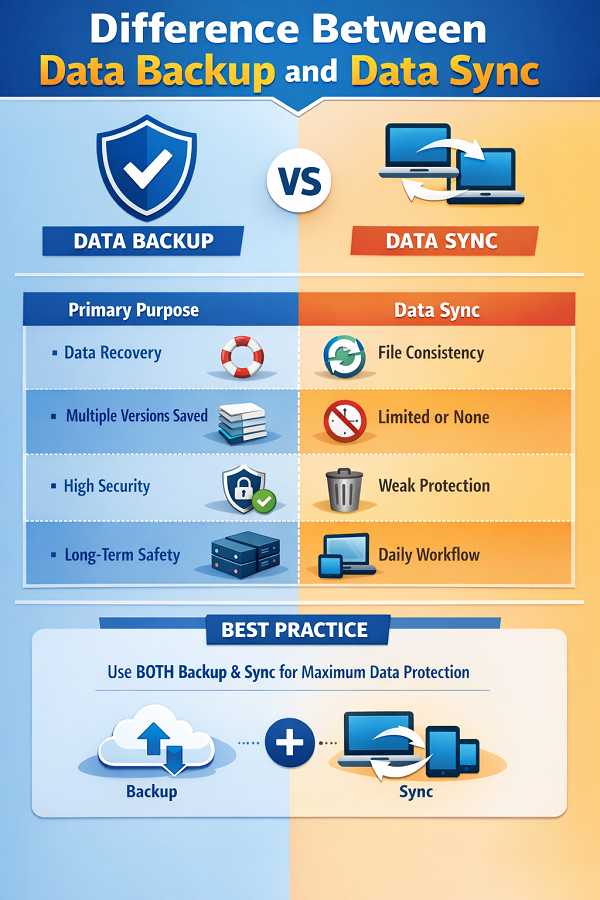
Data Backup vs Data Synchronization: How They Work Differently
Let’s talk mechanics.
With backup, files are copied to backup storage solutions that remain untouched unless you restore them. With sync, files are continuously updated—and replaced.
Delete a synced file by mistake? It’s gone everywhere.
That’s why professionals never rely on sync alone for data protection strategies.
Backup vs Mirror Copy: A Common Misunderstanding
Many people think sync equals backup. It doesn’t.
A backup vs mirror copy comparison shows why:
- A mirror copy reflects changes instantly
- A backup preserves older versions
- Mirror = convenience
- Backup = safety
If ransomware encrypts synced files, the encrypted versions sync too. Backup versions stay clean.
Risk Scenarios – Backup vs Sync
| Scenario | Backup Outcome | Sync Outcome |
|---|---|---|
| Accidental deletion | File recoverable | Deleted everywhere |
| Ransomware attack | Clean restore possible | Encrypted files synced |
| Device failure | Data restored | Data lost |
| Human error | Protected | Propagated |
This is where the Difference Between Data Backup and Data Sync becomes non-negotiable.
When Should You Use Data Backup?
Use data backup if you want to:
- Recover data after system failure
- Maintain long-term archives
- Build data redundancy
- Meet compliance requirements
- Ensure data consistency and safety
Backup is boring—until the day it saves you. Then it’s priceless.
When Should You Use Data Sync?
Use data sync if you want to:
- Keep files updated across devices
- Collaborate across teams
- Access files instantly
- Work across phone, laptop, and tablet
Sync is about flow. Backup is about security. Both have a place.
The Smart Approach: Use Backup and Sync Together
Here’s a practical truth from experience: the safest systems use both.
Sync handles daily productivity. Backup handles worst-case scenarios.
That’s the most effective way to ensure data consistency and safety while staying efficient.
Best Use-Case Matrix
| User Type | Recommended Setup |
|---|---|
| Home users | Sync + Cloud backup |
| Freelancers | Two-way sync + incremental backup |
| Businesses | Real-time sync + disaster recovery backup |
| IT teams | Automated backup + offline backup storage |
This layered approach aligns perfectly with modern data protection strategies.
Difference Between Data Backup and Data Sync in Simple Terms
If you remember one thing, remember this:
- Backup = Insurance
- Sync = Convenience
That single sentence explains the Difference Between Data Backup and Data Sync better than most manuals.
Conclusion: Choosing the Right Strategy for Your Data
Data is emotional. Photos, work files, projects—they matter. Relying only on sync is like trusting one lock on your front door.
To truly protect files from data loss, you need backups. To manage data across multiple platforms, you need sync.
Understanding the Difference Between Data Backup and Data Sync helps you build a system that doesn’t just work—but survives failure.
Use both wisely. Your future self will thank you.
FAQs: Difference Between Data Backup and Data Sync
Q1. Is data sync a replacement for backup?
No. Sync mirrors changes, while backup preserves recoverable versions.
Q2. Can cloud storage act as backup?
Only if it supports versioning and recovery. Otherwise, it’s just sync.
Q3. What’s safer: backup or sync?
Backup is safer for recovery; sync is faster for daily access.
Q4. Do I need both backup and sync?
Yes, if you want both productivity and protection.
Q5. Which one helps after ransomware attacks?
Only proper backup solutions can reliably recover clean data.