Difference Between EC Firmware vs BIOS Firmware – Complete Guide. When working on laptop repairs or motherboard troubleshooting, understanding the difference between EC firmware vs BIOS firmware is crucial. Both play essential roles in system startup, hardware control, and power management, but they have distinct functions and operate on different chips.
EC Controller Programming Guide for Beginners
In this guide, we’ll break down what is difference between BIOS and EC, explain their roles, and show you why both are equally important for smooth laptop operation.
What is BIOS Firmware in a Laptop?
BIOS firmware (Basic Input/Output System) is stored in a dedicated flash chip on the motherboard. It initializes the hardware when you power on your device and loads the operating system.
BIOS firmware functions include:
-Performing the Power-On Self-Test (POST)
-Detecting and initializing CPU, RAM, and storage devices
-Providing an interface for BIOS settings vs EC configurations
-Handing control over to the operating system
BIOS firmware meaning is often associated with the system’s brain for booting. It is the first code that runs when your laptop starts.
What is EC Firmware in a Laptop?
The Embedded Controller (EC) is a microcontroller found on the motherboard. It has its own firmware separate from the BIOS.
EC firmware functions include:
-Power sequence management (turning on different components in order)
-Battery charging and monitoring
-Keyboard, touchpad, and LED control
-Fan speed and thermal management
-Responding to hardware button presses
In short, EC firmware meaning revolves around managing power and input/output hardware functions that run even when the main CPU is off.
Difference Between EC Firmware vs BIOS Firmware:
Here’s a side-by-side comparison to help you understand EC firmware vs BIOS firmware clearly.

EC vs BIOS Roles in Laptops
Both BIOS and EC firmware are critical for laptop stability. The embedded controller vs system BIOS relationship is highly dependent on communication between the two.
EC and BIOS Communication Process
1.The EC powers on basic hardware components.
2.Once power is stable, the EC signals the BIOS to start POST.
3.BIOS initializes the main system hardware.
4.EC continues handling fan speed, battery, and peripherals during OS runtime.
Without proper coordination, hardware issues like battery not charging, fans not spinning, or even complete boot failure can occur.
When to Repair or Replace EC or BIOS Firmware:
Knowing when to perform EC firmware repair or BIOS firmware recovery can save time and money.
EC Firmware Repair Needed When:
1.Laptop powers on but does not boot to BIOS.
2.Keyboard or battery charging issues.
3.Fans or thermal sensors not working.
BIOS Firmware Recovery Needed When:
1.Laptop stuck at logo screen.
2.System unable to detect storage devices.
3.POST fails with beeping codes.
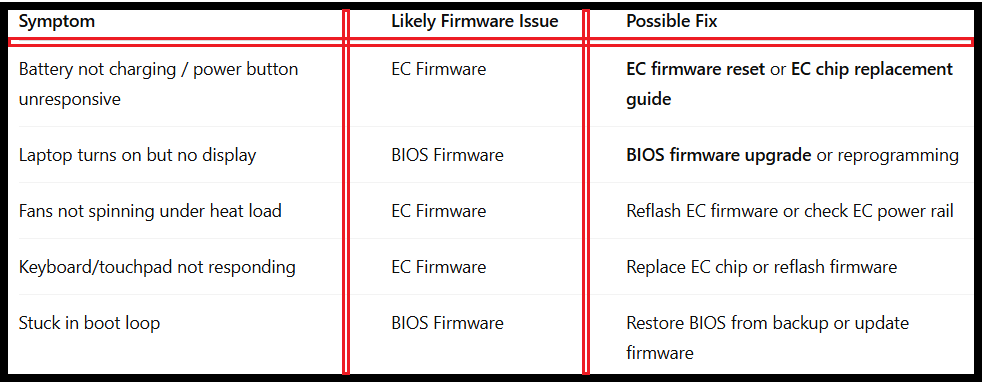
Symptoms & Possible Fixes for EC and BIOS Problems:
How to Update or Reset EC and BIOS Firmware:
Updating BIOS Firmware:
1.Download correct BIOS file from the laptop manufacturer’s site.
2.Run update tool in Windows or DOS environment.
3.Restart system to complete flashing.
Updating EC Firmware:
1.Some updates are bundled with BIOS updates.
2.Others require a dedicated EC update utility.
3.Follow manufacturer instructions carefully.
EC Firmware Reset:
1.Disconnect battery and AC adapter.
2.Hold the power button for 30 seconds.
3.Reconnect and restart.
Final Words:
The difference between EC firmware vs BIOS firmware lies in their responsibilities: BIOS boots your system, while EC controls power, input/output devices, and thermal management. Together, they form the backbone of your laptop’s functionality.
If either firmware becomes corrupted, timely EC firmware repair or BIOS firmware recovery can restore normal operation. As technology advances, understanding both will help technicians handle complex hardware issues more efficiently.
FAQ – Difference Between EC Firmware vs BIOS Firmware
Q1:Can I replace EC and BIOS chips myself?
Yes, but it requires soldering skills and correct firmware files.
Q2:Are EC and BIOS updates safe?
Yes, if done correctly using official tools and files.
Q3:Will BIOS update also update EC firmware?
Sometimes, but not always. Check the manufacturer’s release notes.
Q4:What happens if EC firmware is corrupted?
Laptop may fail to power on or lose keyboard, charging, and fan functions.