DIY BIOS Recovery USB with Backup Switch – A Practical Emergency Guide. A dead motherboard can feel like the end of the road. No display, no POST beep, just silence. I’ve been there. One wrong firmware update, a sudden power cut, and suddenly your system refuses to boot. That’s exactly where a DIY BIOS Recovery USB with Backup Switch becomes a lifesaver.
This guide explains how to recover BIOS using USB, even when your PC refuses to turn on. No fluff. No theory overload. Just a realistic, hands-on motherboard BIOS emergency recovery approach that actually works.
What Is a DIY BIOS Recovery USB with Backup Switch?
A DIY BIOS Recovery USB with Backup Switch is a manually prepared BIOS recovery USB drive combined with a motherboard’s backup BIOS mechanism. Some boards include a backup BIOS switch motherboard feature, while others rely on jumpers or dual chips.
The idea is simple:
If your primary BIOS fails, you trigger the dual BIOS recovery process or force the system into BIOS recovery mode USB, restoring firmware without a working OS.
This method is widely used for:
- Recover BIOS after failed update
- Fix dead motherboard BIOS
- Restore BIOS firmware without boot
Why BIOS Corruption Happens More Often Than You Think
BIOS failure isn’t rare. It’s just rarely explained properly.
Common causes include:
- Power loss during flashing
- Wrong firmware version
- Interrupted updates
- Unstable USB flashing tools
- Overclocking gone wrong
Once corrupted, the system won’t POST, triggering a boot failure BIOS fix scenario. That’s where DIY motherboard BIOS repair methods matter.
When You Should Use a DIY BIOS Recovery USB with Backup Switch
You should try a DIY BIOS Recovery USB with Backup Switch if:
- The motherboard powers on but shows no display
- Fans spin, but nothing loads
- BIOS update failed mid-process
- CMOS reset didn’t work
- You need BIOS recovery without CPU or RAM
This is a real motherboard not booting BIOS solution, not a gimmick.
Tools and Requirements (Before You Start)
Here’s what you’ll realistically need:
| Tool | Purpose | Why It Matters |
|---|---|---|
| BIOS recovery USB drive | Holds firmware | Must be FAT32 |
| Manufacturer BIOS file | Recovery image | Exact model only |
| USB BIOS flashing tool | Firmware loader | Board-specific |
| Backup BIOS switch/jumper | Recovery trigger | Enables rollback |
| Stable power source | Prevents corruption | Critical step |
Take your time here. Rushing BIOS recovery is how boards die permanently.
DIY BIOS Recovery USB with Backup Switch – Step-by-Step Method
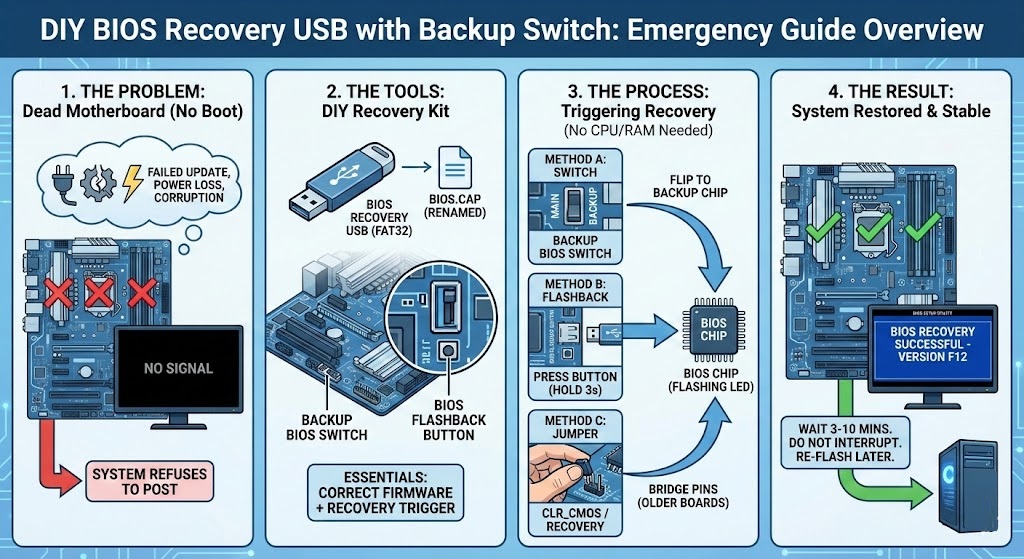
Step 1: Prepare the BIOS Recovery USB Drive
Format the USB to FAT32. Nothing fancy. Rename the BIOS file exactly as required by your motherboard vendor. Some boards won’t recognize it otherwise.
This is where many corrupted BIOS repair method attempts fail—file naming errors.
Step 2: Activate BIOS Recovery Mode USB
Different brands do this differently:
| Brand | Recovery Method | Notes |
|---|---|---|
| Gigabyte | Backup BIOS switch | Automatic rollback |
| ASUS | BIOS Flashback USB | Button-based |
| MSI | Flash BIOS Button | USB + button |
| Older boards | BIOS recovery jumper method | Manual pins |
This triggers motherboard firmware recovery without entering BIOS menus.
Step 3: Use Backup BIOS Switch Motherboard Feature
If your board has dual BIOS chips, flip the backup BIOS switch motherboard to secondary. This initiates the BIOS rollback using backup chip, loading a stable firmware version.
No OS. No display. Just patience.
Step 4: Wait (Seriously)
The dual BIOS recovery process can take 3–10 minutes. Don’t interrupt it. No resets. No power cycling. This is where most DIY motherboard BIOS repair attempts fail.
Comparison: Backup Switch vs Jumper vs USB Flashback
| Recovery Method | Difficulty | Success Rate | Best For |
|---|---|---|---|
| Backup BIOS switch | Easy | Very High | Dual BIOS boards |
| USB Flashback | Medium | High | ASUS/MSI boards |
| Jumper recovery | Advanced | Medium | Older motherboards |
This comparison helps users searching for an emergency BIOS restore guide choose the right approach.
Can You Restore BIOS Firmware Without Boot?
Yes—and that’s the beauty of this method.
A proper DIY BIOS Recovery USB with Backup Switch allows you to:
- Restore BIOS firmware without boot
- Perform BIOS recovery without CPU or RAM
- Execute motherboard BIOS emergency recovery even on dead systems
That’s why professionals rely on it.
Real-World Advice (From Experience)
Here’s the part guides usually skip.
Sometimes, the recovery works… but the system still acts weird. Random reboots. Fan errors. That’s normal. Always re-flash the BIOS again after recovery using the standard method.
Think of recovery as CPR. Stabilize first. Optimize later.
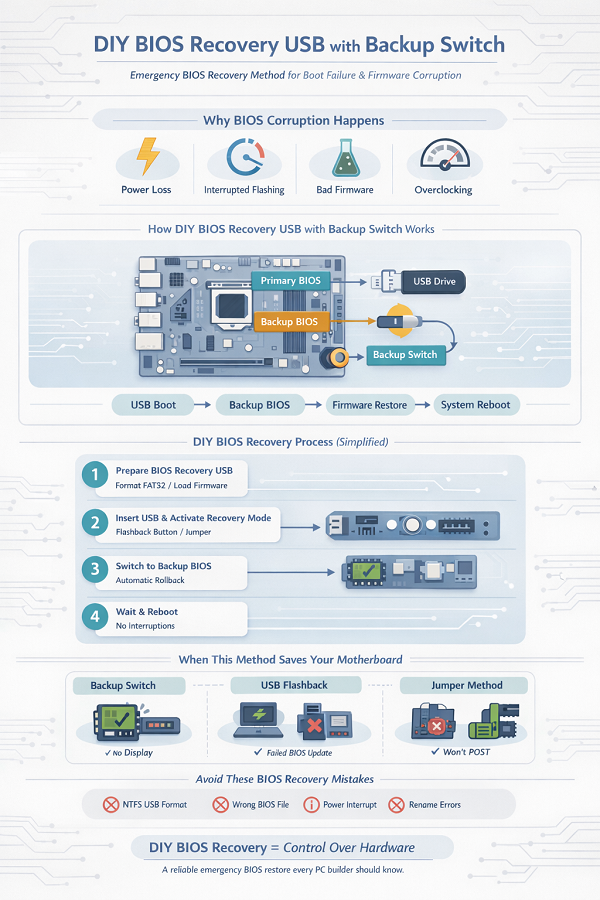
Common Mistakes That Kill BIOS Recovery
Avoid these at all costs:
- Using NTFS USB
- Wrong BIOS version
- Interrupting power
- Mixing firmware regions
- Ignoring checksum validation
These mistakes turn a boot failure BIOS fix into a permanent brick.
Conclusion: Is DIY BIOS Recovery USB with Backup Switch Worth It?
Absolutely.
If you build PCs, repair systems, or simply want control over your hardware, a DIY BIOS Recovery USB with Backup Switch is not optional—it’s essential.
It’s the most reliable motherboard not booting BIOS solution, offering a practical way to fix dead motherboard BIOS without panic or costly repairs.
Once you do it successfully, you’ll wonder why this isn’t standard knowledge.
FAQ – DIY BIOS Recovery USB with Backup Switch
Can I recover BIOS using USB without entering BIOS?
Yes. Most modern boards support BIOS recovery mode USB or flashback features.
Does this work after a failed BIOS update?
Absolutely. It’s one of the best ways to recover BIOS after failed update.
Is BIOS recovery without CPU or RAM really possible?
On supported boards, yes. Many allow BIOS recovery without CPU or RAM using flashback.
What if my motherboard has no backup BIOS?
You can still try USB BIOS flashing tool or BIOS recovery jumper method, but success rates vary.