EZP2010 Hi-Speed Programmer Software Latest Version. If you repair laptops, motherboards, TVs, or embedded devices, you’ve probably heard of EZP2010 Hi-Speed Programmer Software. This software is designed to work with the EZP2010 USB programmer, allowing technicians to read, write, erase, and verify BIOS, EEPROM, SPI Flash, and NAND Flash chips.
Whether you’re updating a corrupted BIOS or backing up firmware before repairs, having the latest EZP2010 Hi-Speed Programmer Software helps improve compatibility with newer ICs and ensures a more reliable programming process.
In this guide, you’ll learn what the software does, its key features, installation steps, and solutions to common problems. DOWNLOAD LINK AT THE END.
What is EZP2010 Hi-Speed Programmer Software?
EZP2010 Hi-Speed Programmer Software is the official application used with the EZP2010 USB programmer. It communicates with the programmer through a USB connection and provides a simple interface for managing firmware chips.
The software is widely used by:
- Laptop repair technicians
- BIOS engineers
- Motherboard repair shops
- TV repair professionals
- Electronics hobbyists
Its primary purpose is to program memory chips used in electronic devices.
Key Features of EZP2010 Hi-Speed Programmer Software
The latest version offers several improvements over older releases.
Supports Multiple Memory Chips
The software supports a large number of:
- SPI Flash
- EEPROM
- BIOS ROM
- NAND Flash
- Serial Flash ICs
Newer versions continue adding support for recently released memory chips.
Fast Programming Speed
As its name suggests, the EZP2010 Hi-Speed Programmer Software provides faster read and write operations compared to many older programmers.
Benefits include:
- Faster BIOS backup
- Reduced flashing time
- Improved repair workflow
Automatic Chip Detection
Many supported ICs can be detected automatically, reducing the chance of selecting the wrong chip manually.
Read, Write, Erase & Verify
The software provides all essential firmware functions:
- Read chip data
- Save firmware backup
- Erase memory
- Program new firmware
- Verify programmed data
Verification ensures the written firmware matches the original file.
How to Install EZP2010 Hi-Speed Programmer Software
Installing the software is straightforward.
Step 1: Download the Software
Download the latest version from a trusted source to ensure compatibility and avoid corrupted files.
Step 2: Install USB Drivers
Install the required USB drivers before connecting the programmer.
Without the drivers, Windows may fail to recognize the EZP2010 device.
Step 3: Connect the Programmer
Plug the EZP2010 programmer into a USB port.
Wait until Windows finishes installing the device.
Step 4: Launch the Software
Open the application.
If everything is installed correctly, the programmer status should display as connected.
Step 5: Select the Chip
Choose the correct IC model or use the auto-detection feature if supported.
Common Uses of EZP2010 Programmer Software
The software is commonly used for:
- BIOS recovery
- BIOS password removal
- Motherboard firmware repair
- EEPROM backup
- TV firmware flashing
- Router firmware programming
- Industrial controller repair
Many repair technicians use it daily because of its simple interface and broad chip support.
Common Problems and Solutions
Programmer Not Detected
Possible causes:
- Missing USB drivers
- Faulty USB cable
- Loose USB connection
Installing the latest drivers usually resolves the issue.
Chip Cannot Be Identified
This usually happens because:
- Incorrect chip selection
- Poor clip connection
- Unsupported IC
- Incorrect chip orientation
Double-check the chip model and pin alignment before programming.
Verification Failed
A verification error may occur due to:
- Low-quality clip contact
- Power interruption
- Damaged flash chip
- Wrong firmware file
Cleaning the chip contacts and using a stable USB connection often fixes the problem.
Why Use the Latest Version?
Using the latest EZP2010 Hi-Speed Programmer Software offers several advantages:
- Better hardware compatibility
- Expanded chip database
- Improved programming stability
- Bug fixes
- Better Windows compatibility
- Enhanced programming performance
Older software versions may not recognize recently released BIOS chips.
BIOS Recovery Methods | Complete Guide
EZP2010 Hi-Speed Programmer Software Free Download
EZP2010 Hi-Speed Programmer Software. It is the EZP2010 programmer 2018 latest software. We have also given the drivers with it. It auto-detects the laptop BIOS IC. And EZP2010 Hi-Speed programmer software can also copy the file from one IC to the other without the need for a computer.
Major Problem With This Software:
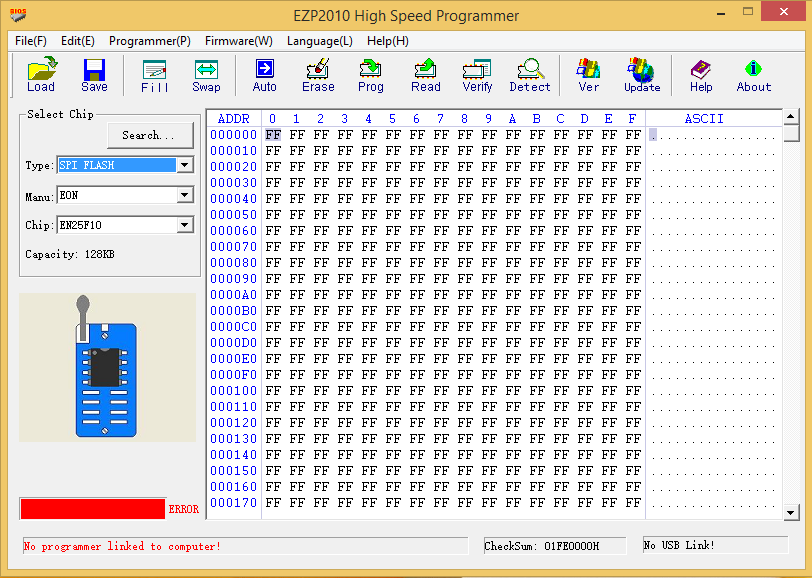
The major problem that many people face regarding this software is that the EZP2010 programmer is not detected by the software. The drivers get installed, but the software does not recognize the programmer. We have found the solution for this problem. We have done the modification in the drivers. So that the software can detect the programmer easily and you will not face any problem. If you face any problem while using the EZP2010 Hi-Speed Programmer, you can discuss it with us freely.
BIOS Update Failed Black Screen Fix
Difference Between EC Controller and BIOS
How to Fix No Display After BIOS Update
Common BIOS Flashing Mistakes and How to Avoid Them
How To Recover Corrupted BIOS Without Display