How To Automate Invoicing with SaaS Tools. Managing invoices manually is time-consuming, prone to errors, and often, payments are delayed. With the rise of cloud-based platforms, businesses of all sizes are now adopting smarter solutions to save time and increase efficiency. One of the most effective strategies is to automate invoicing with SaaS tools, which streamlines billing, improves accuracy, and ensures smoother cash flow.
SaaS Business Ideas You Can Launch Without Coding
In this guide, we’ll explore what SaaS invoicing software is, how to automate invoicing with SaaS tools, the best platforms available, benefits, challenges, and future trends.
What Is SaaS Invoicing Software?
SaaS invoicing software is a cloud-based tool that automates the process of creating, sending, and tracking invoices. Unlike traditional invoicing methods, SaaS solutions are accessible online, integrate with accounting platforms, and often include AI-powered invoicing tools to reduce errors.
Businesses use SaaS invoicing solutions to:
-Save time with online invoice automation tools
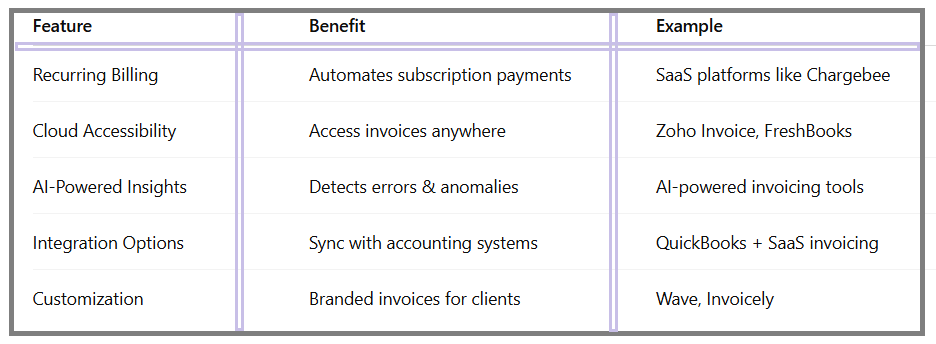
-Enable recurring billing for subscriptions
-Integrate billing with accounting systems
-Improve payment collection speed
Why Automate Invoicing with SaaS Tools?
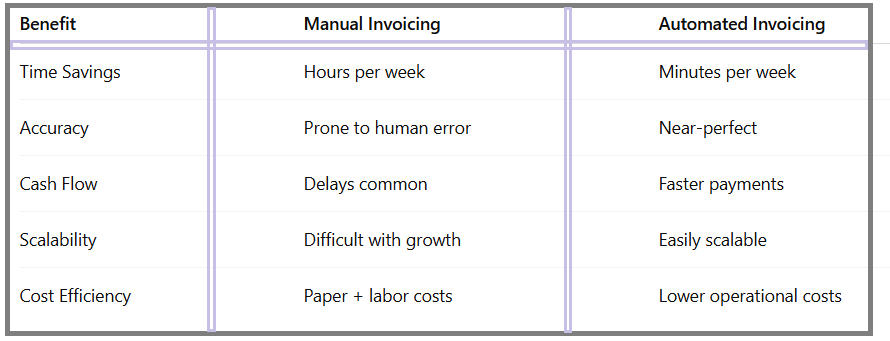
Manual invoicing often leads to misplaced bills, late payments, and calculation mistakes. When you automate invoicing with SaaS tools, you benefit from:
Efficiency – Automating recurring invoices saves countless hours.
Accuracy – Automated invoicing software reduces human error.
Scalability – SaaS-based billing and accounting software grows with your business.
Cash Flow – Automated reminders improve on-time payments.
How to Automate Invoicing with SaaS Tools (Step-by-Step):
If you’re wondering how to automate invoicing with SaaS tools free or paid, here’s a structured approach:
1.Choose the Right SaaS Invoicing Solution:
Look for features like recurring billing, AI-powered invoicing tools, integration options, and multi-currency support.
2.Integrate with Accounting Software:
Most companies use accounting platforms like QuickBooks, Xero, or Zoho. Integrating SaaS invoicing tools with accounting software ensures seamless financial tracking.
3.Automate Recurring Invoices:
For subscription-based businesses, SaaS solutions for subscription billing automate monthly or yearly payments.
4.Set Up Smart Payment Reminders:
Online invoice automation tools send automatic reminders to clients, reducing delays.
5.Track Analytics and Reports:
Use dashboards to monitor payments, overdue invoices, and customer billing history.
Key Features of Automated Invoicing Software:
Best SaaS Tools for Automated Invoicing:
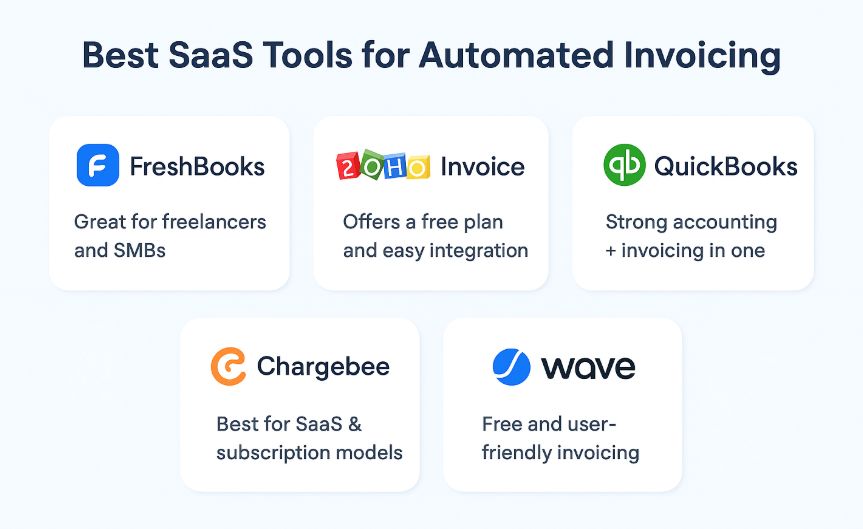
Businesses often ask about the best SaaS tools for automated invoicing. Here are some top choices:
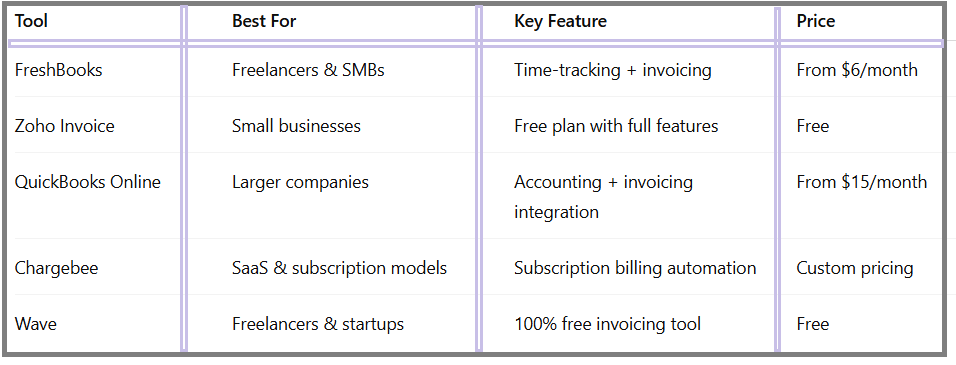
FreshBooks – Great for freelancers and SMBs.
Zoho Invoice – Offers a free plan and easy integration.
QuickBooks Online – Strong accounting + invoicing in one.
Chargebee – Best for SaaS solutions for subscription billing.
Wave – Free and user-friendly invoicing.
How to Streamline Invoicing with SaaS Platforms
To streamline invoicing with SaaS platforms, businesses should:
-Centralize all client data
-Automate recurring bills
-Use AI-powered invoicing tools for error detection
-Adopt SaaS-based billing and accounting software for scalability
Benefits of Automating Invoicing with SaaS:
AI-Powered Invoicing Tools: The Future of Automation
Artificial intelligence is transforming SaaS invoicing solutions. AI-powered invoicing tools can:
-Detect duplicate or fraudulent invoices
-Suggest payment terms based on client history
-Forecast cash flow trends
-Automate tax calculations
This means the future of automated invoicing with SaaS will involve smarter, self-learning systems.
SaaS Solutions for Subscription Billing:
Subscription-based businesses rely on SaaS solutions for subscription billing to manage recurring payments, trial periods, and upgrades. This is especially important for SaaS companies themselves, e-commerce platforms, and digital service providers.
Popular tools like Chargebee, Recurly, and Paddle make subscription billing seamless.
Comparison of SaaS Invoicing Tools:
Challenges of Invoice Automation:
While automation is powerful, businesses may face:
-Learning curve with new SaaS invoicing software
-Subscription costs for advanced features
-Data security concerns in cloud systems
-Integration issues with legacy accounting software
-Future of Automated Invoicing with SaaS
The future of automated invoicing with SaaS points to:
-AI-driven automation for predictive invoicing
-Blockchain-based invoicing for secure transactions
-Voice-enabled invoicing assistants
-Global compliance automation for multi-currency and tax rules
FAQ – How To Automate Invoicing with SaaS Tools:
Q1:What is SaaS invoicing software?
It’s a cloud-based tool that automates invoice creation, delivery, and tracking for businesses.
Q2:How to automate invoicing with SaaS tools free?
Platforms like Wave and Zoho Invoice offer free invoicing solutions with automation features.
Q3:Can automated invoicing software integrate with accounting tools?
Yes, most SaaS invoicing solutions integrate with QuickBooks, Xero, and other accounting platforms.
Q4:What are the best SaaS tools for automated invoicing?
Popular choices include FreshBooks, Zoho Invoice, QuickBooks, Chargebee, and Wave.
Q5:What is the future of automated invoicing with SaaS?
Expect smarter AI-powered invoicing tools, blockchain security, and automated global compliance.
Conclusion:
Switching from manual billing to automated invoicing is no longer optional—it’s essential. By learning how to automate invoicing with SaaS tools, businesses can save time, minimize errors, and scale efficiently. Whether you’re a freelancer using free online invoice automation tools or a large company adopting SaaS-based billing and accounting software, automation will streamline workflows and improve cash flow.
As technology evolves, AI-powered invoicing tools and SaaS solutions for subscription billing will continue shaping the future of automated invoicing with SaaS, making business transactions faster, smarter, and more secure.