How To Build a ChatGPT Plugin for Home Automation. Artificial Intelligence is reshaping how we live, and one of the most exciting use cases is home automation. By combining OpenAI’s powerful language model with smart devices, you can create a seamless and intelligent living environment. A ChatGPT Plugin for Home Automation allows users to control lights, thermostats, security systems, and appliances with natural language commands, making smart homes smarter than ever.
How to Create Custom GPTs in ChatGPT
In this detailed guide, we’ll explore how to build a ChatGPT plugin for home automation, the required tools, integration steps, benefits, and real-world use cases. Whether you’re a developer, a tech enthusiast, or simply curious about AI-driven smart homes, this tutorial will walk you through everything you need to know.
Why Build a ChatGPT Plugin for Home Automation?
Before diving into development, let’s understand the importance of this integration.
Ease of control – Instead of tapping on an app, you can simply say, “Hey ChatGPT, dim the living room lights.”
Contextual understanding – Unlike traditional voice assistants, ChatGPT can understand complex instructions like, “Set the thermostat to 22°C when I arrive home after 6 PM.”
Scalability – Developers can expand the plugin to connect with multiple smart home ecosystems like Google Home, Alexa, or Home Assistant.
Free or open-source flexibility – Many developers ask, “Can ChatGPT be used for automation free?” Yes, you can create a ChatGPT plugin for home automation free using OpenAI’s API and open-source libraries.
Key Requirements for Building a ChatGPT Plugin for Home Automation:
Before building, gather the necessary tools and resources:
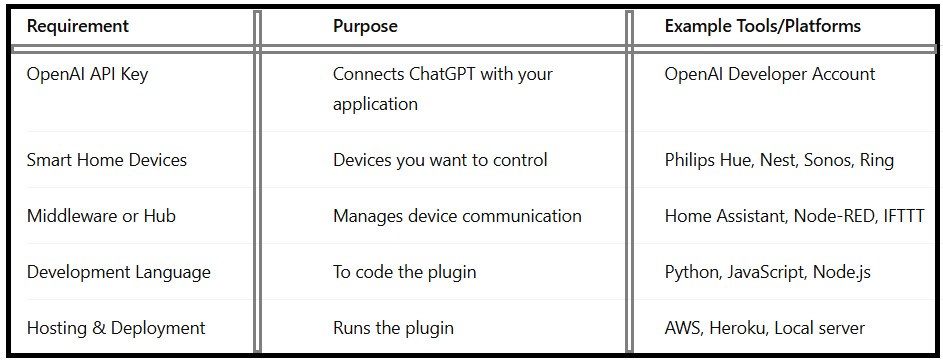
This foundation ensures you’re ready to build a ChatGPT smart home plugin that works efficiently.
Step-by-Step Guide | How to Build a ChatGPT Plugin for Home Automation
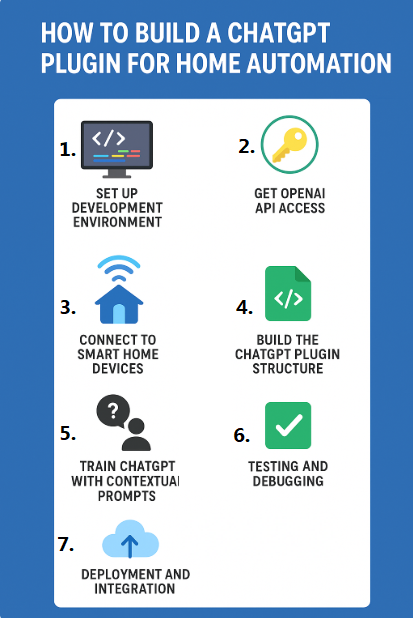
Step 1:-Set Up the Development Environment
•Install Python or Node.js depending on your preference.
•Create a virtual environment for your project.
•Install the OpenAI SDK to interact with ChatGPT.
Step 2:-Get OpenAI API Access
•Sign up at the OpenAI Developer Platform https://platform.openai.com/
.•Generate an API key.
•Test API responses using sample prompts like “Turn on the living room lights.”
Step 3:-Connect to Smart Home Devices
•Use Home Assistant or Node-RED as a middleware hub.
•Create automation rules for devices (e.g., thermostat control, lighting schedules).
•Connect APIs of smart devices with your plugin.
Step 4:-Build the ChatGPT Plugin Structure
The plugin structure typically includes:
•Manifest file (ai-plugin.json) describing plugin details.
•OpenAPI specification to define available endpoints.
•Backend server code to handle requests.
For example, you might define endpoints like:
•/lights/on → Turns lights on
•/lights/off → Turns lights off
•/climate/set → Adjusts thermostat
Step 5:-Train ChatGPT with Contextual Prompts
While you don’t “retrain” ChatGPT directly, you can guide it with system messages:
•“When a user asks to dim lights, call the /lights/dim endpoint with the right parameters.”
This approach ensures accurate execution.
Step 6:-Testing and Debugging
•Run test cases such as:
-“Turn off all bedroom lights at 10 PM.”
-“Set AC to 24°C when I’m home.”
•Ensure ChatGPT calls the correct API endpoints.
Step 7:-Deployment and Integration
•Deploy your plugin on a server (AWS, Heroku, or local machine).
•Connect it with your ChatGPT interface.
•Share it with others if you want broader adoption.
Benefits of Using ChatGPT for Home Automation:
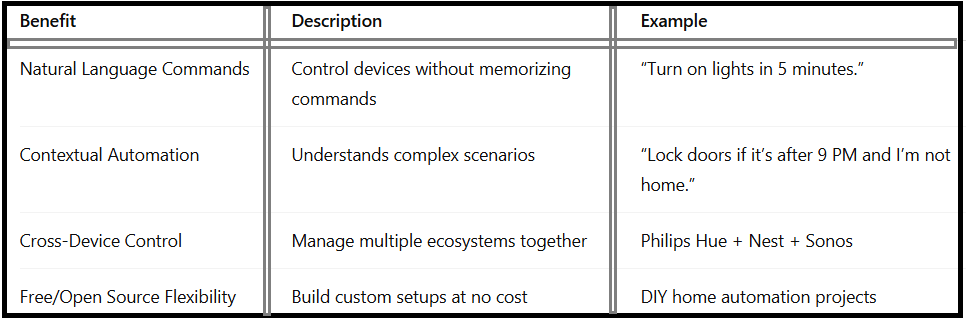
This makes AI home automation with ChatGPT more versatile than traditional smart assistants.
Real-World Use Cases of ChatGPT Home Automation Plugin:
Voice-controlled smart homes – ChatGPT acts like Alexa but with better conversational understanding.
Energy efficiency – Automate thermostat settings to reduce electricity usage.
Security enhancements – Lock doors or activate alarms with natural commands.
Routine automation – Wake-up routines like “Open curtains, play music, and brew coffee at 7 AM.”
Common Challenges When Building a ChatGPT Plugin for Home Automation:
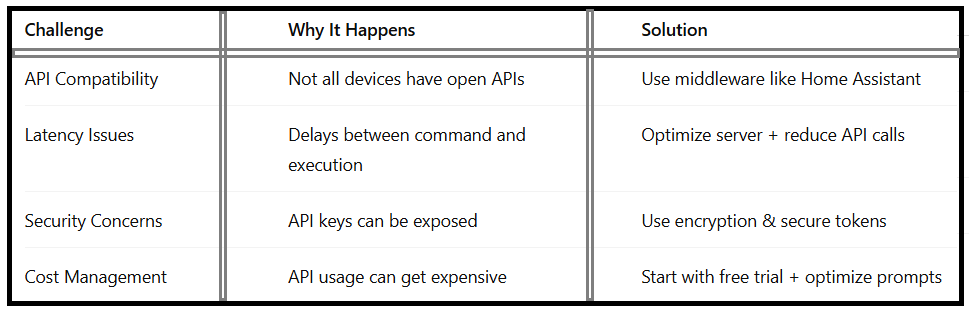
These solutions ensure your plugin is reliable, secure, and scalable.
Future of ChatGPT in Home Automation:
As AI evolves, OpenAI home automation integration will become more mainstream. We may soon see:
•Adaptive AI assistants that learn habits over time.
•Seamless integration with IoT devices across ecosystems.
•Subscription-free options for those exploring ChatGPT plugin for home automation free.
In the near future, ChatGPT could replace multiple apps and hubs by acting as a central smart home brain.
FAQ – ChatGPT Plugin for Home Automation
Q1:Can ChatGPT be used for automation?
Yes, ChatGPT can be integrated with APIs to control smart home devices, making it ideal for automation tasks.
Q2:Is there a free way to build a ChatGPT plugin for home automation?
Yes, you can use the OpenAI free trial and open-source tools like Home Assistant to build a basic setup.
Q3:Which platforms work best for OpenAI home automation integration?
Popular options include Home Assistant, Node-RED, and IFTTT.
Q4:How is this different from Alexa or Google Home?
Unlike preset voice assistants, ChatGPT understands more complex, natural conversations and adapts to custom commands.
Q5:What’s the future of AI home automation with ChatGPT?
We can expect smarter, context-aware assistants that anticipate user needs, making homes fully autonomous.
Conclusion:
Building a ChatGPT Plugin for Home Automation is not just a tech project; it’s the future of smart living. From controlling lights and security systems to managing complex routines, ChatGPT can revolutionize the way we interact with our homes.
By following this guide, you now know the requirements, step-by-step process, benefits, and challenges of creating your own plugin. Whether you’re building for personal use or to launch a new AI-driven smart home product, the possibilities are endless.