How To Build Mobile Edge Compute Node at Home. The demand for faster data processing and reduced latency has given rise to mobile edge computing (MEC), a powerful approach that brings computation closer to end-users. While enterprises and telecoms usually deploy MEC nodes, tech enthusiasts and researchers are now exploring how to build a mobile edge compute node at home to test applications, run edge-based services, and even set up personal labs.
This article explores the basics of mobile edge computing, explains what are edge nodes in edge computing, and provides a step-by-step DIY guide for a home edge computing setup. Whether you are a beginner or a professional experimenting with edge AI, building a MEC node at home can expand your understanding of next-generation computing.
What is Mobile Edge Computing?
Mobile Edge Computing (MEC) is a distributed computing architecture that brings processing power closer to the network edge, rather than relying solely on centralized cloud servers. This reduces latency, improves bandwidth usage, and enhances real-time data analysis for applications such as IoT, smart homes, gaming, and autonomous vehicles.
What are Edge Nodes in Edge Computing?
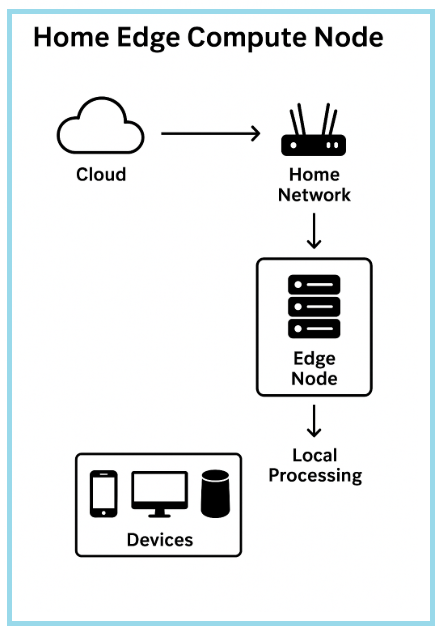
An edge node is a physical or virtual device located near the data source that performs computation, caching, and data routing. In a personal edge computing lab, an edge node might be a small server, a Raspberry Pi cluster, or a repurposed desktop running edge applications.
Basics of Mobile Edge Computing:
Before diving into edge computing DIY, it’s important to understand the basics of mobile edge computing:
•Low Latency: Data is processed closer to users, reducing delays.
•Bandwidth Optimization: Not all data travels back to the cloud.
•Security: Edge node security and privacy help protect sensitive data locally.
•Flexibility: MEC nodes can be customized for IoT, AI, or 5G applications.
Why Build a Mobile Edge Compute Node at Home?
Setting up a mobile edge compute node at home has several advantages:
•Hands-on learning for edge computing for beginners
•Creating a personal edge computing lab for research or development
•Hosting real-time applications like home automation or AI models
•Understanding edge computing vs cloud computing in practice
Hardware and Software Requirements:
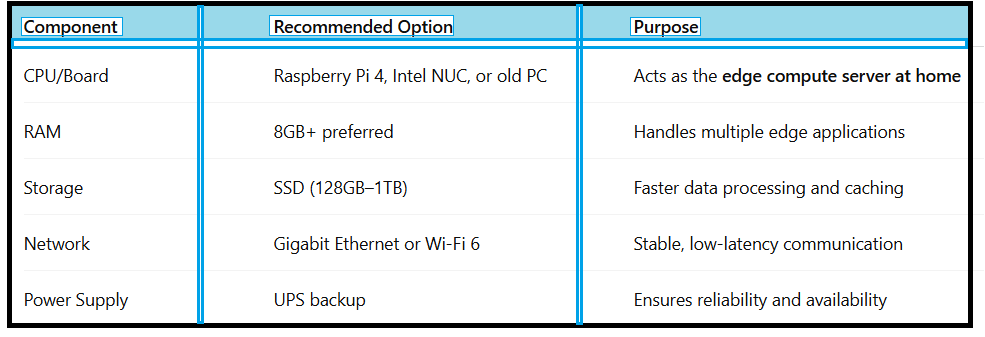
To start your edge computing hardware setup, you’ll need the right components.
Recommended Hardware for Home Edge Computing:
How To Build Mobile Edge Compute Node at Home?
Now let’s get practical with how to build mobile edge compute node in your home lab.
Step 1:-Choose the Right Hardware
Select a compact server such as Intel NUC, Raspberry Pi cluster, or a repurposed desktop PC. These act as the edge compute server at home.
Step 2:-Install an Operating System
For an edge computing DIY setup, lightweight Linux distributions like Ubuntu Server or Debian are ideal.
Step 3:-Set Up Virtualization or Containers
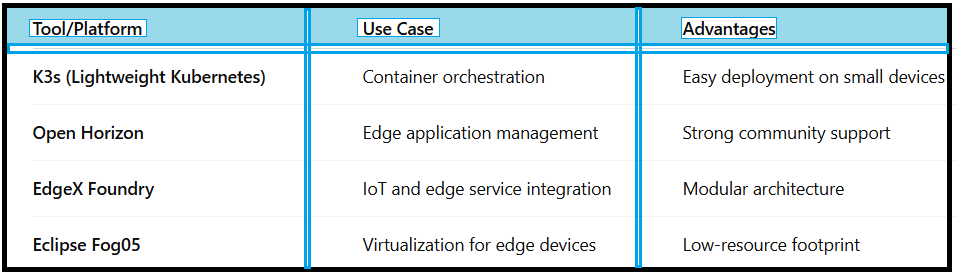
Install tools like Docker, Kubernetes, or K3s for deploying edge applications. These open-source edge computing tools allow you to run multiple workloads efficiently.
Step 4:-Configure Networking
Use a static IP, enable firewall rules, and consider a VPN for secure external access.
Step 5:-Deploy Applications
Install workloads such as IoT gateways, AI inference servers, or edge computing for smart home automation.
Software Options for Edge Computing Home Lab:
Popular Open-Source Edge Computing Tools are given in the table below:
Benefits of Edge Computing at Home:
Building a home edge computing setup has unique benefits:
•Practical Learning – Experiment with edge and IoT projects.
•Faster Data Processing – Local data handling without cloud dependency.
•Cost Savings – Repurpose existing hardware instead of renting cloud servers.
•Privacy – Edge node security and privacy ensures sensitive data stays local.
•Research Platform – Create a sandbox for edge computing vs cloud computing analysis.
Practical Use Cases:
Here are some real-world applications of a mobile edge compute node in a home environment:
•Smart Home Automation:
Run AI-based voice or image recognition locally.
•IoT Integration:
Manage devices like sensors and cameras in real-time.
•AI/ML Training:
Use the node for small-scale model training and inference.
•Gaming Servers:
Low-latency hosting for multiplayer games.
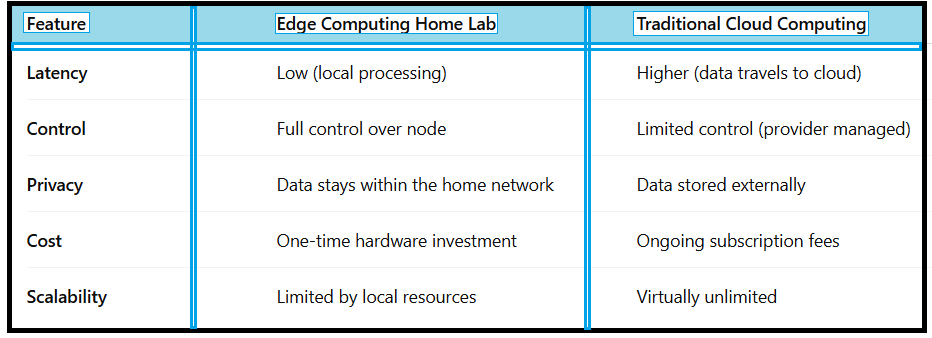
Comparison of Edge Computing vs Cloud Computing:
Security Considerations:
Security is vital when you build mobile edge computing node at home:
•Enable firewalls and access controls
•Encrypt data transmissions
•Regularly update OS and container images
•Use VPNs for remote access
•Monitor activity logs for anomalies
Conclusion:
Learning how to build mobile edge compute node at home opens new opportunities for tech enthusiasts, researchers, and developers. With the right edge computing hardware setup, open-source edge computing tools, and proper networking, you can create a personal edge computing lab that mimics real-world MEC infrastructure. From IoT experiments to privacy-focused applications, edge computing DIY is a powerful way to gain hands-on experience with the future of distributed computing.
FAQ – How To Build Mobile Edge Compute Node at Home
Q1.What is mobile edge computing?
Mobile edge computing brings processing closer to the user, reducing latency and improving performance compared to centralized cloud computing.
Q2.What is mobile edge compute node used for?
A mobile edge compute node processes data locally for applications like IoT, smart homes, gaming, and real-time AI inference.
Q3.Can I use Raspberry Pi for edge computing DIY?
Yes, Raspberry Pi devices are great for beginners who want to build a personal edge computing lab at low cost.
Q4.How secure is a home edge computing setup?
With proper edge node security and privacy measures like firewalls, VPNs, and encryption, a home setup can be secure.
Q5.Is edge computing better than cloud computing?
Not always—it depends on use cases. Edge computing reduces latency and improves privacy, while cloud offers better scalability and centralized management.