How To Fix PS5 Error Code CE-106487-6. PlayStation 5 is known for its seamless gaming experience, but like any advanced console, it’s not immune to errors. One of the most common issues players encounter is PS5 Error Code CE-106487-6, usually triggered while downloading or installing a game or update. This error disrupts gameplay and can be frustrating, but fortunately, there are several proven solutions.
How To Fix PS5 Overheating Problem
This guide will explain the reasons behind CE-106487-6, provide step-by-step fixes, and help you resolve the problem without delay.
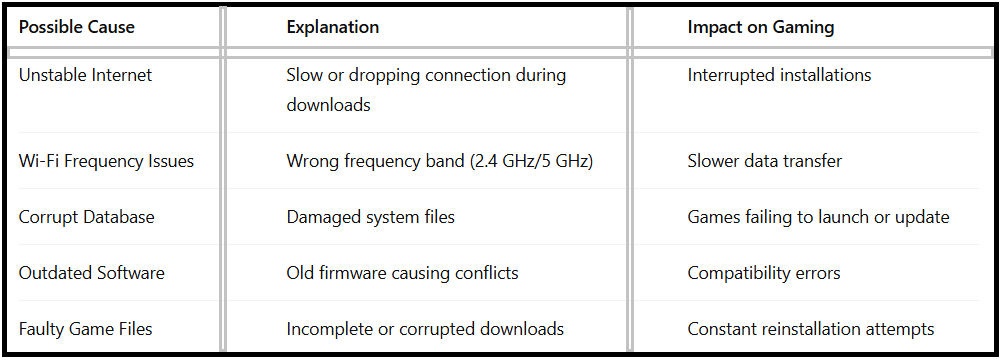
Reasons Behind PS5 Error Code CE-106487-6:
Understanding why PS5 Error Code CE-106487-6 occurs is the first step in fixing it. This error may also relate to similar issues like CE-105638-3, where network or database corruption causes installation problems.
How To Fix PS5 Error Code CE-106487-6
Below are tried-and-tested methods to fix this error and restore smooth gameplay.
1.Check Internet Connection:
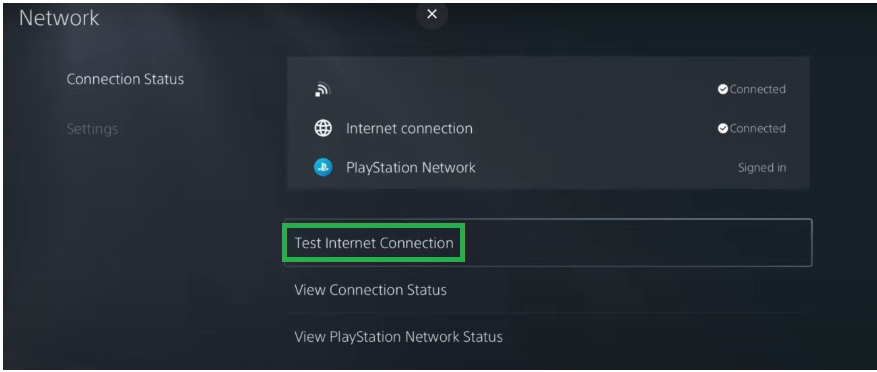
Most PS5 error CE-106487-6 fix solutions start with checking the network. A poor or unstable internet connection often leads to failed downloads or updates.
1.Go to Settings > Network > Test Internet Connection.
2.Check the download/upload speed and NAT type.
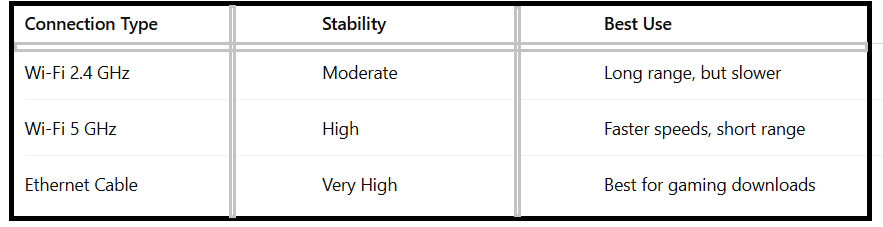
If possible, use a wired Ethernet connection instead of Wi-Fi for more stability.
2.Switch Wi-Fi Frequency Bands
If you rely on wireless connectivity, switching bands may help.
Steps:
1.Open Settings > Network > Set Up Internet Connection.
2.Select your Wi-Fi and press Options.
3.Choose Wi-Fi Frequency Bands and set it to 5 GHz for faster speeds.
3.Restart the Console
Sometimes, temporary system glitches cause CE-106487-6 PS5 fix errors. Restarting the console clears cache and refreshes the system.
1.Turn off the PS5 completely.
2.Unplug it for at least 5 minutes.
3.Restart and attempt the download again.
4.Update PS5 System Software
Running outdated system software can trigger this error or related download errors.
Steps:
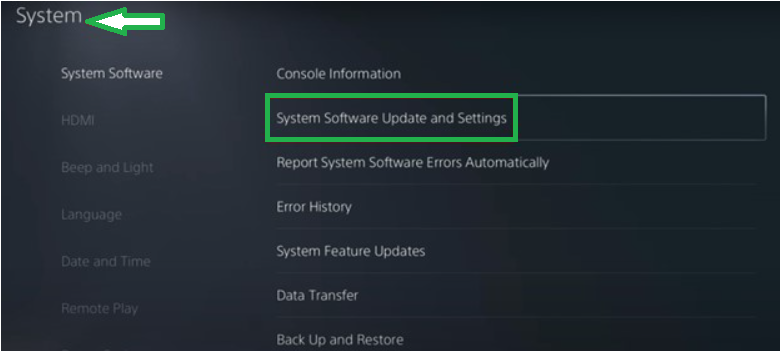
1.Go to Settings > System > System Software Update and Settings.
2.Select Update Using Internet.
3.Install the latest firmware and restart the console.
5.Rebuild Database
If you’re still facing the error, your console database may be corrupted. A rebuild database clears errors without deleting game data.
Steps:
1.Turn off the PS5 completely.
2.Hold the power button until two beeps are heard to boot into Safe Mode.
3.Connect the controller via USB and select Clear Cache and Rebuild Database.
4.Press the PS button on the controller.
5.Then select Clear Cache and Rebuild Database.
6.Select “Rebuild Database” from the menu using the controller to navigate.
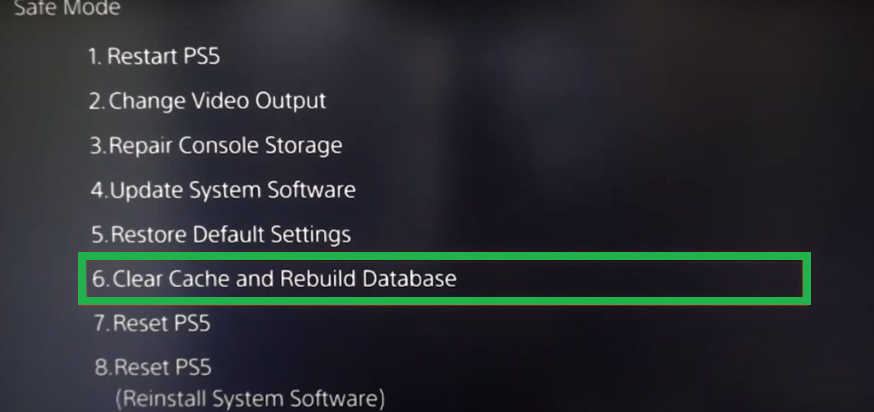
7.Confirm the rebuild operation by pressing the “X” button on the controller.
8.Follow the on-screen instructions further.
9.After completing the rebuild process, restart the console.
6.Delete and Reinstall Content
If the error occurs with a specific game, the files may be corrupted.
1.Navigate to Settings > Storage > Games and Apps.
2.Delete the problematic game.
3.Reinstall it from the PlayStation Store or disc.
7.Contact PlayStation Support
If none of the above solutions resolve the error, it may be linked to deeper system or hardware issues. Visit the official PlayStation Support page and report the issue.
FAQs – PS5 Error Code CE-106487-6
Q1.What is PS5 Error Code CE-106487-6?
It’s an error that occurs during game downloads or updates, often due to unstable internet or corrupted files.
Q2.Can rebuilding the database delete my saved data?
No, rebuilding the database reorganizes system files without deleting saved games.
Q3.Is CE-106487-6 related to CE-105638-3?
Yes, both errors often result from connectivity or data corruption issues.
Q4.What if reinstalling the game doesn’t help?
In that case, contact PlayStation Support for a CE-106487-6 PS5 fix guided by experts.
Wrapping Up:
The PS5 Error Code CE-106487-6 usually occurs due to unstable internet, corrupted files, or outdated software. By following the steps above—from checking your internet to rebuilding the database—you can resolve the error and return to smooth gaming. If the problem persists, contacting PlayStation Support is the best option.