How to Reset BIOS Without Opening Laptop. Resetting the BIOS can resolve many hardware and boot-related issues. However, if you’re unable to open the laptop or access internal components, you might wonder how to reset BIOS without opening laptop. This guide walks you through multiple ways to reset BIOS safely, without removing the CMOS battery or opening the chassis.
How to Unlock BIOS Password on Any Laptop
Whether you’re troubleshooting hardware issues, fixing boot errors, or resetting a password, knowing how to reset BIOS can be a lifesaver.
What does BIOS do?
BIOS is firmware embedded into your motherboard. BIOS stands for Basic Input/Output System or UEFI stands for Unified Extensible Firmware Interface. It initializes hardware during boot and passes control to the operating system.
Resetting BIOS becomes necessary when:
-Your system won’t boot properly
-You’re stuck in a boot loop
-You’re locked out due to a BIOS password
-Hardware settings are incorrectly configured
How to Reset BIOS Without Opening Laptop – Complete Guide:
Let’s explore BIOS reset options that don’t involve physically opening the machine.
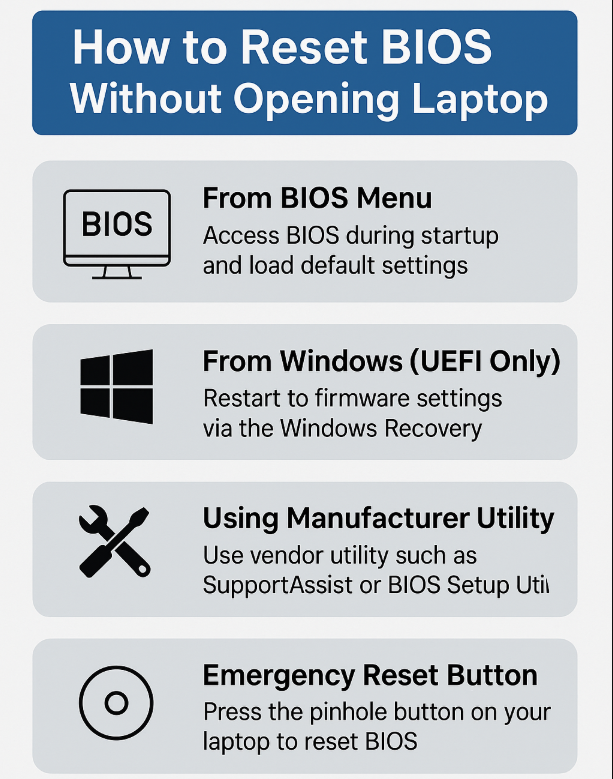
Method 1 – Reset BIOS From BIOS Menu (When Accessible):
If your laptop still turns on, the easiest method is via BIOS itself.
Steps:
1.Restart the laptop.
2.Press the BIOS key during boot (Like F2, F10, Del, or Esc).
3.Navigate to “Exit” or “Setup Defaults.”
4.Choose “Load Setup Defaults” or “Restore Defaults.”
5.Save and exit.
This method helps restore BIOS defaults and works for most Dell, HP, and Lenovo systems.
Method 2 – Reset BIOS from Windows (UEFI BIOS Only):
Windows offers built-in options if you are using UEFI.
Steps to reset UEFI BIOS from Windows:
1.Go to Settings > System > Recovery.
2.Under Advanced Startup, click Restart now.
3.Choose Troubleshoot > Advanced Options > UEFI Firmware Settings.
4.Click Restart to enter BIOS.
5.Load default settings and save.
This is an ideal way to reset UEFI BIOS from Windows without needing BIOS-level access initially.
Method 4 – Use a Manufacturer-Specific Utility:
Many brands offer tools for BIOS recovery and resetting.
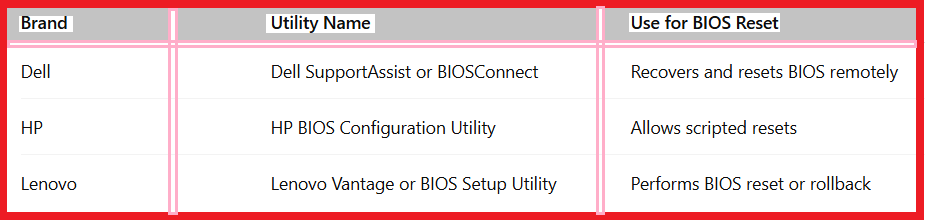
These tools help with Dell/HP/Lenovo BIOS reset without requiring internal access.
Method 4 – Use Jumper or EC Reset (External Buttons):
Some laptops offer an EC reset button or a small reset hole accessible via a paperclip. This triggers a system reset, including BIOS settings.

It’s a reliable way to recover BIOS without opening the laptop, especially if there’s a physical button involved.
Method 5 – Reset BIOS Password Without CMOS Battery:
Can’t open your laptop but forgot the BIOS password?
Try this:
1.Use backdoor passwords from the manufacturer.
2.Use Windows tools like CMOS De-Animator or Hiren’s BootCD.
3.Contact support for a master password based on error code.
This method helps reset BIOS password without CMOS battery, but success depends on the model.
⚙️ Additional Scenarios: How to Reset BIOS Without Turning On Laptop
If your laptop won’t power on:
-Disconnect all peripherals, hold the power button for 30 seconds (battery drain reset).
-Try a hardware reset via pinhole reset if available.
-For some models, plug in the charger and hold power for 60 seconds to force a reset.
In extreme cases, use recovery USB tools or service centre support to reset BIOS without opening computer.
For Advanced Users: Change BIOS Settings Remotely
For network-managed systems:
1.Use Intel AMT or vPro to modify BIOS over LAN.
2.HP and Lenovo offer remote BIOS configuration tools.
This is how IT admins change BIOS settings remotely and perform BIOS resets without physical access.

❓ FAQ – How to Reset BIOS Without Opening Laptop:
1.Can I reset BIOS without turning on the laptop?
Yes, using hardware reset buttons or power-cycle methods. Some devices reset when left without power for an extended time.
2.How do I reset BIOS on Windows?
Use the Advanced Startup > UEFI Firmware Settings path to access BIOS and restore defaults.
3.Can I reset BIOS without removing the CMOS battery?
Yes. Most modern laptops let you reset BIOS settings through software or external reset buttons.
4.I can’t access BIOS or boot menu, What to do?
Try pressing different BIOS keys. For example; Esc, F2, F10, Del. If that fails, explore the reset BIOS without opening computer methods listed above.
5.Is there a way to change BIOS remotely?
Yes. Enterprise systems support remote BIOS management through vPro, AMT, or vendor-specific tools.