How to Use a Laptop for Low-Frequency RFID Tracking. Low-frequency RFID tracking sounds complex at first. Many people assume it requires industrial hardware or expensive proprietary systems. In reality, you can build a surprisingly reliable low frequency RFID system using nothing more than a laptop, the right reader, and some patience.
This guide explains How to Use a Laptop for Low-Frequency RFID Tracking in a way that feels practical, realistic, and usable—especially if you’re experimenting with asset tracking with RFID, access control projects, or academic research.
Understanding Low-Frequency RFID Technology Before You Begin
Before jumping into hardware, it helps to understand how 125 kHz RFID technology actually behaves.
Low-frequency RFID operates between 125–134 kHz, making it ideal for short-range identification. Unlike UHF systems, LF RFID is resistant to interference from metal and water, which is why it’s widely used with passive RFID tags in access cards, livestock tracking, and industrial badges.
Key advantages:
- Stable performance near metal
- No internal battery needed
- Simple RFID communication protocol
- Lower cost hardware
Limitations? Yes—short RFID tag detection range and slower read speeds. But for RFID tracking using laptop, it’s more than enough.
How to Use a Laptop for Low-Frequency RFID Tracking: Hardware Essentials
Setting up a reliable system begins with selecting compatible hardware. The goal is smooth RFID hardware integration, not frustration.
Core Hardware Components
| Component | Purpose | Practical Tip |
|---|---|---|
| USB RFID reader for PC | Reads tag data | Choose a reader supporting serial mode |
| Passive RFID tags | Store unique IDs | EM4100 tags are beginner-friendly |
| RFID antenna configuration | Determines read range | Built-in antennas are easier |
| Laptop (Windows/Linux) | Data processing | USB ports work best |
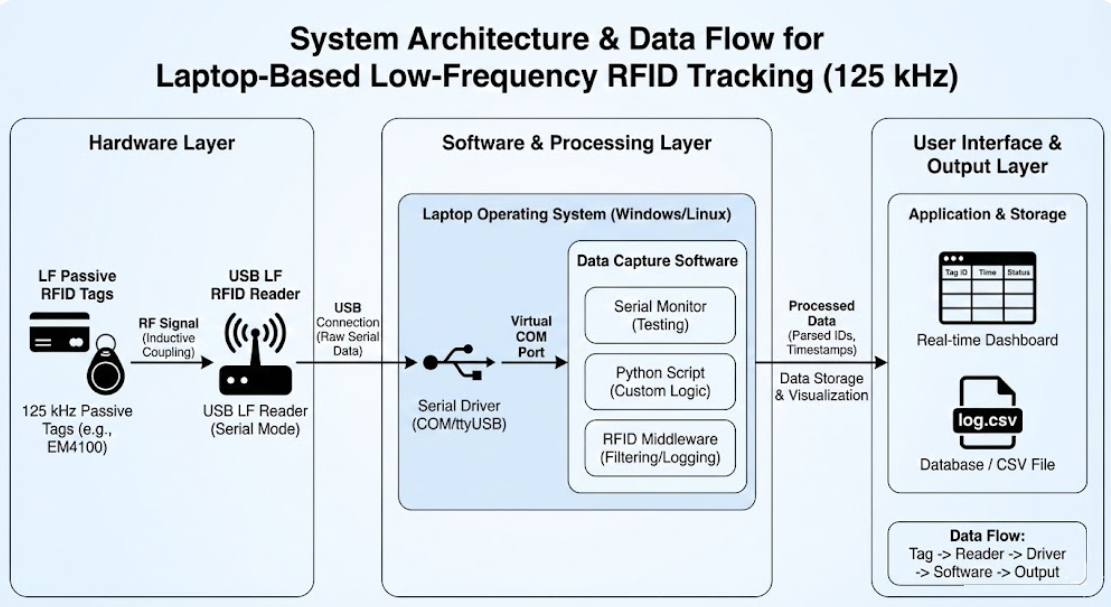
Many beginners underestimate the importance of a serial communication RFID reader. Readers that expose serial output are easier to integrate with scripts and RFID data capture software.

LF RFID Reader Setup on a Laptop (Step-by-Step)
This is where theory meets reality. A clean LF RFID reader setup prevents hours of troubleshooting later.
Step 1: RFID Reader Driver Installation
Most USB readers require manual RFID reader driver installation. Once installed, the reader appears as a COM port (Windows) or ttyUSB device (Linux).
If it doesn’t show up—don’t panic. This is normal. Driver conflicts are common and fixable.
Step 2: Verifying Serial Communication
Open a serial terminal and scan a tag. If you see a hexadecimal string, congratulations—your laptop-based RFID monitoring system is alive.
Step 3: Antenna Placement
Poor RFID antenna configuration kills read performance. Keep tags flat, close, and centered. A slight tilt can double detection reliability.
How to Use a Laptop for Low-Frequency RFID Tracking with Software Tools
Hardware alone does nothing. Software transforms raw reads into intelligence.
Choosing RFID Data Capture Software
You can use:
- Open-source serial monitors
- Custom Python scripts
- Lightweight RFID middleware software
Middleware is useful when building a real-time RFID tracking system, especially if data needs filtering, logging, or cloud syncing.
| Software Type | Best Use Case | Skill Level |
|---|---|---|
| Serial Monitor | Testing reads | Beginner |
| Python Scripts | Custom workflows | Intermediate |
| RFID Middleware | Real-time tracking | Advanced |
RFID signal processing often involves removing duplicate reads, timestamping events, and validating IDs.
Real-World Use Case: Asset Tracking with RFID Using a Laptop
Let’s talk practical application.
Imagine tracking tools in a workshop. Each tool has a passive RFID tag. When scanned, the laptop logs:
- Tool ID
- Timestamp
- User ID
This simple setup already qualifies as asset tracking with RFID—no enterprise software required.
The laptop becomes the control center, handling RFID data capture software, filtering noise, and exporting logs to CSV or databases.
RFID Tag Detection Range: What to Expect (and What Not to)
Many guides exaggerate performance. Let’s be honest.
With LF systems:
- Typical range: 2–10 cm
- Heavily affected by antenna size
- Tag orientation matters more than power
| Factor | Effect on Range |
|---|---|
| Tag orientation | High |
| Antenna size | Very High |
| Environmental noise | Moderate |
| Reader quality | High |
If you expect meters of range, LF RFID is not for you. But if you value reliability, it shines.
Advanced Topics: LF RFID Tag Programming & Protocols
Some tags allow limited LF RFID tag programming, mainly writing IDs or access bits. This depends heavily on the RFID communication protocol used by your reader.
Programming is slower and riskier than reading. One mistake can brick a tag. Always test with spare tags first.
How to Use a Laptop for Low-Frequency RFID Tracking in Real-Time Systems
For live dashboards or automation, combine:
- Laptop
- Serial reader
- Middleware
- Database
This transforms basic scans into a real-time RFID tracking system suitable for labs, attendance systems, or access logs.
The laptop handles filtering and logic. The reader simply listens.
RFID Troubleshooting and Calibration (Hard Truths)
Every setup breaks at least once. That’s normal.
Common issues include:
- Random disconnects
- Duplicate reads
- Missing tags
Effective RFID troubleshooting and calibration means adjusting antenna placement, verifying power stability, and confirming serial settings.
Sometimes the fix is embarrassingly simple—like switching USB ports.
Why Laptop-Based RFID Monitoring Still Makes Sense
In an era of cloud everything, a laptop-based system feels old-school. But it’s flexible, affordable, and transparent.
You control:
- Data
- Security
- Processing logic
No subscriptions. No lock-in.
Frequently Asked Questions (FAQ)
Is low-frequency RFID better than UHF for laptops?
For short-range, interference-heavy environments, yes. LF is more stable.
Can I build an RFID tracking system without coding?
Basic monitoring is possible, but advanced RFID tracking using laptop setups benefit from scripting.
Does LF RFID work through metal?
It performs better than UHF but still has limits.
Can one laptop handle multiple RFID readers?
Yes, with proper port management and RFID middleware software.
Final Thoughts
Learning How to Use a Laptop for Low-Frequency RFID Tracking isn’t about perfection—it’s about understanding limitations and working within them. Once you accept the short range and slower reads, LF RFID becomes incredibly reliable.
It’s not flashy. But it works. And sometimes, that’s exactly what you want.