How to Use Google Search Console for SEO – Step-by-Step Beginner Guide. If you want your website to rank higher in Google search results, you must understand how Google views your site. The most effective free tools for this is Google Search Console. In this guide, we’ll walk you through How to Use Google Search Console for SEO, from setup to advanced optimization tips, so you can boost organic search traffic and improve rankings.
How to Make an AI Website Without Coding
What Is Google Search Console?
Google Search Console (GSC) is a free service by Google that helps you monitor, maintain, and troubleshoot your website’s presence in search results. It gives you a lot of help in growing the website SEO. GSC is a great tool because, it:
•Shows how your site performs for different keywords.
•Identifies technical SEO issues.
•Tracks backlinks and internal links.
•Provides data for improving click-through rates (CTR).
When learning How to Use Google Search Console for SEO Beginners, your main goal is to understand how to use this data for smarter search engine optimization.
How to Use Google Search Console for SEO – Step-by-Step Setup
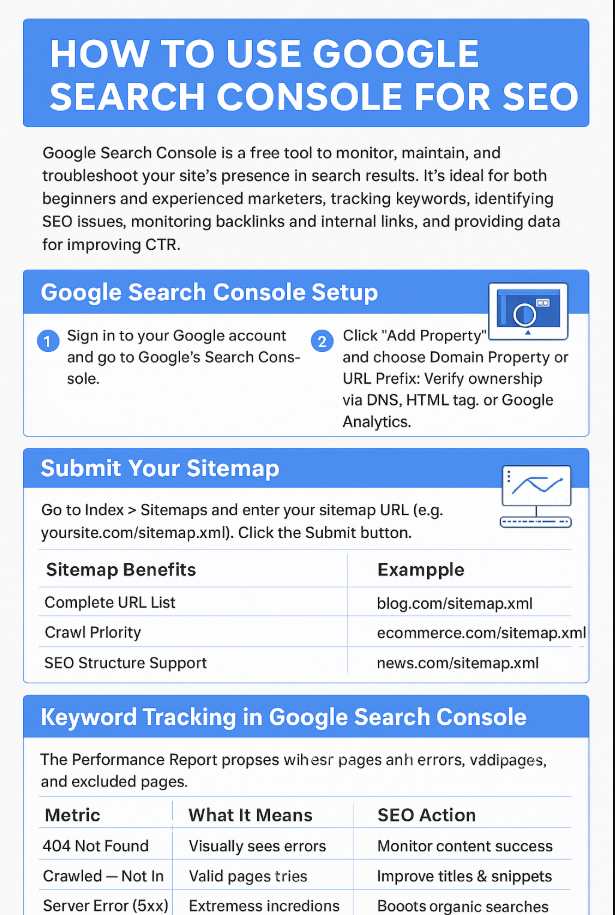
Before diving into optimization, you need to set up Google Search Console properly.
Google Search Console Setup:
Before you can use GSC, you need to add your website and verify ownership.
Steps to Set Up Google Search Console:
1.Sign in to your Google account and go to Google Search Console.
2.Click Add Property and choose either:
Domain Property – tracks all URLs and subdomains.
URL Prefix – tracks only a specific URL path.
3.Verify ownership via DNS, HTML tag, or Google Analytics.
Once your property is verified, you can start exploring the Google Search Console tutorial features to optimize your site.
Submit Your Sitemap:
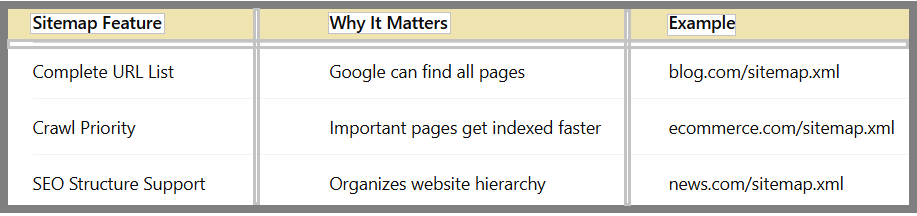
A sitemap helps Google understand your site’s structure and find pages faster.
Go to Index > Sitemaps and enter your sitemap URL (e.g., yoursite.com/sitemap.xml).
Benefits include:
•Faster indexing of new pages.
•Better crawl efficiency.
•Improved visibility for important content.
Keyword Tracking in Google Search Console:
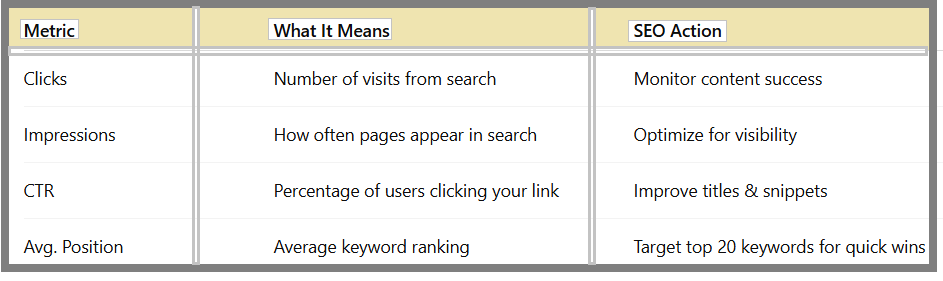
One of the most powerful features in GSC is keyword tracking. Under the Performance Report, you can see:
•Clicks
•Impressions
•Average Position
•CTR
By analyzing this data, you can:
•Identify which queries bring traffic.
•Find low-performing keywords that need better optimization.
•Target search engine optimization basics like improving titles and meta descriptions.
Fix Indexing Issues in Google Search Console:
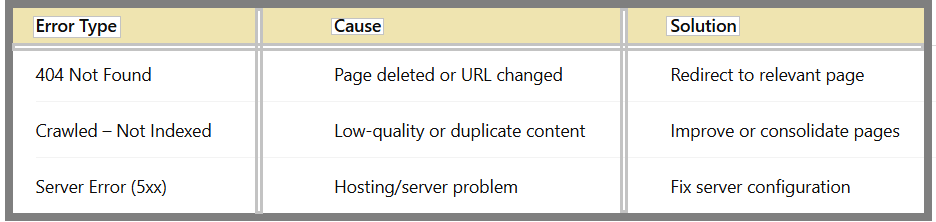
If Google can’t index your content, it won’t appear in search results. The Coverage Report shows:
•Pages with errors (404, server errors)
•Valid indexed pages
•Excluded pages
Common solutions:
•Redirect or update broken links.
•Remove “noindex” tags if they are blocking important pages.
•Ensure mobile-friendliness for mobile-first indexing.
By learning how to use Google Search Console to fix indexing issues, you make sure Google can properly crawl and display your site.
Monitor Backlinks with Google Search Console:
Backlinks are critical for SEO. The Links Report lets you:
•See which external websites link to you.
•Identify top linked pages on your site.
•Track internal linking patterns.
SEO Tip:
Strengthen internal linking to pass ranking power to important pages. Use external backlinks to build credibility.
Mobile Usability & Core Web Vitals:
Google prioritizes mobile-friendly websites. The Mobile Usability Report helps you:
•Fix text that’s too small to read.
•Adjust clickable elements that are too close together.
•Ensure responsive layouts.
The Core Web Vitals Report tracks loading speed, interactivity, and visual stability; an important ranking factors for SEO.
Advanced Google Search Console Tips:
To make the most of GSC:
1.Check Weekly – Spot and fix issues early.
2.Optimize CTR – Rewrite meta titles and descriptions to boost clicks.
3.Track New Keywords – Find fresh opportunities to target.
4.Request Indexing – After updating important content, request Google to re-crawl.
5.Combine with Google Analytics – For deeper traffic analysis.
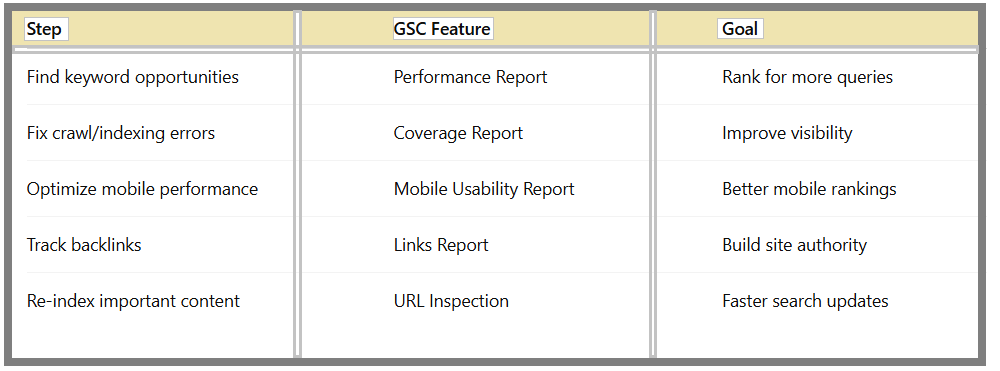
Monthly SEO Workflow Using Google Search Console:
Here’s a simple monthly process:
FAQ – How to Use Google Search Console for SEO
Q1:Is Google Search Console free?
Yes, it’s completely free and provided by Google.
Q2:Can beginners use GSC effectively?
Absolutely. The Beginner Guide to Google Search Console makes it easy to start.
Q3:Does GSC directly improve rankings?
Not directly—it provides the data you need to optimize for better rankings.
Q4:How often should I check GSC?
At least once a week for monitoring keyword performance and fixing technical issues.
Final Takeaway:
Mastering How to Use Google Search Console for SEO is one of the smartest steps for improving your site’s visibility. With keyword tracking, backlink monitoring, and indexing insights, GSC gives you the exact data needed to make impactful SEO decisions.