Pros and Cons of Under-Display Fingerprint Readers. Smartphone security has evolved rapidly, and one of the most interesting innovations is the under-display fingerprint scanner. This technology has become mainstream in mid-range and flagship smartphones, and consumers often want a clear understanding of the Pros and Cons of Under-Display Fingerprint Readers before making a purchase. With brands competing to deliver seamless security features, under-screen fingerprint technology continues to improve, yet it still has limitations many users are unaware of.
In this guide, we will explore the under-display fingerprint scanner pros and cons, compare optical vs ultrasonic fingerprint sensors, highlight performance factors like under-display fingerprint scanner accuracy, and determine whether these sensors are truly reliable and secure.
What Are Under-Display Fingerprint Readers?
Under-display fingerprint readers—or in-display fingerprint readers—allow users to unlock their smartphones by placing a finger directly on the screen. Instead of a physical sensor, the scanner sits beneath the display and uses either optical or ultrasonic technology to detect fingerprint patterns.
This innovation provides a clean, modern look and allows manufacturers to expand screen real estate. But while the design benefits are obvious, its real-world performance depends heavily on sensor type and software optimization.
Key Advantages of Under-Display Fingerprint Readers
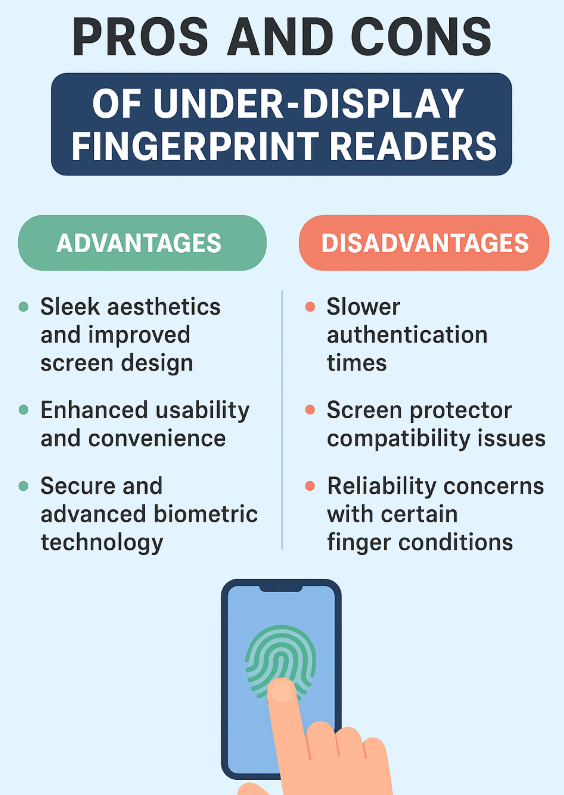
The advantages of Under-Display Fingerprint Readers make them appealing to smartphone manufacturers and consumers alike. Below is a detailed look at their most important strengths.
1. Sleek Aesthetics and Improved Screen Design
A major selling point is the seamless look achieved by removing physical buttons. Because the sensor sits beneath the display, smartphones enjoy a more premium and modern design. This directly appeals to users who prefer edge-to-edge screens without interruptions.
2. Enhanced Usability and Convenience
Unlocking the device simply by tapping the screen adds convenience. Even when the phone is resting on a table, users can easily access it without lifting the device, something not possible with rear-mounted sensors.
3. Secure and Advanced Biometric Technology
A common question is: are in-display fingerprint sensors secure?
The answer depends on sensor type, but modern ultrasonic sensors—like those found in premium flagships—offer strong security. They provide greater depth mapping accuracy and reduced spoofing risks. Many experts consider ultrasonic-based under-screen fingerprint technology to be more robust than earlier optical scanners.
Optical vs Ultrasonic Fingerprint Sensor — A Clear Comparison
| Feature | Optical Sensors | Ultrasonic Sensors |
|---|---|---|
| Scanning Method | Uses light to capture a 2D image | Uses sound waves for 3D mapping |
| Security Level | Moderate | High |
| Performance with Wet/Dirty Fingers | Poor | Excellent |
| Speed | Fast | Slightly slower but more accurate |
| Typical Device Type | Budget/Mid-range | Flagship |
This table highlights that while optical sensors are common, ultrasonic fingerprint sensors offer superior reliability.
Main Disadvantages of Under-Display Fingerprint Readers
Despite their benefits, there are legitimate disadvantages of Under-Display Fingerprint Readers, and assessing the pros and cons of in-display fingerprint sensor performance helps reveal their practical limitations.
1. Slower Authentication Times
Many users report that under-display sensors—particularly optical ones—are slower than traditional physical fingerprint readers. The scanning animation and image processing can create noticeable delays.
2. Screen Protector Compatibility Issues
One of the biggest complaints is in-display fingerprint reader issues related to screen protectors. Tempered glass, poorly aligned protectors, or thick coatings can reduce accuracy and make unlocking difficult.
3. Reliability Concerns with Certain Finger Conditions
Even with improved under-display fingerprint sensor reliability, these scanners may fail more often when:
- Fingers are wet
- Skin is too dry
- The display is dirty or scratched
For users who expect consistent performance across all environments, this inconsistency can be frustrating.
Under-Display Fingerprint Scanner Accuracy Factors
| Condition | Impact on Accuracy | Suitable Sensor Type |
|---|---|---|
| Wet Fingers | Low accuracy | Ultrasonic |
| Dry Fingers | Moderate accuracy | Optical or Ultrasonic |
| Dirty Screen | Low accuracy | Ultrasonic |
| Direct Sunlight | Decreases optical accuracy | Optical struggles |
This table shows that optical scanners are more sensitive to environmental conditions than ultrasonic ones.
Is Under-Display Fingerprint Sensor Better Than Traditional Sensors?
Many users ask: is under-display fingerprint sensor better?
The answer varies depending on what the user values most. If aesthetics and modern design are priorities, the answer is yes. However, for raw speed and reliability, physical capacitive sensors still outperform under-display units.
Under-screen sensors have improved, especially ultrasonic ones, but they still cannot match the lightning-fast speed of older physical sensors found on past smartphones.
Pros and Cons of Under-Display Fingerprint Readers (Summary)
To provide a quick overview of the Pros and Cons of Under-Display Fingerprint Readers, we have summarized the most important points in an easy-to-read table.
Pros and Cons Summary
| Pros | Cons |
|---|---|
| Modern, seamless design | Slower than physical sensors |
| Convenient placement on screen | Struggles with screen protectors |
| Advanced biometric security | Accuracy varies by finger condition |
| Works well in dark environments (optical) | Optical sensors less secure |
| Flagship-level features with ultrasonic tech | Still evolving technology |
This table helps highlight the core trade-offs consumers should consider before relying on under-display fingerprint scanner pros and cons in buying decisions.
Are Under-Display Fingerprint Sensors Secure Enough?
Modern ultrasonic sensors significantly reduce spoofing attempts by capturing 3D fingerprint data. Therefore, for users questioning are in-display fingerprint sensors secure, the answer is: yes—especially ultrasonic ones.
However, optical sensors still carry some vulnerability due to their reliance on 2D imaging, which, while sufficient for casual use, may not satisfy individuals needing high-security authentication.
Conclusion
Understanding the Pros and Cons of Under-Display Fingerprint Readers is essential for making an informed smartphone purchase. While this technology offers futuristic aesthetics, improved usability, and advanced biometric features, it also comes with noticeable drawbacks like reduced reliability under certain conditions and slower authentication speeds.
For the best performance and security, models featuring ultrasonic in-display fingerprint readers are highly recommended. As under-screen fingerprint technology continues to evolve, users can expect even more improvements in accuracy, speed, and durability.
FAQs
1. Are under-display fingerprint sensors reliable?
Yes, especially ultrasonic ones. Optical sensors can struggle with dirty or wet screens but are reliable under normal conditions.
2. Which is better: optical vs ultrasonic fingerprint sensor?
Ultrasonic sensors provide better accuracy, deeper fingerprint mapping, and improved performance in various environments.
3. Do screen protectors affect in-display fingerprint reader issues?
Yes, thick protectors or misaligned ones can reduce accuracy, mostly on optical sensors.
4. Are in-display fingerprint sensors secure?
Ultrasonic sensors are considered highly secure, while optical sensors offer moderate security.