Disable And Uninstall The Mozilla Maintenance Service. In this article, you will read what is Mozilla Maintenance Service, how to disable Mozilla Maintenance Service, and how to uninstall Mozilla Maintenance Service. Firefox is a prevalent and well-known browser. Many people across the world use it. However, it is not used as much as Chrome, but it still gives users valuable features.
What Is Mozilla Maintenance Service?
Firefox updates from time to time to provide its users with the best browsing experience. Firefox has introduced a new feature, known as Mozilla maintenance service. It manages the updates automatically.
Firefox maintenance service is provided for application updates in a background process. It will start the service and download the updates, as soon as Mozilla releases a new update. It will streamline the process and complete the installation. The service process won’t run until there will be a new update. It is a free service and will also avoid pop-ups in the middle of your work.
Disable And Uninstall The Mozilla Maintenance Service:
How To Disable Mozilla Maintenance Service?
Many users prefer to avoid the automatic update of their apps and their browsers. So, Mozilla has provided you with the disabled service of this feature. It will let you eliminate unauthorised updates and enable you to make the changes. To disable Mozilla Maintenance Service:
1.Open ‘Firefox Browser’
2.Click on the ‘Menu’ button.
3.Go to ‘Options’.
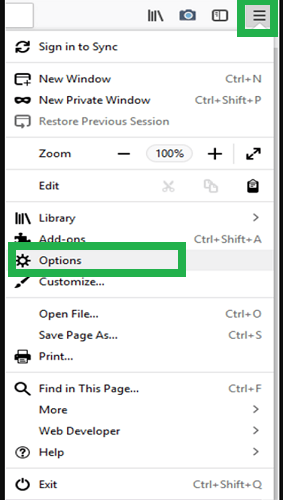
4.‘Option’ page will get open on the main screen.
5.Scroll down to ‘Firefox Updates’.
6.Uncheck ‘Use a background service to install updates’.

7.Close the page and start browsing.
8.Now, there will be no automatic update installation to your browser.
9.Follow the same steps to enable the Mozilla Maintenance Service.
10.Check ‘Use a background service to install updates’.
How To Uninstall Mozilla Maintenance Service?
You can also permanently remove the maintenance service from the browser. There is an uninstalling process for this maintenance service provided by Firefox. To uninstall Mozilla Maintenance Service:
1.Type ‘control panel’ in the Windows search box.
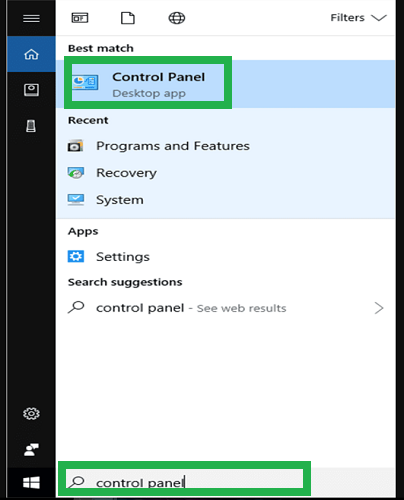
2.Click on ‘Control Panel’ desktop app.
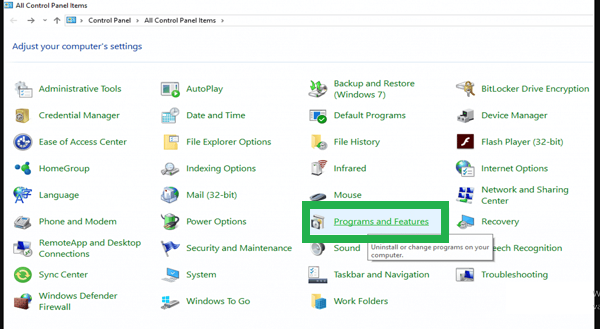
3.Go to ‘Programs and Features’.
4.Search for ‘Mozilla Maintenance Service’.
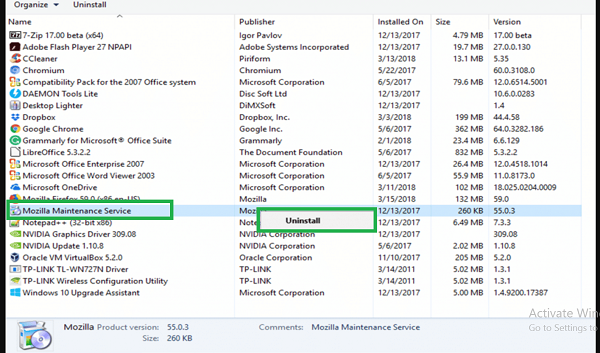
5.Right click on ‘Mozilla’.
6.Click on ‘Uninstall’ and proceed.
7.Wait for a few seconds till the process is complete.
8.Restart your PC.