How To Fix PS5 NP-103047-5 Error Code ‘Unable to connect to the server’. Encountering the PS5 NP-103047-5 Error Code just as you’re about to enjoy your favourite game can be incredibly frustrating. This error, usually accompanied by the message “Unable to connect to the server,” is a common issue faced by many PlayStation 5 users. The good news? It’s usually easy to resolve with a few targeted steps.
Whether the issue stems from PlayStation Network (PSN) outages, weak internet connections, or incorrect system configurations, this guide will walk you through the most effective methods to fix the PS5 NP-103047-5 error code and get back online quickly.
Causes Of PS5 NP-103047-5 Error Code?
This error typically indicates that your PS5 is unable to reach the PlayStation Network servers. Here are the primary reasons behind the issue:
-PSN server maintenance or outages
-Weak or unstable Wi-Fi or Ethernet connection
-Improper DNS configurations
-Outdated system software
-Router or modem issues
-Regional restrictions or geo-blocks
Identifying the cause is crucial in choosing the right fix. Let’s dive into the solutions.
How to Fix PS5 NP-103047-5 Error Code?
Follow these proven steps to troubleshoot and resolve the PS5 connection error.
Method 1 – Check the PlayStation Network Status:
The first step is to confirm whether the problem lies with Sony’s servers.
1.Go to the official PlayStation Network Service Status page.
2.If there’s an outage or scheduled maintenance, you’ll need to wait until services are restored.
Pro Tip:-Bookmark this page for quick access during future connection issues.
Method 2- Test and Troubleshoot Your Internet Connection:
A weak internet signal can easily cause the NP-103047-5 error.
To test your connection on PS5:
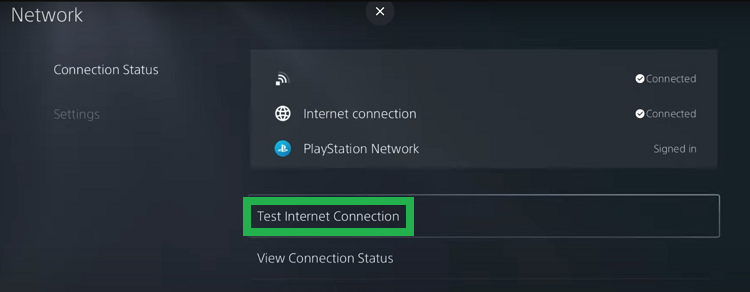
1.Go to Settings > Network > Test Internet Connection.
2.Review the download/upload speeds and NAT type.
3.If the speed is low or your console can’t connect; Reboot your modem and router.
4.Try to reduce interference by limiting other devices.
Method 3 – Restart Your Network Devices:
Simple, but effective.
Steps:
1.Power off your PS5, modem, and router.
2.Unplug them for at least 5 minutes.
3.Plug everything back in and restart the devices.
4.This clears temporary glitches and can restore proper connectivity.
Method 4 – Use a Wired (Ethernet) Connection To Fix PS5 NP-103047-5 Error:
Wi-Fi signals are prone to interference. For better stability:
1.Plug your PS5 directly into your router. Use an Ethernet cable.
2.Re-run the internet connection test.
3.A wired connection often results in faster speeds and fewer disconnections.
Method 5 – Adjust DNS Settings on Your PS5:
Changing your DNS can resolve connection timeouts.
How to configure DNS manually:
1.Go to Settings > Network > Settings > Set Up Internet Connection
2.Choose your active network > Press Options
3.Select Advanced Settings
4.Change DNS Settings to Manual
Input:
Primary DNS: 8.8.8.8
Secondary DNS: 8.8.4.4 (Google’s Public DNS)
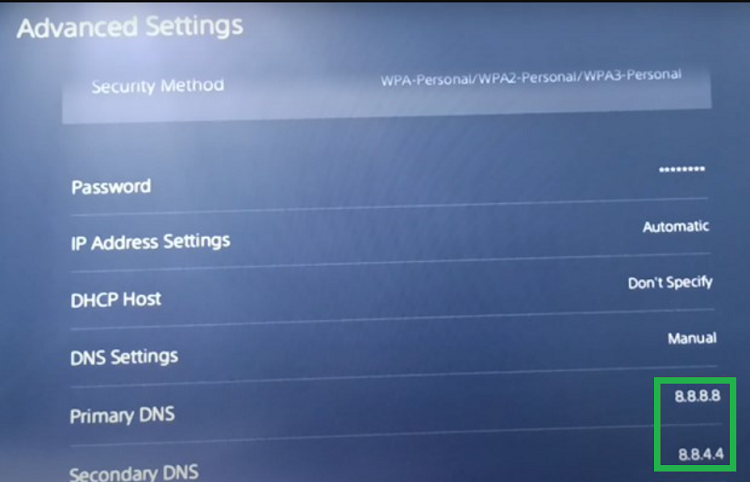
5.Save settings and re-test your internet connection.
Alternative DNS:-Cloudflare (1.1.1.1 / 1.0.0.1)
Method 6 – Update PS5 System Software To Fix PS5 NP-103047-5 Error:
Outdated firmware can cause unexpected network issues.
Steps:
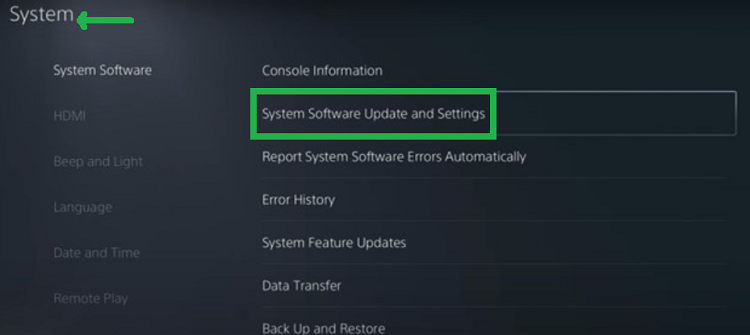
1.Navigate to Settings > System > System Software.
2.Then, select System Software Update and Settings.
3.Choose Update Using Internet
4.Let the system install the latest update if available
5.This ensures compatibility with PlayStation Network services.
Method 7 – Use a VPN to Bypass Regional Restrictions:
If the error occurs due to geo-restricted access, a VPN can help. Use a VPN router or connect your PS5 via a shared VPN connection through a PC. This masks your IP address and may resolve connection issues
Note:-VPN use may violate the terms of service for some online games. Use with caution.
Method 8 – Contact PlayStation Support:
If none of the above methods resolve the issue, contact to Sony team.
1.Visit the PlayStation Support site.
2.Select your region and follow the prompts to report the NP-103047-5 error.
3.Their team can provide tailored troubleshooting and escalate hardware issues if needed.
Final Thoughts: How To Fix PS5 NP-103047-5 Error Code Effectively:
The Fix PS5 NP-103047-5 Error Code process doesn’t have to be complicated. Most of the time, the solution lies in verifying network settings, updating your system software, or adjusting your DNS configuration. Following the steps outlined in this guide, you’ll be back to gaming online in no time.
If the error persists, don’t hesitate to explore advanced fixes like using a VPN or contacting Sony’s official support team. Ensuring a strong, stable internet connection and keeping your system updated are the best ways to avoid this issue.