How to Use AI for Website Optimization – A Complete Beginner-to-Expert Guide. If you’ve ever felt overwhelmed by SEO, website speed, technical audits, or content updates, you’re not alone. Running a successful website today involves much more than publishing great content. Search engines are smarter, users expect faster experiences, and AI-powered search platforms are changing how websites are discovered.
The good news? You don’t have to do everything manually anymore.
Learning How to Use AI for Website Optimization can save hours of work while helping improve search visibility, user experience, and conversions. Whether you manage a personal blog, a business website, or an eCommerce store, artificial intelligence can automate repetitive tasks, uncover hidden SEO opportunities, and provide recommendations that once required expensive SEO agencies.
However, AI isn’t a magic button. The best results come from combining AI with human expertise. Think of AI as a knowledgeable assistant—it can analyze data quickly, but you still make the important decisions.
In this guide, you’ll discover practical ways to use AI Website Optimization Tools, improve technical SEO, optimize content, and prepare your website for traditional search engines as well as AI-powered search experiences like Google AI Overview, ChatGPT, Gemini, Claude, Perplexity, and Microsoft Copilot.
AIO & GEO Strategies for Tech Content Ranking
How to Use AI for Website Optimization – Quick Answer
How to optimize a website using AI?
Use AI to analyze your website, improve content quality, optimize technical SEO, monitor Core Web Vitals, research keywords, automate SEO tasks, improve user experience, and continuously track performance using trusted AI-powered tools combined with human review.
Why AI Matters for Website Optimization
Website optimization has changed dramatically over the past few years.
Instead of manually checking hundreds of pages, AI can analyze an entire website within minutes. It identifies technical issues, content gaps, weak keywords, slow-loading pages, broken links, and opportunities to improve user engagement.
This shift has made artificial intelligence SEO one of the most valuable skills for website owners.
Some of the biggest advantages include:
- Faster technical audits
- Smarter keyword research
- Better content planning
- Improved search engine rankings
- Stronger page experience
- Enhanced mobile optimization
- More accurate search intent optimization
- Continuous performance monitoring
Rather than replacing SEO professionals, AI allows them to spend more time on strategy instead of repetitive tasks.

Common Challenges AI Can Help Solve
Many websites struggle for reasons that aren’t immediately obvious. AI can quickly identify patterns that are easy to miss during manual reviews.
Common Website Problems
| Website Problem | How AI Helps | Expected Benefit |
|---|---|---|
| Slow loading pages | AI for Website Speed Optimization identifies heavy resources and optimization opportunities | Better Core Web Vitals |
| Low Google rankings | AI analyzes keyword gaps and content quality | Higher organic visibility |
| Poor user engagement | AI studies visitor behavior | Lower bounce rate |
| Thin or outdated content | AI Content Optimization suggests improvements | More helpful content |
| Technical SEO errors | AI for Technical SEO scans crawl and indexing issues | Better indexing |
Notice something interesting? Most ranking problems aren’t caused by one big issue. They’re usually dozens of small problems that gradually reduce your website’s overall quality. AI excels at finding those hidden issues.
Best AI Tools for YouTube Script Writing
Signs Your Website Needs AI Optimization
Not sure whether it’s time to introduce AI into your workflow? Watch for these warning signs:
- Organic traffic has stopped growing.
- Pages take too long to load.
- Your competitors consistently outrank you.
- Visitors leave after viewing only one page.
- Content hasn’t been updated in months.
- Technical SEO errors keep appearing.
- Important pages aren’t getting indexed.
- You spend too much time on repetitive SEO tasks.
If several of these sound familiar, AI can make a noticeable difference.
AI Tools for Freelancers to Save Time
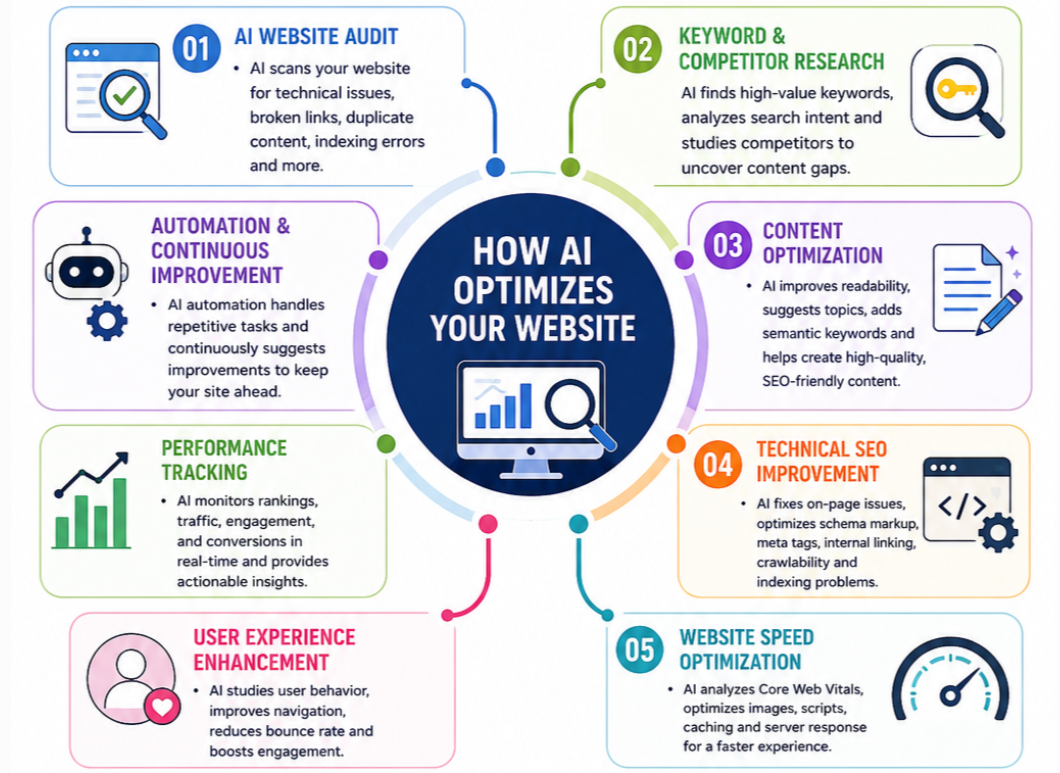
Step 1: Perform a Complete AI Website Audit
Before making changes, understand your website’s current health.
Modern AI Website Optimization Tools combine data from multiple sources to create a comprehensive report covering:
- Technical SEO
- Content quality
- Internal linking
- Broken pages
- Duplicate content
- Schema markup
- Crawl optimization
- Indexing optimization
- Website health checker reports
An AI website analyzer can also prioritize issues based on their potential impact, helping you focus on the fixes that matter most.
Expert Tip
Start with technical problems before rewriting content. Search engines need to crawl and index your pages efficiently before your content can perform at its best.
Step 2: Improve Content with AI—But Keep the Human Touch
One of the smartest uses of AI is enhancing existing content rather than replacing human writing.
Effective AI Content Writing for SEO involves using AI to:
- Expand thin articles.
- Improve readability.
- Discover missing topics.
- Suggest better headings.
- Find semantic keyword opportunities.
- Perform an AI content audit.
- Identify content gap analysis opportunities.
This is where generative AI SEO becomes especially useful. Instead of creating generic articles from scratch, use AI to brainstorm ideas, organize information, and recommend improvements. Then refine everything with your own expertise and experience to align with Google’s E-E-A-T principles.
Remember, readers value authentic insights. A short personal observation, a real-world example, or a practical tip often makes an article far more engaging than perfectly polished but impersonal text.
Step 3: Strengthen Technical SEO with AI
Technical SEO can feel intimidating, especially if you’re new to website management. Fortunately, AI for Technical SEO simplifies many complex tasks.
AI can help identify:
- Broken internal links
- Redirect chains
- Duplicate meta tags
- Missing structured data
- Poor crawl paths
- Indexing issues
- Canonical errors
- Large image files affecting performance
- Weak internal linking structures
Improving these areas contributes to better crawl optimization, indexing optimization, and stronger visibility in both traditional search results and AI-generated summaries.
Popular AI SEO Tasks
| AI Task | Manual Time | AI Time | Difficulty |
|---|---|---|---|
| Technical audit | Several hours | Minutes | Easy |
| Keyword research | 2–4 hours | 20–30 minutes | Easy |
| Content audit | Multiple days | Under an hour | Medium |
| Competitor analysis | Several hours | Around 30 minutes | Medium |
| SEO reporting | 1–2 hours | A few minutes | Easy |
The real advantage isn’t just speed. AI also helps uncover relationships between technical issues, content quality, and user behavior that are difficult to spot manually.
Step 4: Use AI to Improve Website Speed
Website speed affects everything from user satisfaction to search rankings.
Modern AI Website Performance Optimization platforms can monitor:
- Core Web Vitals
- Largest Contentful Paint (LCP)
- Interaction to Next Paint (INP)
- Cumulative Layout Shift (CLS)
- Image optimization opportunities
- Script loading order
- Server response times
- Caching efficiency
Rather than simply reporting problems, many tools recommend specific fixes, making AI for Website Speed Optimization much more practical than traditional performance testing.
Step 5: Optimize for AI Search Engines
Traditional SEO is no longer enough. Search platforms like Google AI Overview, ChatGPT, Gemini, Claude, Perplexity, and Microsoft Copilot look for well-structured, trustworthy content they can easily understand and summarize.
To improve your visibility:
- Answer questions directly before adding detailed explanations.
- Use descriptive H2 and H3 headings.
- Add comparison tables and FAQs.
- Implement schema markup for better indexing.
- Focus on GEO optimization, AEO optimization, and semantic SEO.
- Keep paragraphs short and easy to scan.
This approach increases your chances of appearing in both traditional search results and AI-generated answers.
Step 6: Improve User Experience with AI
Great SEO starts with a great user experience. AI can analyze visitor behavior and suggest improvements that keep users engaged.
Some of the most valuable improvements include:
- Faster page loading with AI Website Performance Optimization
- Better Core Web Vitals
- Improved mobile optimization
- Smarter internal linking
- Personalized content recommendations
- Lower bounce rate reduction
- Higher conversion optimization
The longer visitors stay on your website, the stronger the positive signals you send to search engines.
Advanced Troubleshooting
If your website still isn’t ranking well after using AI, check these common issues.
Troubleshooting Table
| Problem | Possible Cause | Recommended Fix |
|---|---|---|
| Rankings not improving | Weak content or poor search intent | Refresh content and improve AI Content Optimization |
| Pages not indexed | Crawl or sitemap issues | Check crawl optimization and indexing optimization |
| Slow website | Large images or poor hosting | Use AI for Website Speed Optimization |
| High bounce rate | Poor user experience | Improve navigation and page layout |
| AI content feels generic | Minimal human editing | Add original insights and real examples |
Warning: Never publish AI-generated content without reviewing it. AI can speed up your workflow, but human expertise is still essential for accuracy, originality, and trust.
AI Tools to Automate Customer Support
Best Practices
To get the most from AI Powered SEO, follow these recommendations:
- Use AI for research and analysis—not blind automation.
- Regularly perform an AI content audit.
- Monitor search engine rankings with analytics tools.
- Build topical authority by publishing related content.
- Use AI competitor analysis to discover new opportunities.
- Review and update older articles every few months.
- Always prioritize helpful, people-first content.
Manual SEO vs AI-Powered SEO
| Task | Manual SEO | AI-Powered SEO |
|---|---|---|
| Keyword Research | Time-consuming | Fast and data-driven |
| Content Optimization | Manual editing | AI-assisted recommendations |
| Technical SEO | Complex audits | Automated website analysis |
| Competitor Research | Several hours | Completed in minutes |
| Performance Monitoring | Manual reports | Real-time insights |
How AI Is Changing SEO Strategy
Conclusion
Learning How to Use AI for Website Optimization isn’t about replacing human creativity—it’s about working smarter. AI can automate technical audits, improve content quality, enhance website speed, and uncover SEO opportunities that are difficult to find manually.
Still, the most successful websites combine AI with real expertise. Use AI to support your decisions, but let your experience, unique insights, and understanding of your audience shape the final content. By balancing AI SEO Tools, technical SEO, and helpful content, you’ll be well-positioned for higher rankings in Google and greater visibility across AI-powered search platforms.
Frequently Asked Questions
1. Can AI improve website SEO?
Yes. AI helps with keyword research, technical audits, content optimization, and performance monitoring, leading to better SEO results when combined with human review.
2. What are the best AI tools for SEO?
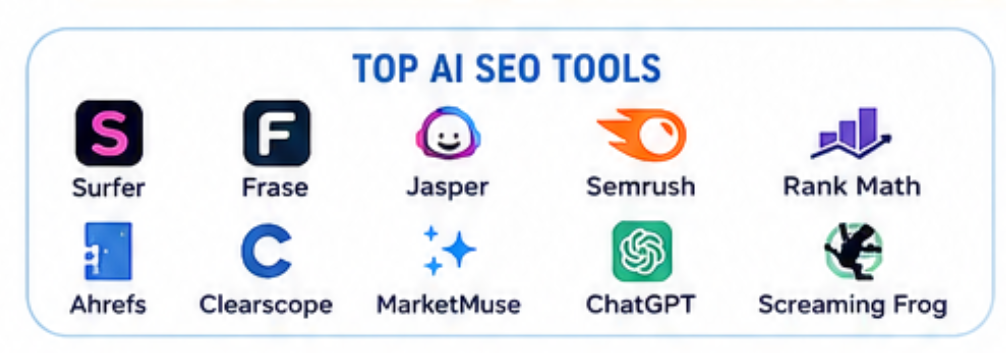
The Best AI Tools for SEO include AI-powered content assistants, website analyzers, keyword research platforms, and SEO automation software.
3. How do I optimize a website using AI?
Start with a technical audit, improve content using AI suggestions, optimize website speed, monitor Core Web Vitals, and regularly update your pages.
4. Is AI-generated content good for Google?
Yes, as long as it is accurate, original, helpful, and reviewed by a human to meet Google’s Helpful Content guidelines.
5. Does AI help with technical SEO?
Absolutely. AI for Technical SEO can identify crawl errors, indexing issues, broken links, duplicate content, and missing schema markup.
6. Can AI improve website speed?
Yes. AI for Website Speed Optimization identifies large files, render-blocking resources, and other performance bottlenecks that affect user experience.
7. Should beginners use AI for SEO?
Yes. AI makes SEO more accessible by simplifying keyword research, technical analysis, and content optimization while reducing manual work.
8. Is AI replacing SEO experts?
No. AI is a powerful assistant, but successful SEO still depends on strategy, creativity, and real-world expertise.
Best AI Tools for Email Marketing Automation
Best AI Tools for Keyword Research
Best AI Tools for Graphic Designers
AI Tools to Automate Social Media Posts
How To Automate Blogging With AI Tools