What Is Disc Soft Lite Bus Service in Windows 10. If you’ve explored the Windows 10 Services list or Task Manager, you may have stumbled upon a service called Disc Soft Lite Bus Service. For many users, this unfamiliar name raises questions: Is it essential, is it safe, and what exactly does it do?
In this article, we’ll demystify what Disc Soft Lite Bus Service is, explain its functions, and help you decide whether you should keep it running or remove it. We’ll also cover related topics like virtual drives, ISO mounting, and how to disable the service if needed.
Understanding Disc Soft Lite Bus Service in Windows 10:
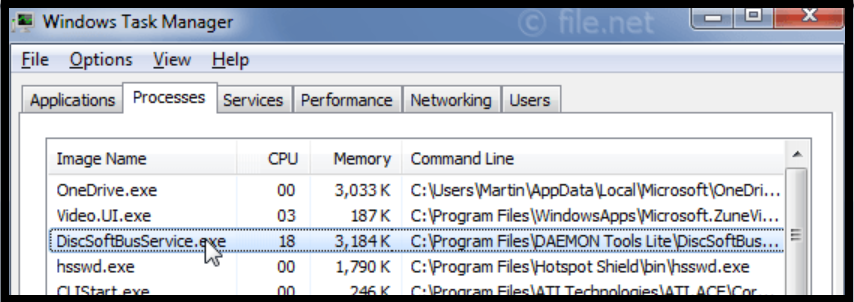
The Disc Soft Lite Bus Service is a system service that gets installed when you use DAEMON Tools Lite or other Disc Soft Ltd. applications. These are programs designed to create and manage virtual drives or virtual disks, allowing you to mount ISO files and other disk image formats without burning them to a physical disc.
The service enables communication between the operating system and the virtual devices created by the software. It’s essentially the bridge that makes your ISO image behave like an actual CD/DVD drive within Windows 10.
Is Disc Soft Lite Bus Service Necessary?
Do You Need Disc Soft Lite Bus Service in Windows 10?
Whether you need the Disc Soft Lite Bus Service depends entirely on your usage. If you actively use DAEMON Tools Lite or similar programs to mount ISO files, create virtual drives, or emulate disc images, this service is essential. Disabling it may cause such applications to malfunction or not run at all.
However, if you do not use any virtual drive software or have uninstalled DAEMON Tools, then keeping this service running is unnecessary and could be safely removed or disabled.
Is Disc Soft Lite Bus Service Safe?
The Disc Soft Lite Bus Service itself is not a virus or malware. It is a legitimate service installed by trusted virtual drive software like DAEMON Tools. However, like any other third-party software, it could become a potential vulnerability if outdated or bundled with unofficial versions.
To ensure safety:
-Install software only from the official DAEMON Tools website or trusted sources.
-Keep the software and your Windows OS updated.
-Use antivirus software to scan and verify any suspicious files.
How to Disable or Remove Disc Soft Lite Bus Service:
If you’ve decided that you no longer need the Disc Soft Lite Bus Service, here’s how you can disable or remove it:
Option 1:-Disable via Services:
1.Press Windows + R, type services.msc, and press Enter.
2.Scroll down to Disc Soft Lite Bus Service.
3.Right-click and select Properties.
4.Set the Startup Type to Disabled.
5.Click Stop to stop the service if it’s running.
Option 2:-Uninstall DAEMON Tools:
1.Go to Settings > Apps > Apps & features.
2.Locate DAEMON Tools Lite.
3.Click Uninstall.
4.This will also remove the Disc Soft Lite Bus Service from your system.
Performance Impact of Disc Soft Lite Bus Service:
Some users report that the Disc Soft Lite Bus Service can cause slight CPU or memory usage, especially on startup. While it usually doesn’t significantly impact system performance, disabling it when not in use can help speed up boot time and reduce background resource usage.
If your Windows 10 system is running slowly or taking longer to start, checking for unnecessary background services like this one is a good practice.
Should You Keep Disc Soft Lite Bus Service?
In conclusion, the Disc Soft Lite Bus Service in Windows 10 is harmless and useful, but only if you need it. For users who regularly use virtual drive software like DAEMON Tools Lite, it provides essential functionality. However, if you’ve moved on to other tools or no longer use virtual disks, it’s safe to disable or remove the service to streamline your system.
Final Thoughts:
Understanding what runs in the background of your system is key to maintaining good performance and security. The Disc Soft Lite Bus Service is just one of many system components that users often overlook. By knowing its purpose, you can make informed decisions about what stays and what goes.
If you’re managing a lean, high-performance system or troubleshooting performance issues, reviewing background services like this one can make a significant difference.