How To Use Multimeter For Motherboard Repair. If your computer suddenly stops working or exhibits unusual symptoms, such as not booting, freezing, or shutting down unexpectedly, the issue may be related to the motherboard. One of the most important skills in electronics repair is learning how to use a multimeter for motherboard repair. A multimeter is a versatile tool that helps you test voltage, resistance, and continuity. It is essential for diagnosing motherboard problems. In this guide, we’ll cover everything from multimeter basics for electronics repair to advanced troubleshooting techniques so you can confidently test a motherboard with a multimeter.
SMD Testing Guide for Laptop Motherboard Repair
Why Learning How to Use Multimeter for Motherboard Repair Matters
Motherboards are complex circuit boards, and even a single faulty capacitor or shorted transistor can stop a computer from functioning. Knowing how to use a multimeter to test a motherboard can help you:
-Detect short circuits quickly
-Measure voltage across components
-Check the health of capacitors and resistors
-Save time and money by identifying the faulty area
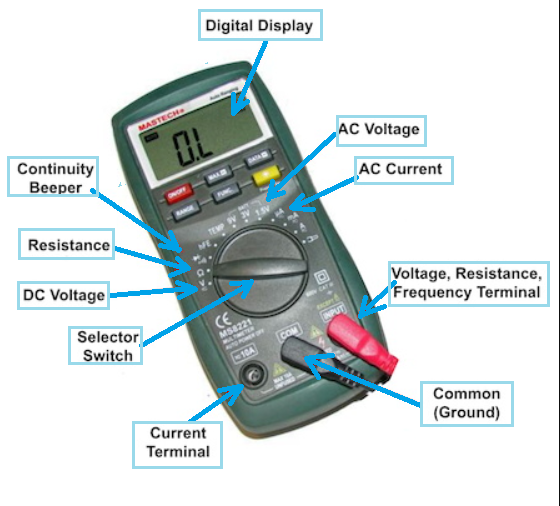
Understanding Multimeter Basics for Electronics Repair:
Before testing your motherboard, it’s important to understand digital multimeter usage. A multimeter measures three main electrical properties:
1.Voltage (V) – Measures electrical potential.
2.Current (A) – Measures the flow of electric charge.
3.Resistance (Ω) – Measures how much a component resists current flow.
Common Multimeter Signs and Symbols:
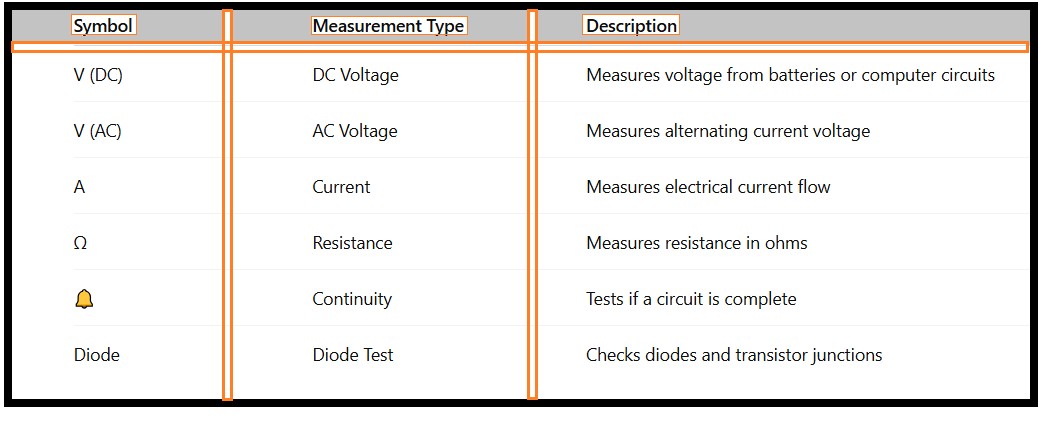
How to Use Multimeter in Motherboard Repair – Step-by-Step Guide
1.Safety Precautions:
Before you start:
1.Turn off the computer and unplug it from power.
2.Use an anti-static wrist strap to prevent damage from static electricity.
3.Discharge residual electricity by holding the power button for 5–10 seconds.
2.Continuity Test for Motherboard Circuits:
The continuity test for motherboard circuits helps you detect broken tracks or short circuits.
Steps:
1.Set the multimeter to the continuity mode (🔔 symbol).
2.Place one probe on one end of the circuit and the other probe on the other end.
3.If you hear a beep, the circuit is continuous. No sound means it’s broken.
3.How to Check Voltage on Motherboard:
To diagnose power issues:
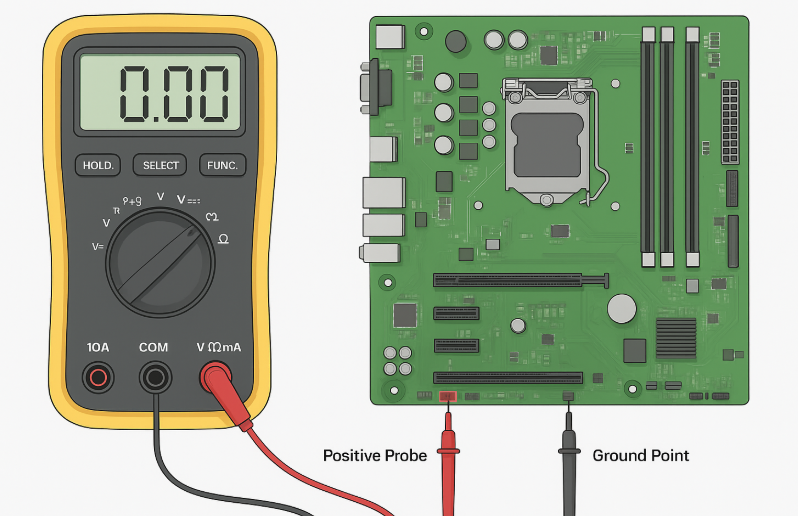
1.Set the multimeter to DC voltage.
2.Connect the black probe to the ground and the red probe to the power rail.
3.Compare the readings to the expected values from the motherboard’s manual.
4.Measuring Resistance on Computer Motherboard:
1.If your PC fails to start, some components might have incorrect resistance.
2.Switch to Ω mode.
3.Place probes across resistors or suspected faulty components.
4.Compare values with manufacturer specifications.
Common Voltage Reference Points on a Motherboard:
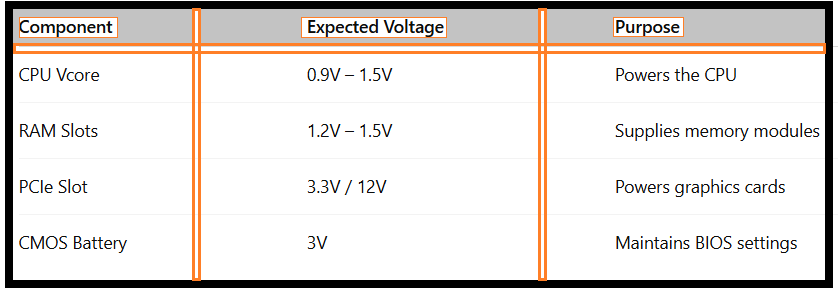
Diagnosing Motherboard Problems with a Multimeter:
Knowing how to use a multimeter for computer repair allows you to pinpoint:
1.Dead capacitors – No voltage or bulging top.
2.Short circuits – Continuity beep between power and ground.
3.Faulty VRMs – Incorrect CPU voltage output.
4.Dead BIOS battery – Less than 2.8V reading.
Checking Motherboard Components Step by Step:
When testing motherboard with multimeter, follow a structured approach:
1.Start with the power input.
2.Move to voltage regulators.
3.Check RAM and CPU voltage.
4.Test capacitors and resistors.
5.Verify continuity on data lines.
Conclusion:
Mastering how to use multimeter for motherboard repair is an essential skill for anyone interested in electronics repair. From testing voltage to diagnosing continuity issues, a multimeter allows you to identify problems quickly and accurately. With the right approach and careful handling, you can bring dead motherboards back to life.
FAQ – How To Use Multimeter For Motherboard Repair:
Q1:Can I test a motherboard without removing it from the case?
Yes, but ensure the computer is unplugged and you have access to test points.
Q2:What’s the most common motherboard failure detected with a multimeter?
Short circuits and faulty capacitors are the most common.
Q3:Can a beginner learn how to use a multimeter to test a motherboard?
Absolutely. With basic safety knowledge and step-by-step guidance, even beginners can perform basic tests.