Best External Hard Drives for Backup. In today’s digital world, protecting your data is just as important as creating it. Whether it’s work files, photos, videos, or critical documents, losing data can be devastating. That’s where external hard drives come in. Choosing the Best External Hard Drives for Backup ensures your data is secure, accessible, and stored safely for the long term.
How To Fix BIOS Not Detecting Hard Drive
This guide explores the best external HDD for backup, storage options for Windows and Mac, security features like encryption, and the most reliable drives available. We’ll also compare HDDs and SSDs, list top recommendations, and help you make an informed decision.
Benefits Of Using External Hard Drives for Backup:
External Hard Drives are one of the most dependable and cost-effective solutions for keeping data safe. Cloud storage is convenient, but it comes with subscription costs and limited space. With external drives, you own the hardware and can store terabytes of data without ongoing fees.
Benefits of using external drives:
•Large storage capacity at an affordable price.
•Offline accessibility without internet.
•High-speed transfer rates for quick backups.
•Portability for moving files between devices.
•Data protection with encryption for sensitive files.
•Choosing the Best External Hard Drives for Backup
Factors For Choosing The Best Drive:
When selecting an external drive, consider the following factors:
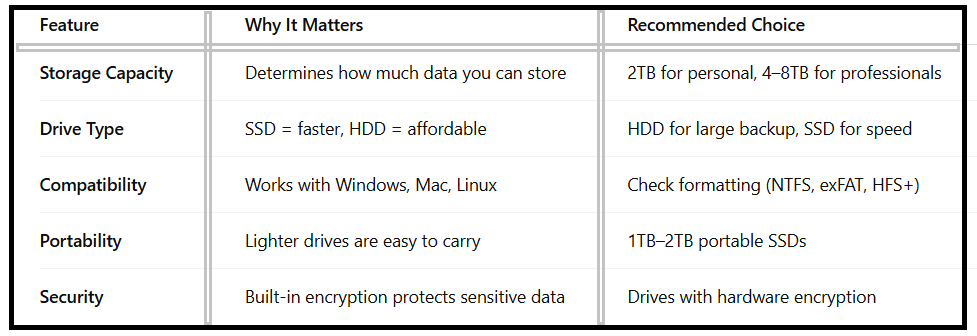
By balancing these features, you can find the best external HDD for backup that matches your needs.
Best External Hard Drives for Backup:
Below is a comparison of the Best External Hard Drives currently available:
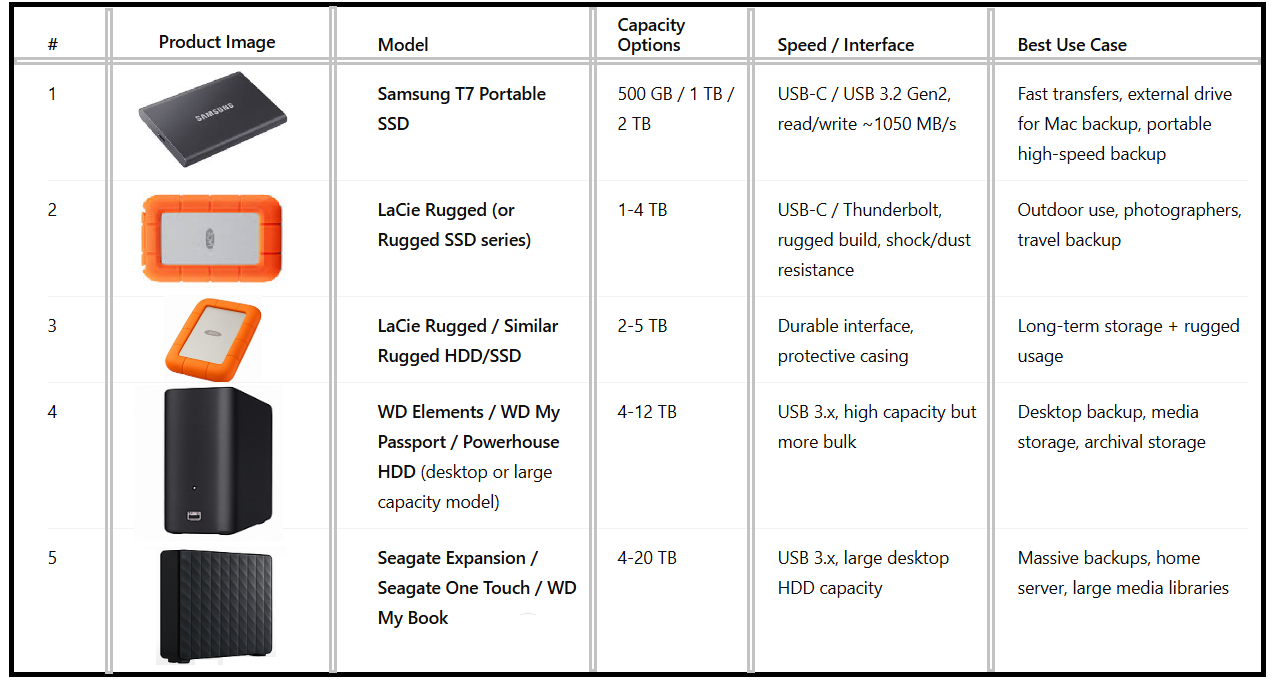
These drives provide a mix of affordability, speed, and durability, ensuring your backup is safe and efficient.
External Hard Drives for Windows Backup:
Windows users often look for external drives with NTFS support, seamless backup software, and compatibility with Windows File History.
•Western Digital My Passport integrates perfectly with Windows backup tools.
•Seagate Expansion Drive offers large capacities at affordable prices.
•Drives with encryption features are recommended for businesses using Windows-based PCs.
External Hard Drives for Mac Backup:
For Apple users, external drives for Mac backup must support Time Machine and have HFS+ or APFS formatting.
•Samsung T7 SSD is ideal for MacBook users due to its compact size and blazing-fast speed.
•LaCie Rugged Mini is popular among creative professionals who need durability.
•G-Technology G-Drive offers high-capacity storage designed specifically for Mac systems.
High-Capacity External Hard Drives:
If you manage videos, large design projects, or enterprise files, high-capacity external hard drives are the best solution.
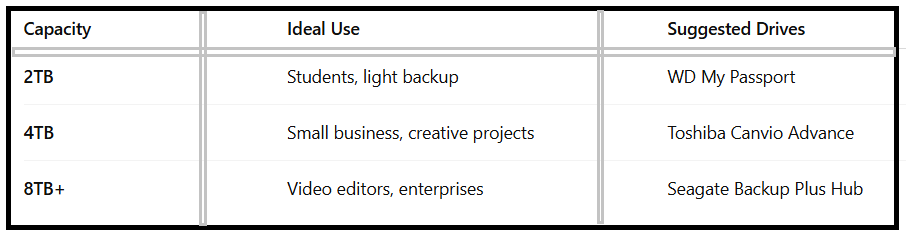
The Best External Hard Drives for Backup are often above 4TB if you need to store heavy multimedia files.
Reliable External Hard Drives for Long-Term Storage:
When choosing storage for long-term backup, durability is critical. Factors like shock resistance, data retention lifespan, and brand reliability matter.
WD Elements Desktop Drive – affordable, large storage.
Seagate IronWolf (NAS) – designed for multi-device environments.
LaCie Rugged SSD Pro – long-term reliability plus durability.
These drives are known as reliable external hard drives for long-term storage and ensure data safety over years.
External Drives with Encryption for Data Protection
Security is a growing concern, and external drives with encryption for data protection provide peace of mind.
•WD My Passport Ultra – built-in AES-256 encryption.
•Apricorn Aegis Padlock – physical keypad with secure access.
•Samsung T7 Touch SSD – fingerprint recognition for enhanced security.
Such features make them the best HDD and SSDs for storing sensitive information like financial records and personal files.
HDD vs SSD: Which is Best for Backup?
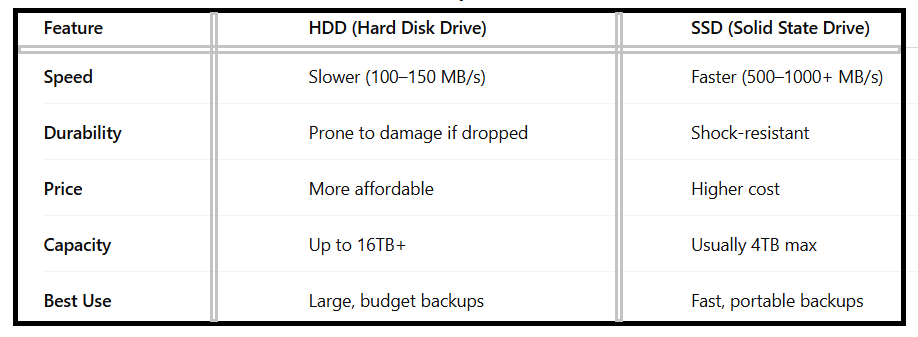
For most users, the best external HDD for backup remains HDDs due to affordability. However, SSDs are superior for speed and portability.
Tips for Maintaining Your External Backup Drive:
•Safely eject drives to prevent corruption.
•Store drives in a cool, dry place to extend lifespan.
•Run periodic backups to keep data updated.
•Test restoration occasionally to confirm backups are working.
•These practices help maintain the Best External Hard Drives for Backup over the long term.
FAQ – Best External Hard Drives for Backup
Q1:What is the best external HDD for backup in 2025?
The Seagate Backup Plus and WD My Passport are among the most reliable external HDDs for backup.
Q2:Can I use the same external drive for Windows and Mac?
Yes, but you need to format it as exFAT for cross-platform compatibility.
Q3:Which is better for long-term storage: HDD or SSD?
HDDs are more affordable and available in higher capacities, making them better for large long-term storage. SSDs are better for portability and durability.
Q4:Are external drives with encryption necessary?
If you store sensitive data, yes. Encryption ensures your files remain safe even if the drive is lost.
Q5:What is the safest backup strategy?
Follow the 3-2-1 backup rule: 3 copies of data, 2 different storage media, and 1 offsite copy.
Conclusion:
Choosing the Best External Hard Drives for Backup depends on your needs: capacity, speed, portability, and security. HDDs remain the most cost-effective for high-capacity backups, while SSDs offer unmatched speed and reliability.
Whether you need external hard drives for Windows backup, external drives for Mac backup, or high-capacity drives for long-term storage, this guide gives you the best options available in 2025. By investing in reliable and secure external drives, you ensure that your digital life remains safe for years to come.