How to Secure Cloud Storage from Hackers. Cloud storage has become part of everyday life. Whether you’re saving family photos, work documents, or business backups, services like Google Drive, Dropbox, OneDrive, and iCloud make accessing files incredibly convenient. But convenience also attracts attention from cybercriminals.
The good news? Most cloud storage breaches don’t happen because hackers magically “break into the cloud.” They usually succeed by exploiting weak passwords, phishing emails, reused credentials, or poor security settings. That’s why learning How to Secure Cloud Storage from Hackers is more important than ever.
Think about it for a moment—if someone gained access to your cloud account today, what could they see? Personal documents, financial records, confidential business files, or years of treasured memories could all be exposed.
Fortunately, protecting your data isn’t complicated. By following a few smart security habits and understanding modern Cloud Storage Security practices, you can dramatically reduce the chances of unauthorized access. This guide explains everything in plain English, whether you’re protecting a personal account or managing cloud storage for your business.
How to Protect Personal Data Online
Why Hackers Target Cloud Storage
Cloud storage accounts contain valuable information in one place. Instead of stealing a single file from your computer, attackers can potentially access years of documents, backups, passwords, and personal information from a single compromised account.
Some of the most common motives include:
- Identity theft
- Financial fraud
- Corporate espionage
- Ransomware attacks
- Selling stolen data on the dark web
- Accessing linked online accounts
Modern Cloud Cybersecurity isn’t just about defending servers—it’s also about protecting user accounts through better authentication, encryption, and access control.
Common Causes of Cloud Storage Security Risks
Understanding the risks helps you avoid them before they become serious problems.
Weak Passwords
Using short or reused passwords remains one of the biggest reasons hackers gain access. A leaked password from another website can often unlock your cloud account if you reuse credentials.
Phishing Attacks
Cybercriminals frequently send fake emails pretending to be Google, Microsoft, or Dropbox. One careless click can reveal your login details.
Poor Sharing Permissions
Improper Secure File Sharing settings may accidentally expose confidential files to anyone with a link.
Unencrypted Files
Although many providers offer Cloud Storage Encryption, adding your own File Encryption before uploading sensitive documents provides an extra layer of protection.
Malware-Infected Devices
Even the strongest cloud account can be compromised if malware steals your login credentials from your computer.
Top Cloud Accounting Software for Small Businesses
Signs Your Cloud Storage May Be Compromised
Many people don’t notice suspicious activity until it’s too late. Watch for these warning signs.
- Unknown login notifications
- Missing or deleted files
- New shared folders you didn’t create
- Password reset emails you didn’t request
- Unrecognized devices connected to your account
- Storage filling unexpectedly
- Strange file modifications
If you notice any of these, change your password immediately and enable Multi-Factor Authentication for Cloud Storage.
Common Cloud Storage Threats
| Threat | Risk Level | Recommended Solution |
|---|---|---|
| Weak password | High | Use a strong unique password with a Password Manager |
| Phishing emails | High | Verify links before logging in |
| Public Wi-Fi | Medium | Use a trusted VPN |
| Shared file links | Medium | Review Cloud Permissions regularly |
| Malware | High | Install reliable Malware Protection software |
| Stolen device | Medium | Enable remote sign-out and secure login alerts |
How to Secure Cloud Storage from Hackers: Step-by-Step Guide
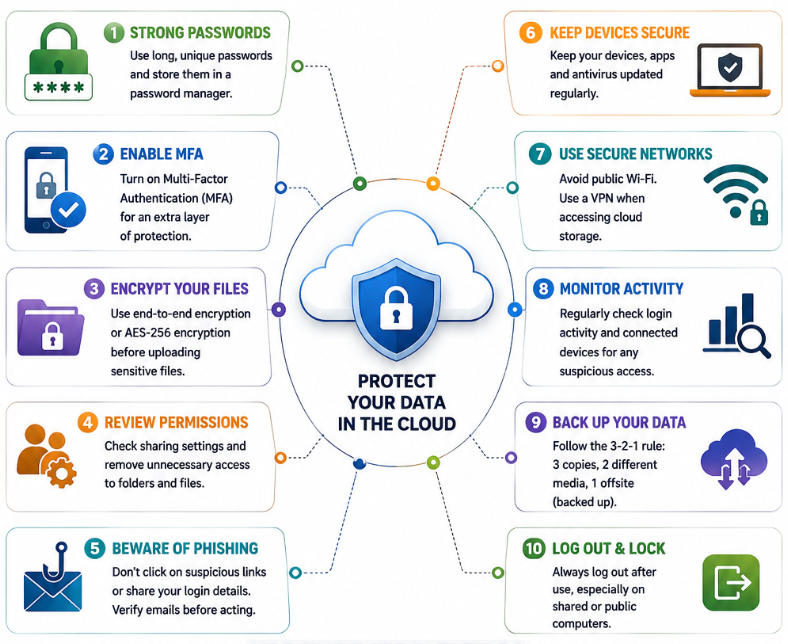
1. Enable Multi-Factor Authentication Immediately
If there’s one security feature you should activate today, it’s Multi-Factor Authentication for Cloud Storage.
Even if someone discovers your password, they still need your verification code or authentication app to sign in.
Many services support both Two-factor authentication and advanced Multi-factor authentication, making unauthorized access significantly more difficult.
2. Create Strong, Unique Passwords
A password like “Password123” or your pet’s name won’t stand up against modern attacks.
Instead:
- Use at least 16 characters.
- Mix uppercase and lowercase letters.
- Include numbers and symbols.
- Never reuse passwords across different websites.
A reliable Password Manager can generate and safely store complex passwords for every account.
3. Encrypt Sensitive Files Before Uploading
Most leading providers already use Cloud Storage Encryption, but encrypting important files yourself adds another layer of security.
Look for software that supports AES-256 encryption, which remains one of today’s strongest encryption standards.
This approach is especially useful for financial documents, confidential business records, and legal files.
4. Review Sharing Permissions Regularly
Convenience sometimes comes at the cost of security.
It’s surprisingly common to forget that an old folder is still shared publicly months—or even years—later.
Good Cloud Storage Privacy starts with checking who has access.
Review:
- Shared folders
- Public links
- Team permissions
- External collaborators
- File ownership
Proper Access Control prevents accidental exposure while improving overall Cloud Data Security.
5. Use Trusted Cloud Providers
Not all cloud services offer the same level of protection.
When choosing the Best Secure Cloud Storage, look for providers that offer:
- End-to-End Encryption
- Login alerts
- Version history
- Secure cloud backup
- Automatic threat detection
- Ransomware recovery
- Compliance certifications
- Strong Cloud Infrastructure security
Security Features Worth Looking For
| Security Feature | Why It Matters |
|---|---|
| End-to-End Encryption | Protects files even during transfer |
| AES-256 Encryption | Industry-standard data protection |
| Login Alerts | Detect suspicious activity quickly |
| Version History | Recover overwritten or encrypted files |
| Ransomware Detection | Helps restore affected files |
| Device Management | Remove unknown devices instantly |
| Secure Login | Prevent unauthorized access |
| Backup Recovery | Improves Cloud Backup Securit |
⚠️ Warning
Never assume your cloud provider alone can keep your data safe.
Even the most secure platform can’t protect an account if the password has been stolen through phishing or malware. Combining strong passwords, encryption, Secure Google Drive, Secure Dropbox Account, and OneDrive Security Tips with smart online habits offers far better protection than relying on default settings alone.
6. Watch Out for Phishing Scams
Phishing remains one of the easiest ways for hackers to steal cloud accounts. Instead of attacking the cloud provider, criminals trick users into giving away their passwords.
Be cautious if you receive emails claiming your account will be suspended or asking you to verify your login. Before clicking any link, check the sender’s email address and visit the provider’s official website directly.
A few simple habits can Prevent Cloud Storage Hacking:
- Never open suspicious email attachments.
- Don’t enter your password through unknown links.
- Verify unexpected login requests.
- Report phishing emails instead of responding to them.
Sometimes the safest click is the one you don’t make.
7. Keep Your Devices Updated
Even the most secure cloud account becomes vulnerable if the computer or smartphone accessing it is infected.
Regular operating system and software updates fix security flaws that attackers actively exploit. Enable automatic updates whenever possible, and install trusted antivirus software for continuous Malware Protection.
Updating may feel like a small task, but it closes many security holes before hackers can use them.
8. Monitor Login Activity
Most cloud storage providers let you review recent sign-in activity.
Check periodically for:
- Unknown devices
- Unfamiliar locations
- Failed login attempts
- Recently connected applications
If anything looks suspicious, immediately change your password, remove unknown devices, and review your account’s Cloud Permissions.
9. Back Up Important Files Separately
Cloud storage is excellent, but it should never be your only backup.
Following the 3-2-1 backup rule is still one of the smartest strategies:
- Keep 3 copies of important files.
- Store them on 2 different types of storage.
- Keep 1 copy offsite.
This approach improves Cloud Backup Security and protects your data against ransomware, accidental deletion, or service outages.
10. Practice Zero Trust Security
One of today’s most effective security models is Zero Trust.
Instead of assuming every device or user is trustworthy, Zero Trust verifies every login attempt, every device, and every request.
Many businesses already rely on this approach because it reduces the risk of unauthorized access, even if credentials are stolen.
Best Cloud Storage with Lifetime Plan
Advanced Troubleshooting
If you suspect someone has already accessed your cloud account, don’t panic. Acting quickly can often prevent further damage.
Immediate Recovery Steps
- Disconnect unknown devices.
- Change your password immediately.
- Enable Multi-factor authentication if it isn’t already active.
- Review recent file activity.
- Restore deleted files from version history.
- Remove suspicious third-party apps.
- Scan every connected device for malware.
- Contact your cloud provider if you believe your account has been compromised.
The faster you respond, the better your chances of preventing a serious Data Breach.
When Should You Change Cloud Providers?
Sometimes the issue isn’t your security habits—it may be the provider itself.
Consider switching if your current service lacks:
- Strong End-to-End Encryption
- Reliable security updates
- Device management
- Ransomware recovery
- Detailed login history
- Access controls
- Secure backup options
- Responsive customer support
Choosing the Best Secure Cloud Storage means looking beyond storage space and pricing. Security should always be a top priority.
Best Free Cloud Backup for Windows 11
Cloud Storage Security Checklist
| Security Task | Recommended Frequency |
|---|---|
| Change passwords | Every 3–6 months |
| Review shared folders | Monthly |
| Check login history | Weekly |
| Update devices | As updates become available |
| Scan for malware | Weekly |
| Verify backups | Monthly |
| Remove unused apps | Every 2–3 months |
| Review account permissions | Monthly |
Expert Recommendations
If you’ve read this far, you’ve probably realized that securing cloud storage isn’t about relying on a single feature. It’s about combining several layers of protection.
Here are the practices I personally recommend for almost every user:
- Enable Multi-Factor Authentication for Cloud Storage immediately.
- Use a trusted Password Manager.
- Encrypt sensitive files before uploading them.
- Avoid logging in over unsecured public Wi-Fi unless you’re using a VPN.
- Regularly review Secure File Sharing permissions.
- Keep multiple backups of critical files.
- Monitor login alerts instead of ignoring them.
- Learn to recognize phishing attempts before they become successful attacks.
These simple habits provide much stronger Cloud Data Security than relying on passwords alone.
Cloud Storage vs External Hard Drive
Quick Summary
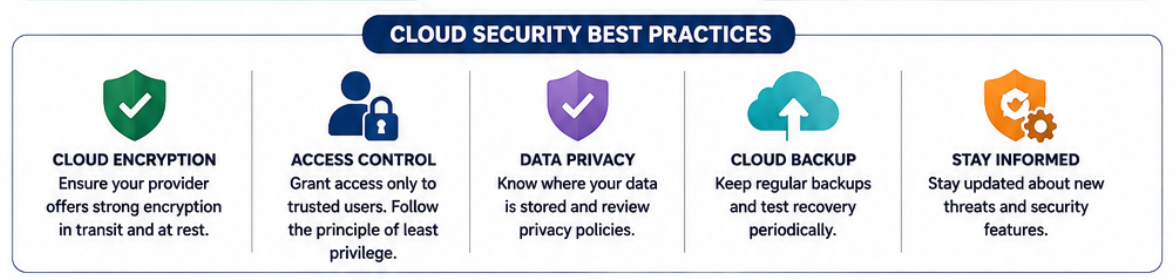
If you’re wondering where to start, focus on these five essentials:
- Enable multi-factor authentication.
- Use strong, unique passwords.
- Encrypt confidential files.
- Review sharing permissions regularly.
- Keep your devices clean and updated.
Together, these steps significantly improve Cloud Security Best Practices while reducing common Cloud Storage Security Risks.
Conclusion
Learning How to Secure Cloud Storage from Hackers doesn’t require advanced technical knowledge. In fact, most successful attacks happen because of everyday mistakes like weak passwords, phishing emails, or forgotten sharing permissions—not because cloud providers are inherently insecure.
By combining Cloud Storage Security, strong authentication, Cloud Storage Encryption, careful account monitoring, and smart online habits, you can protect both personal and business data from modern cyber threats.
Cybersecurity isn’t something you set up once and forget. Treat it like locking the front door of your home. The habit only takes a few moments, but it can save you from major problems later.
Top Free Cloud Storage Apps for Mobile
Frequently Asked Questions
1. Is cloud storage safe from hackers?
Yes. Most major providers use advanced security technologies, but your account security also depends on strong passwords, Multi-Factor Authentication for Cloud Storage, and safe online habits.
2. What is the safest cloud storage service?
Services like Google Drive, Microsoft OneDrive, Dropbox, iCloud, and Sync.com all offer strong security. The safest choice depends on features like End-to-End Encryption, access controls, and backup options.
3. Can hackers access Google Drive?
Hackers usually don’t break into Google Drive directly. They often gain access through phishing attacks, stolen passwords, or malware. Following Secure Google Drive recommendations greatly reduces this risk.
4. Does cloud storage use encryption?
Yes. Most providers use Cloud Storage Encryption during file transfer and while storing data. Some also offer End-to-End Encryption for additional privacy.
5. Should I encrypt files before uploading them?
Absolutely. Encrypting sensitive files yourself provides another layer of protection, even if your cloud account is compromised.
6. How often should I review cloud sharing permissions?
It’s a good practice to check your shared folders at least once a month to ensure only authorized users have access.
7. Can ransomware affect cloud storage?
Yes. If infected files sync to your cloud account, ransomware can spread. Maintaining version history and secure backups helps recover your data.
8. What is the easiest way to improve cloud security?
Start by enabling Multi-Factor Authentication for Cloud Storage, using a unique password stored in a password manager, and reviewing your sharing permissions regularly. These three steps alone dramatically strengthen your cloud account security
How to Build a Privacy-Focused Personal Cloud
Top Cloud Accounting Tools for Freelancers
How to Backup Laptop Data to Cloud Easily
Difference Between Cloud Hosting and Shared Hosting
Cloud Backup vs External Hard Drive: Which Is Safer?