How To Fix PS5 Error Code CE-108877-1: Complete Troubleshooting Guide. The PS5 Error Code CE-108877-1 can be frustrating, especially when you’re about to play your favorite game or access online features. This error usually indicates that your PlayStation 5 is having trouble connecting to the PlayStation Network (PSN). Without a stable connection, you may face issues such as failed downloads, multiplayer disconnections, or even the “PS5 Content Activation Failed” message.
How To Fix PS5 Overheating Problem
In this guide, we’ll explain the reasons behind CE-108877-1, and provide step-by-step methods on how to fix PS5 Error Code CE-108877-1 effectively.
Reasons Behind CE-108877-1 on PS5:
Lets understand the causes of this error. Multiple factors can contribute to the issue, ranging from server downtime to incorrect settings.

How to Fix PS5 Error Code CE-108877-1?
Here are proven methods to fix the PS5 Error CE-108877-1 and get back to seamless gaming.
1.Check PlayStation Network Status
Many times, the error has nothing to do with your console. Instead, the PSN servers may be down.
-Visit the PlayStation Network Status page.
-Confirm if all services (gaming, account, store, etc.) are working.
-If servers are under maintenance, wait until Sony restores them.
✅ Quick Tip: If you also face PS5 error CE-105638-3, it’s often due to similar server issues.
2.Use a Wired Connection for Stability
Wi-Fi connections are prone to interruptions. A direct Ethernet connection ensures stronger and more reliable connectivity.

If possible, connect your PS5 directly to the router. This is one of the most effective ways to fix CE 108877 1 PS5 fix issues.
3.Restart Your Router and Modem
A simple restart often solves temporary network issues:
1.Turn off your router and modem.
2.Wait at least 5 minutes.
3.Power them back on and reconnect your PS5.
4.This can clear out network congestion and help with the PS5 Error Code CE-108877-1 fix.
4.Change the DNS Settings
Switching to Google DNS or Cloudflare DNS can solve hidden network conflicts.
1.Steps to change DNS on PS5:
2.Go to Settings > Network > Set Up Internet Connection.
3.Select your Wi-Fi, then go to Advanced Settings.
4.Under DNS Settings, choose Manual.
5.Set Primary DNS = 8.8.8.8 and Secondary DNS = 8.8.4.4.
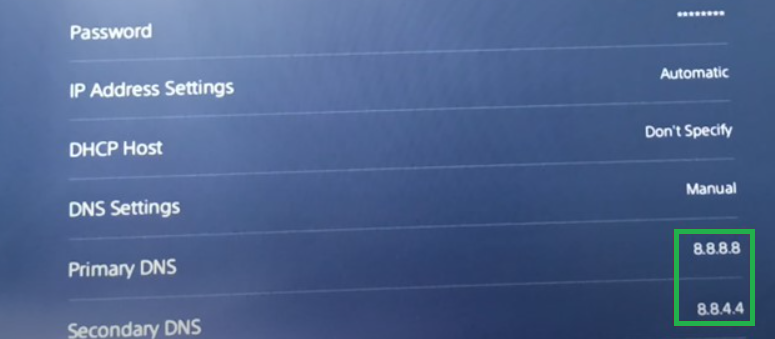
5.Save and test your internet connection.

6.If Google DNS doesn’t help, try Cloudflare DNS (1.1.1.1 & 1.0.0.1) for improved performance.
5.Update PS5 System Software
Outdated software can cause compatibility issues.
1.Navigate to Settings > System > System Software Update and Settings.
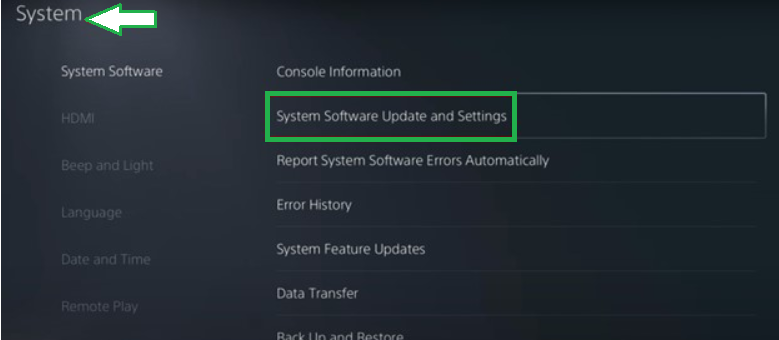
2.Select Update Using Internet.
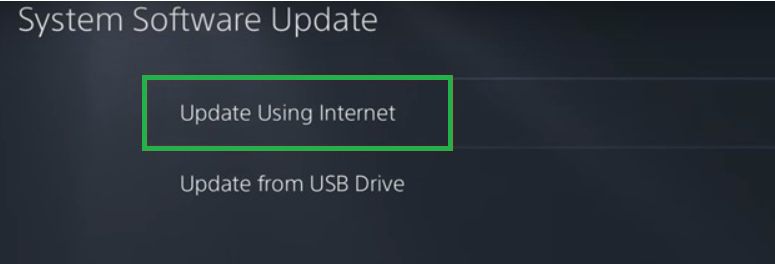
3.Follow on-screen instructions to install the latest update.
Keeping your PS5 up to date prevents both CE-108877-1 and related issues like CE-105638-3.
6.Contact PlayStation Support
If none of the above works, it may be a deeper issue. Visit the official PlayStation Support page and provide details about your error. In rare cases, hardware issues may require professional inspection.
FAQ – PS5 Error Code CE-108877-1
Q1.What does PS5 Error Code CE-108877-1 mean?
It means your PS5 is struggling to connect with the PlayStation Network due to server, internet, or system issues.
Q2.Can CE-108877-1 damage my PS5?
No, it’s a network-related error and doesn’t harm your console hardware.
Q3.Is CE-108877-1 related to CE-105638-3?
Yes, both errors often occur due to network or PSN server issues.
Q4.What’s the fastest way to fix it?
Using a wired Ethernet connection and updating your system software usually resolves the error quickly.
Q5.Should I reset my PS5 if nothing works?
Factory reset is the last resort. Try all other solutions first before opting for a reset.
Wrapping Up:
The PS5 Error Code CE-108877-1 may look intimidating, but in most cases, it’s linked to network or server issues rather than hardware failure. By following the methods above—checking PSN status, switching to a wired connection, adjusting DNS, or updating your console—you can resolve the error quickly.
If you continue to face the CE 108877 1 PS5 fix doesn’t work, don’t hesitate to reach out to official support.