How To Fix NP-104627-0 Error Code On PS5: Complete Guide. If you’re a PlayStation 5 user, nothing feels more frustrating than being interrupted by an error when you’re just about to dive into your favorite game. One of the most common issues reported by players is the NP-104627-0 Error Code on PS5. This error usually occurs when your console is unable to connect to the PlayStation Network (PSN), leaving you unable to enjoy online gaming, multiplayer features, or even access the PlayStation Store.
But don’t worry—this guide covers everything you need to know about the PS5 Error Code NP-104627-0, including the possible reasons behind it and step-by-step solutions to fix it.
What Does the NP-104627-0 Error Code on PS5 Mean?
The NP-104627-0 error code on PS5 typically indicates a network connectivity problem between your console and PlayStation Network servers. It prevents your PS5 from properly signing in to your account, syncing data, or connecting to online features.
This error can occur due to multiple factors like:
-Temporary glitches with your PSN account.
-Bugs or corrupted cache in the PS5 system software.
-Router or modem issues leading to unstable connectivity.
-Outdated system updates.
-Weak or unstable Wi-Fi signals.
-Incorrect DNS settings blocking a stable internet connection.
In the next section, let’s break down the main reasons behind this error.
Reasons Behind NP-104627-0 Error Code on PS5
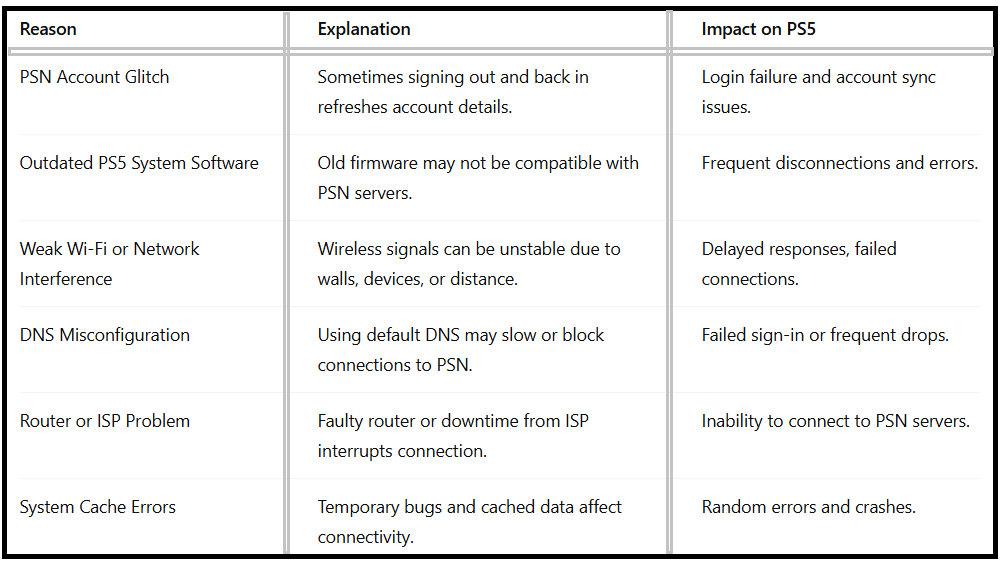
Understanding these causes helps you quickly apply the right fix.
How to Fix NP-104627-0 Error Code on PS5?
Now, let’s walk through proven methods to solve the PS5 error NP-104627-0. Try these solutions one by one until the problem is resolved.
1.Sign Back Into Your PSN Account:
Sometimes, the simplest solution is the most effective. Logging out and signing back into your PlayStation Network account can refresh the connection and remove minor glitches.
Steps:
1.Go to Settings on your PS5.
2.Navigate to Users and Accounts > Account > Sign Out.
3.Restart your PS5.
4.Sign back in using your email ID and password.
5.This resolves many cases of NP-104627-0 PS5 fix without extra steps.
2.Restart Your Console
A quick restart clears temporary bugs and cached processes that may trigger errors.
1.Press the PS button on your controller.
2.Open the Control Center.
3.Select Power > Restart PS5.
4.After rebooting, check if the PS5 Error Code NP-104627-0 is gone.
3.Restart Your Router and Modem
Network issues are a common cause behind this error. Restarting your router and modem refreshes your internet connection.
Steps:
1.Power off both router and modem.
2.Wait at least 5 minutes.
3.Turn them back on and reconnect your PS5.
4.This can fix connectivity disruptions caused by your ISP or home network.
4.Update Your PS5 System Software
Outdated firmware can create compatibility problems with PlayStation Network. Always keep your PS5 updated.
How to Update:
1.Go to Settings > System > System Software > Update and Settings.
2.Select Update System Software > Update Using Internet.
3.Follow the on-screen steps to install the update.
4.Once completed, restart the PS5 and check if the NP-104627-0 error persists.
5.Use a Wired Connection Instead of Wi-Fi
Wi-Fi signals are often unstable due to interference. Switching to an Ethernet cable ensures a stable, faster, and uninterrupted connection.

If possible, always prefer a wired setup for smoother PSN access.
6.Change the DNS Settings
Incorrect or slow DNS servers can cause the NP-104627-0 error code on PS5. Manually setting DNS can improve connectivity.
Steps to Change DNS:
1.Open Settings > Network > Settings > Set Up Internet Connection.
2.Choose your network and select Advanced Settings.
3.Set DNS Settings to Manual.
4.Enter:
Primary DNS: 8.8.8.8
Secondary DNS: 8.8.4.4
5.Save settings and run Test Internet Connection.
This is one of the most reliable methods for a PS5 error NP-104627-0 fix.
7.Contact PlayStation Support
If none of the above methods work, the issue may be related to PSN servers or deeper account problems. In that case, contacting PlayStation Support is the best option.
Visit the official PlayStation Support page and provide the error code NP-104627-0 along with your account details.
Advanced Tips for Stable PS5 Networking:
To avoid running into PS5 Error Code NP-104627-0 in the future, consider these best practices:
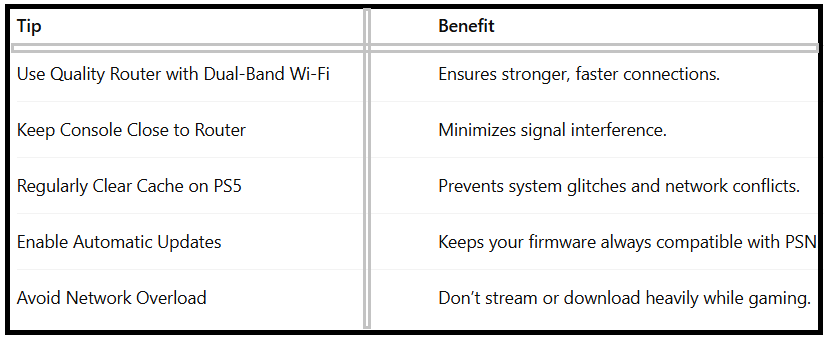
By following these preventive steps, you can minimize future disruptions.

FAQ: How To Fix NP-104627-0 Error Code On PS5
Q1:What is NP-104627-0 on PS5?
It’s a network connectivity error preventing your PS5 from accessing PlayStation Network.
Q2:Can a weak Wi-Fi connection cause PS5 error NP-104627-0?
Yes, unstable Wi-Fi is one of the most common triggers of this error. Switching to a wired connection often helps.
Q3:How do I know if PSN servers are down?
You can check the official PSN status page to confirm if the servers are under maintenance.
Q4:Is changing DNS safe for fixing NP-104627-0 PS5 fix?
Yes, using trusted DNS servers like Google’s (8.8.8.8, 8.8.4.4) is completely safe and improves connectivity.
Q5:What if none of the fixes work?
If you still face issues, contact PlayStation Support for further assistance.
Wrapping Up:
The NP-104627-0 Error Code on PS5 can be frustrating, but it’s usually linked to connectivity issues that can be fixed with some simple troubleshooting. Whether it’s signing back into your account, restarting your router, updating system software, or changing DNS settings, these solutions will help you get back online quickly.
If nothing works, contacting PlayStation Support is the best way to resolve persistent issues. By following the methods in this guide, you’ll not only fix the PS5 error NP-104627-0 but also ensure a more stable gaming experience in the future.