How To Fix Error Code 0xc004c032 – Complete Guide. When you try activating Microsoft Office or Microsoft Word, you may suddenly encounter Error Code 0xc004c032. This issue is frustrating because it blocks you from using essential productivity tools. The error usually arises during the activation process, leaving many users confused about what caused it and how to resolve it.
In this comprehensive guide, we will explain what is Error Code 0xc004c032, why it appears, and provide multiple methods to fix it effectively. Whether you’re facing this issue with Microsoft Office 365, Office 2013, or Word, the following solutions will help you overcome the problem.
What is Error Code 0xc004c032?
Error Code 0xc004c032 is an activation error that occurs when the Microsoft Software Licensing Service fails to validate your product key. It is often linked to:
-Invalid or expired product keys
-License mismatches between Office editions
-Corrupted Office installation files
-Conflicts with system services or third-party applications
-Attempting to install trial versions on multiple PCs
In simple terms, the error prevents Microsoft Office or Word from verifying its license, thus restricting full access.
Common Scenarios Where You May See Error Code 0xc004c032
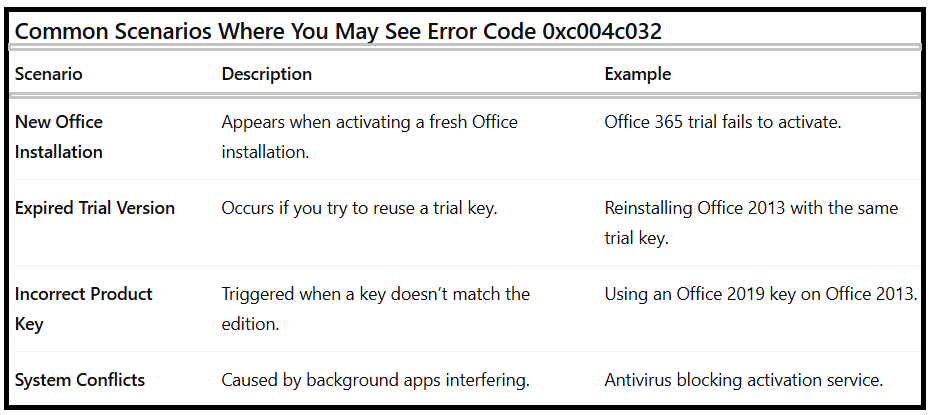
Understanding these scenarios helps narrow down the best Error code 0xc004c032 solution for your case.
Cause Of Microsoft Office Error Code 0xc004c032:
Many users ask: “Why am I getting Error Code 0xc004c032?” The main reasons include:
Incorrect Product Key – Using a wrong or pirated key often triggers the error.
Corrupt Installation Files – Damaged files during installation may break the activation process.
Multiple Activations – Trial keys can only be used once per device.
Conflicts with Other Programs – Background apps or antivirus may block Office’s licensing service.
Outdated Windows – Compatibility issues with outdated system files may prevent activation.
How To Fix Error Code 0xc004c032?
Below are the proven solutions to resolve this activation problem. Follow them step by step.
1.Verify the Accuracy of Your Product Key
The most common reason for Microsoft Office Error Code 0xc004c032 is an invalid or mismatched product key.
Steps to check your key:
Open any Office app (Word, Excel, etc.).
Navigate to File > Account > Product Information.
Check the activation status and compare it with your Office version.
Re-enter the correct key from your purchase email or official Microsoft account.
⚠️ If you entered the wrong edition key (e.g., Office 2019 key for Office 2016), the activation will fail.
2.Perform a Clean Boot
Conflicting third-party programs can block the activation process. Performing a clean boot ensures only Microsoft services run.
Steps to perform a clean boot:
1.Press Windows + R, type msconfig, and hit Enter.
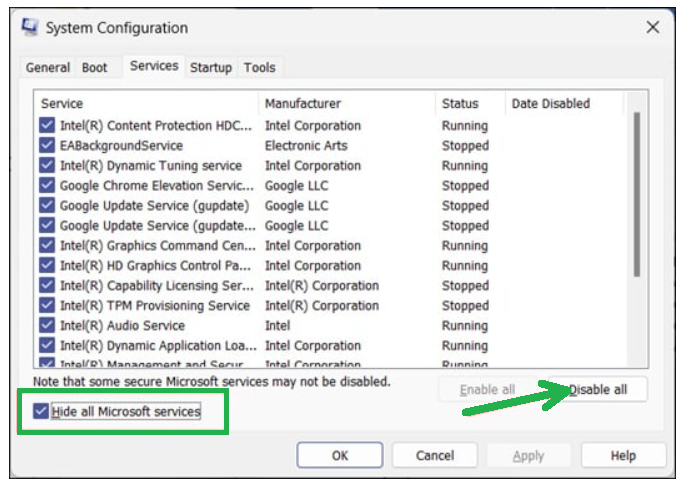
2.In the System Configuration window, go to the Services tab.
3.Check Hide all Microsoft services, then click Disable All.
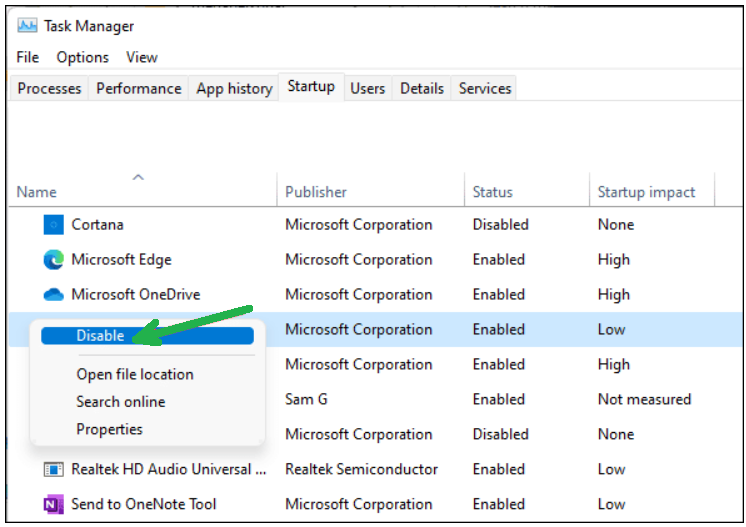
4.Open Task Manager by right-clicking on your Taskbar.
5.Next, click the Startup tab and disable unnecessary apps by right-clicking on the programs you want to disable.
5.Restart your PC and try activating Office again.
3.Activate Microsoft Word or Office as Administrator
Sometimes Office lacks sufficient permissions to access licensing files. Running it as Administrator fixes this.
Steps:
1.Right-click on the Start menu and select Device Manager.
2.Right-click on Office programs.
3.Select the End Task option.
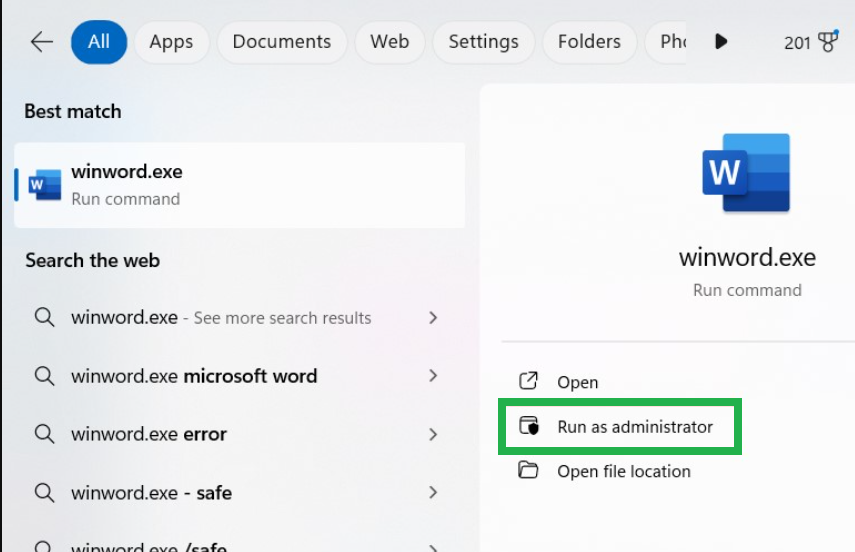
4.Search for winword.exe.
5.Right-click on it and select Run as Administrator.
6.Try activating again.
4.Use Command Prompt to Activate Office
For advanced users, the Command Prompt can manually trigger activation.
1.Type cmd in the search bar.
2.Right-click Command Prompt,
3.Select Run as Administrator.
4.Enter the following command (replace with your actual key):
%ProgramFiles%\Microsoft Office\Office14\ospp.vbs” /inpkey:
5.Restart your PC and check if Office activates successfully.
5.Reinstall Microsoft Office
If nothing works, reinstalling Office is often the best solution.
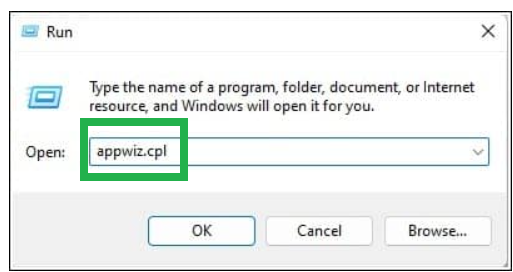
1.Press Windows + R and type appwiz.cpl.
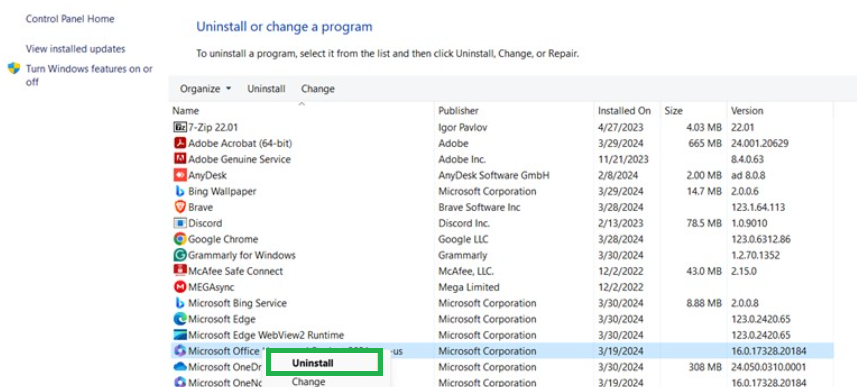
2.Locate Microsoft Office and select Uninstall.
3.Restart your PC.
4.Download Office from the official Microsoft website.
5.Install it again and use your valid product key.
6.Use Microsoft Support and Recovery Assistant
Microsoft provides a free tool called Support and Recovery Assistant (SaRA). It automatically diagnoses and fixes activation problems.
Steps:
1.Download SaRA from Microsoft’s official website.
2.Install and launch the tool.
3.Select Office > Activation Issues.
4.Follow the on-screen prompts to repair your Office activation.
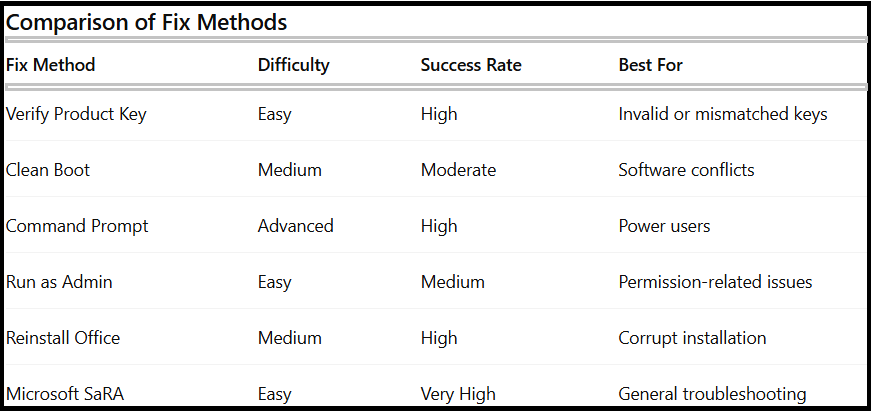
Comparison of Fix Methods:
FAQs About Fixing Error Code 0xc004c032
Q1.What is Error Code 0xc004c032?
It’s an activation error in Microsoft Office or Word caused by invalid keys, expired trials, or licensing conflicts.
Q2.How To Fix Microsoft Office Error 0xc004c032 quickly?
Start by verifying your product key. If it doesn’t work, try clean booting, activating via CMD, or reinstalling Office.
Q3.Can I install the trial version on multiple PCs?
No. Microsoft allows a trial to run on only one device. Installing it on multiple PCs causes the error.
Q4.Does Microsoft provide an official solution?
Yes, the Microsoft Support and Recovery Assistant (SaRA) tool is the recommended official fix.
Final Words:
Facing Error Code 0xc004c032 during Office activation can be frustrating, but it’s not a permanent roadblock. By following the above methods—whether verifying your product key, performing a clean boot, or using Microsoft’s SaRA tool—you can successfully resolve the issue.
Remember, the safest way to avoid this error in the future is to always use a genuine Microsoft Office license and keep your system updated. With the right steps, you can quickly fix Error Code 0xc004c032 and get back to using Microsoft Office without interruptions.