Difference Between HDD Vs SSD – Which Storage Option Truly Fits Your Needs? Choosing the right storage is no longer a small decision. Whether you’re upgrading an old laptop, building a gaming PC, or simply trying to speed up your system, understanding the Difference Between HDD Vs SSD can dramatically impact your daily computing experience.
Both drives store data. That part is obvious. But how they do it—and how that affects speed, durability, and overall system performance improvement—is where things get interesting. And sometimes confusing.
Let’s clear that confusion, step by step, without robotic explanations or marketing fluff.
Understanding Modern Data Storage Technology
At their core, HDDs and SSDs are computer storage devices, but they belong to two very different generations of data storage technology.
A hard disk drive vs solid state drive comparison isn’t just about old vs new. It’s about mechanics vs electronics, movement vs silence, patience vs instant response.
What Is an HDD (Hard Disk Drive)?
A Hard Disk Drive stores data on spinning magnetic platters. These platters rotate thousands of times per minute while a physical arm reads and writes information.
Yes, actual movement is involved.
That’s why HDD mechanical parts play such a huge role in performance—and also why failures can happen if the drive is dropped or shaken.
Key Characteristics of HDDs:
- Relies on spinning disks
- Contains moving components
- Affordable for large HDD storage capacity
- Slower HDD read write speed compared to modern alternatives
Despite newer technology, HDDs still exist because they serve one important role: cost-effective, long-term storage.
What Is an SSD (Solid State Drive)?
An SSD uses flash memory—similar to what you find in smartphones. No spinning. No noise. No waiting for parts to move.
This is where SSD data transfer speed changes everything.
An SSD can access data almost instantly, leading to faster boot and load times and a noticeably smoother system.
Key Characteristics of SSDs:
- No moving parts
- Extremely fast response
- Lower SSD power consumption
- Higher reliability and shock resistance
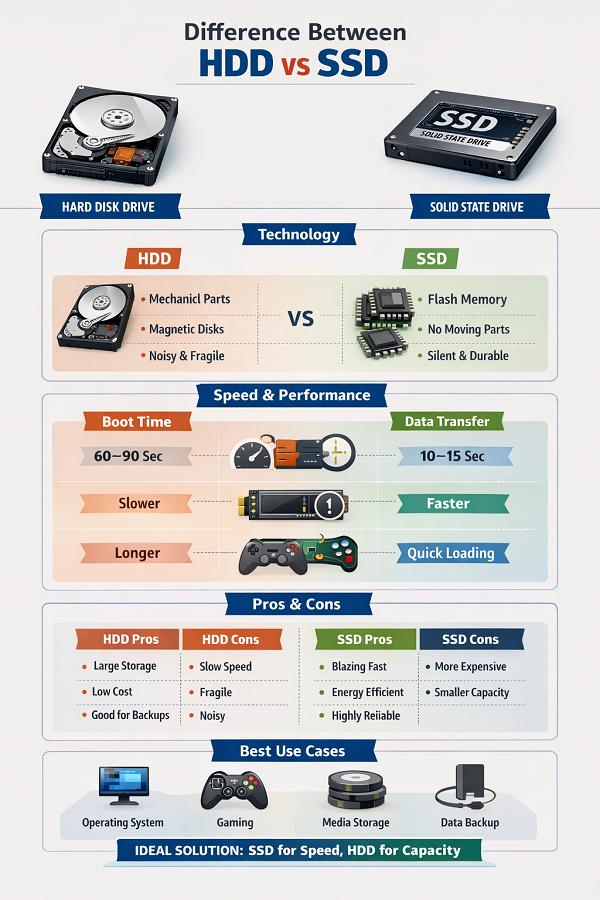
Difference Between HDD Vs SSD: Core Technology Comparison
Before diving into performance, here’s a clear HDD and SSD comparison table to ground the discussion.
HDD vs SSD Core Technology
| Feature | HDD | SSD |
|---|---|---|
| Technology | Magnetic spinning disks | Flash memory |
| Moving Parts | Yes | No |
| Noise | Audible | Silent |
| Heat Generation | Higher | Lower |
| Durability | Fragile | Highly durable |
This technological difference alone explains why SSDs feel “instant” while HDDs often feel… slow.
HDD vs SSD Performance: Speed That You Can Feel
Here’s where most users notice the difference immediately.
In real-world use, HDD vs SSD performance isn’t measured only by numbers—it’s measured by patience.
Ever waited for Windows to load? Or watched a spinning circle open a file? That’s HDD behavior.
SSD Speed vs HDD Speed in Daily Use
- SSD boot time: 8–15 seconds
- HDD boot time: 45–90 seconds
- Apps launch almost instantly on SSD
- File transfers are dramatically faster
The gap between SSD speed vs HDD speed becomes even wider as software grows heavier.
Speed & Performance Comparison Of HDD Vs SSD
| Task | HDD | SSD |
|---|---|---|
| Boot Time | Slow | Ultra-fast |
| File Copying | Limited | Lightning-fast |
| Multitasking | Struggles | Smooth |
| System Responsiveness | Delayed | Instant |
This is why SSD upgrades are often described as “the biggest performance boost” you can make.
SSD Advantages Over HDD (And Yes, They Matter)
From personal experience—and countless system upgrades—SSD advantages over HDD are not exaggerated.
Here’s what truly stands out:
- Faster app launches
- Near-zero lag during multitasking
- Improved battery life due to lower SSD power consumption
- Better resistance to drops and shocks
And perhaps most underrated? Silence. Once you go silent, you don’t want to go back.
HDD Disadvantages You Should Know
HDDs aren’t bad—but they are limited.
Common HDD disadvantages:
- Slower HDD read write speed
- Prone to mechanical failure
- Sensitive to movement
- Slower system performance improvement
These drawbacks become obvious on laptops, especially when mobility is involved.
SSD Lifespan and Durability: Myths vs Reality
Some users still worry about SSD lifespan and durability. That fear made sense ten years ago. Not today.
Modern SSDs last many years—often longer than HDDs—because there’s no physical wear from moving parts.
Unless you’re writing terabytes of data daily (most users don’t), SSD endurance is not a concern.
HDD Storage Capacity: Still a Strong Advantage
Let’s be fair.
When it comes to massive storage, HDD storage capacity still wins on price.
If you need:
- Backups
- Video archives
- Long-term storage solution
HDDs remain practical and affordable.
Best Use-Case Comparison HDD vs SSD
| Usage Scenario | Best Choice | Why |
|---|---|---|
| Operating System | SSD | Faster boot and load times |
| Gaming | SSD | Faster loading & smoother play |
| Media Storage | HDD | Large capacity at low cost |
| Laptop Upgrade | SSD | Lightweight & shock-resistant |
SSD for Gaming: Does It Really Matter?
Short answer? Yes.
While FPS may not skyrocket, SSD for gaming drastically reduces loading screens, texture pop-ins, and game launch times.
Open-world games especially benefit from SSD storage. Once you try it, HDD gaming feels outdated.
HDD vs SSD for Laptop Users
For portability, HDD vs SSD for laptop isn’t even a close contest.
SSDs:
- Improve battery life
- Handle movement better
- Reduce heat
- Make laptops feel brand new
This is often the first upgrade professionals recommend.
Final Verdict: Difference Between HDD Vs SSD Explained Simply
The Difference Between HDD Vs SSD comes down to priorities.
Choose HDD if you want:
- Cheap large storage
- Backup solutions
- Archival data
Choose SSD if you want:
- Speed
- Reliability
- Quiet performance
- Real system performance improvement
In most modern systems, a combination of both delivers the best balance.

Frequently Asked Questions (FAQ)
Q1: Is SSD worth upgrading from HDD?
Absolutely. It’s the fastest way to improve everyday performance.
Q2: Does SSD improve boot time?
Yes, SSD boot time is significantly faster than HDD.
Q3: Which lasts longer, HDD or SSD?
Modern SSDs often outlast HDDs due to fewer failure points.
Q4: Can I use both HDD and SSD together?
Yes. Many users install the OS on SSD and store data on HDD.