Difference Between TPM 1.2 and TPM 2.0. If you’ve ever checked your PC for security requirements and stumbled upon TPM settings, you’re not alone. Many users only learned about TPM when Windows 11 appeared and suddenly their perfectly fine PC was labeled “unsupported.” That confusion usually leads to one key question: what is the Difference Between TPM 1.2 and TPM 2.0, and why does it matter so much today?
Let’s break it down properly—no robotic explanations, no filler—just a clear, human-first guide based on how TPM actually works in real systems.
At its core, TPM acts as a hardware root of trust, enabling platform integrity verification and device-level cryptographic security. But the gap between TPM 1.2 and TPM 2.0 is bigger than most people realize.
Understanding TPM Before the Comparison
Before jumping into the Difference Between TPM 1.2 and TPM 2.0, it helps to understand what TPM really is.
TPM Security Chip Explained (In Simple Terms)
A TPM (Trusted Platform Module) is a hardware-based security module designed to store cryptographic keys securely. Unlike software-based encryption, TPM isolates sensitive data from the operating system, malware, and even firmware-level attacks.
It supports:
- Secure boot validation
- Disk encryption keys (like BitLocker)
- Credential protection
- System integrity checks
This is where enterprise-grade hardware encryption becomes practical for everyday PCs.
Trusted Platform Module Version Differences: Why Versions Matter
TPM isn’t a single standard frozen in time. Over the years, evolving threats forced changes in cryptographic strength, flexibility, and compatibility. These changes created major Trusted Platform Module version differences, especially between 1.2 and 2.0.
And yes—those differences directly impact modern OS security.
Difference Between TPM 1.2 and TPM 2.0 (High-Level View)
Here’s a quick overview before we dive deeper:
| Feature Area | TPM 1.2 | TPM 2.0 |
|---|---|---|
| Encryption Algorithms | Limited (SHA-1) | Multiple (SHA-256, ECC) |
| OS Compatibility | Legacy systems | Modern operating systems |
| Security Flexibility | Fixed functions | Modular & extensible |
| Secure Boot Support | Partial | Full |
| Key Management | Basic | Advanced |
This table alone hints at why modern operating system security requirements heavily favor TPM 2.0.
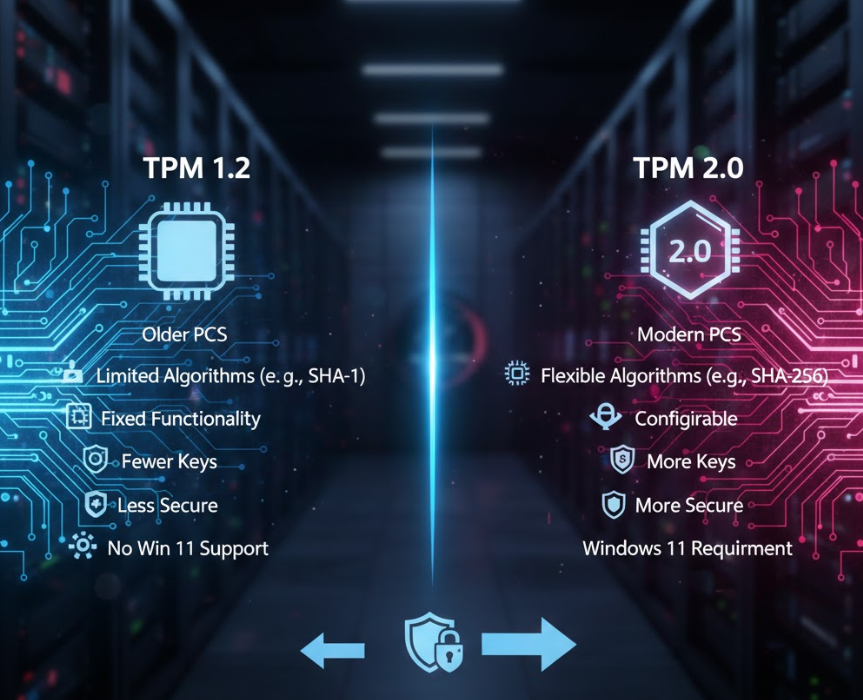
TPM 1.2 vs TPM 2.0 Comparison: Encryption & Cryptography
TPM Encryption Standards Explained
TPM 1.2 relies primarily on SHA-1. Years ago, that was acceptable. Today? Not so much.
TPM 2.0 introduces:
- SHA-256 hashing
- Elliptic Curve Cryptography (ECC)
- Flexible cryptographic agility
This shift directly impacts TPM key management differences and long-term security reliability.
| Cryptographic Capability | TPM 1.2 | TPM 2.0 |
|---|---|---|
| Hash Algorithms | SHA-1 only | SHA-1, SHA-256 |
| Key Types | RSA only | RSA + ECC |
| Crypto Flexibility | Fixed | Algorithm-agnostic |
This is one of the clearest examples of the Difference Between TPM 1.2 and TPM 2.0 from a security engineering standpoint.
TPM 2.0 Security Features vs TPM 1.2 Limitations
Why TPM 1.2 Compatibility Issues Are Common
TPM 1.2 works fine on older systems, but compatibility ends there. It struggles with:
- New firmware standards
- Advanced Secure Boot implementations
- Modern encryption policies
These TPM 1.2 compatibility issues are the main reason many systems fail Windows 11 checks.
TPM 2.0 Security Features That Actually Matter
It improves:
- TPM authentication mechanisms
- Secure key lifecycle management
- Firmware trust validation
- Measured boot processes
In real-world terms, this means better protection against firmware rootkits and boot-level malware.
TPM 2.0 Requirements for Windows 11 (Why Microsoft Drew the Line)
Let’s address the elephant in the room.
Microsoft didn’t require TPM 2.0 randomly. The TPM 2.0 requirements for Windows 11 align with:
- Secure Boot enforcement
- Virtualization-based security
- Credential isolation
TPM 1.2 simply can’t guarantee these protections consistently anymore. From Microsoft’s perspective, the Difference Between TPM 1.2 and TPM 2.0 is the difference between “acceptable risk” and “baseline security.”
Firmware TPM vs Discrete TPM: Does Implementation Matter?
Yes. A lot.
TPM Chip for Modern PCs
Modern systems may use:
- Firmware TPM (fTPM) built into CPU firmware
- Discrete TPM as a physical chip on the motherboard
| TPM Type | Security Level | Performance | Cost |
|---|---|---|---|
| Firmware TPM | Good | Moderate | Low |
| Discrete TPM | Excellent | High | Higher |
Both support TPM 2.0, but discrete TPMs offer better isolation. This distinction often comes up in enterprise environments.
BIOS TPM Configuration and UEFI Integration
BIOS TPM Configuration Basics
TPM is usually disabled by default. You must manually enable it in BIOS/UEFI. The naming varies:
- TPM
- fTPM
- PTT (Intel systems)
UEFI and TPM Integration
TPM 2.0 works seamlessly with UEFI firmware, enabling:
- Measured boot
- TPM for secure boot verification
- Firmware integrity checks
This tight UEFI and TPM integration is another major improvement over TPM 1.2.
TPM Key Management Differences (Why Admins Care)
TPM 2.0 allows:
- Multiple isolated key hierarchies
- Policy-based key authorization
- Better lifecycle management
In contrast, TPM 1.2 uses a rigid structure that limits scalability. This alone makes TPM 2.0 far more suitable for enterprise deployment.
Real-World Perspective: Which One Should You Use?
If you’re running legacy hardware and don’t plan upgrades, TPM 1.2 still functions. But realistically?
For:
- New PCs
- Windows 11
- Business or sensitive data
TPM 2.0 is non-negotiable.
This is where the Difference Between TPM 1.2 and TPM 2.0 stops being theoretical and becomes very practical.
Final Comparison Table (Quick Decision Guide)
| Use Case | Recommended TPM |
|---|---|
| Legacy OS | TPM 1.2 |
| Windows 11 | TPM 2.0 |
| Secure Boot | TPM 2.0 |
| Enterprise Security | TPM 2.0 |
| Basic Encryption | Either |
Conclusion: The Real Difference That Matters
The Difference Between TPM 1.2 and TPM 2.0 isn’t just about versions—it’s about trust. TPM 2.0 aligns with today’s threat landscape, supporting stronger cryptography, better authentication, and deeper firmware integration.
TPM 1.2 had its time. TPM 2.0 defines the future.
If your system supports TPM 2.0, enable it. If it doesn’t, now you know exactly why modern platforms are moving on.
FAQ: TPM 1.2 vs TPM 2.0
Q1. Can TPM 1.2 be upgraded to TPM 2.0?
No. TPM versions are hardware-defined. Firmware updates don’t change TPM generation.
Q2. Is firmware TPM less secure than discrete TPM?
Slightly, but both are secure enough for most users.
Q3. Why does Windows 11 require TPM 2.0?
For secure boot enforcement, credential isolation, and modern encryption standards.
Q4. Do I need TPM for everyday use?
Not strictly—but it significantly improves system-level security.