Difference Between SSD and NVMe SSD – Which Storage Option Is Better? A Complete Guide for Speed, Performance, and Value. Upgrading your computer’s storage is one of the smartest investments you can make. It doesn’t matter whether you use your PC for work, gaming, video editing, or everyday browsing—a faster drive changes the entire experience. Applications launch quicker, files transfer in seconds, and Windows feels much more responsive.
Yet one question keeps confusing buyers: What is the Difference Between SSD and NVMe SSD?
At first glance, they look similar because both use Flash memory technology instead of spinning disks like traditional hard drives. However, the technology working behind the scenes is quite different. The interface, speed, performance, and even the type of workloads they handle can vary significantly.
If you’re planning a Computer storage upgrade, choosing the right drive today can save both money and frustration tomorrow. Whether you’re building a gaming PC, buying an office laptop, or looking for a High-speed storage solution for professional work, understanding these storage technologies is essential.
Interestingly, faster storage isn’t just useful for gamers. Professionals working with artificial intelligence for remote work, digital workflow optimization, automated business processes, productivity enhancement technology, and freelancer efficiency solutions also benefit greatly from quicker file access and Faster boot and load times provided by a Modern storage interface.
Let’s break everything down in simple terms.
Understanding the Difference Between SSD and NVMe SSD
The Difference Between SSD and NVMe SSD starts with how each drive communicates with your computer.
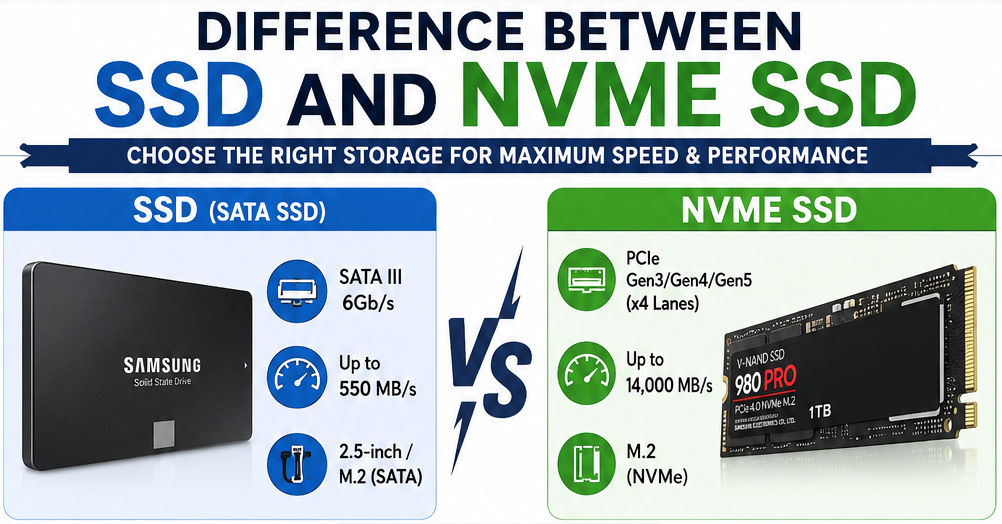
-A traditional SSD usually connects through the SATA interface, which was originally designed for mechanical hard drives. While SATA SSDs are already much faster than HDDs, they are limited by the SATA connection itself.

-An NVMe SSD, on the other hand, uses PCI Express (PCIe) lanes. Instead of being restricted by older technology, NVMe communicates directly with the processor, allowing dramatically higher bandwidth and much lower latency.
Think of it this way:
A SATA SSD is like driving on a well-maintained two-lane highway.
An NVMe SSD is like driving on a modern eight-lane expressway.
Both will reach the destination—but one arrives much faster.
SATA SSD vs NVMe SSD – How Do They Work?
Understanding SATA SSD vs NVMe SSD becomes much easier once you know their communication methods.
SATA SSD
A SATA SSD uses the SATA III interface, which has a maximum theoretical speed of around 600 MB/s. It replaces old hard drives without requiring advanced hardware, making it an affordable upgrade.
NVMe SSD
An NVMe SSD uses PCI Express lanes. Instead of relying on SATA, it communicates directly with the CPU through NVMe storage technology, reducing delays and increasing throughput dramatically.
This direct communication makes NVMe ideal for heavy workloads like:
- 4K video editing
- Large software compilation
- Virtual machines
- AI processing
- Professional content creation
- Modern gaming
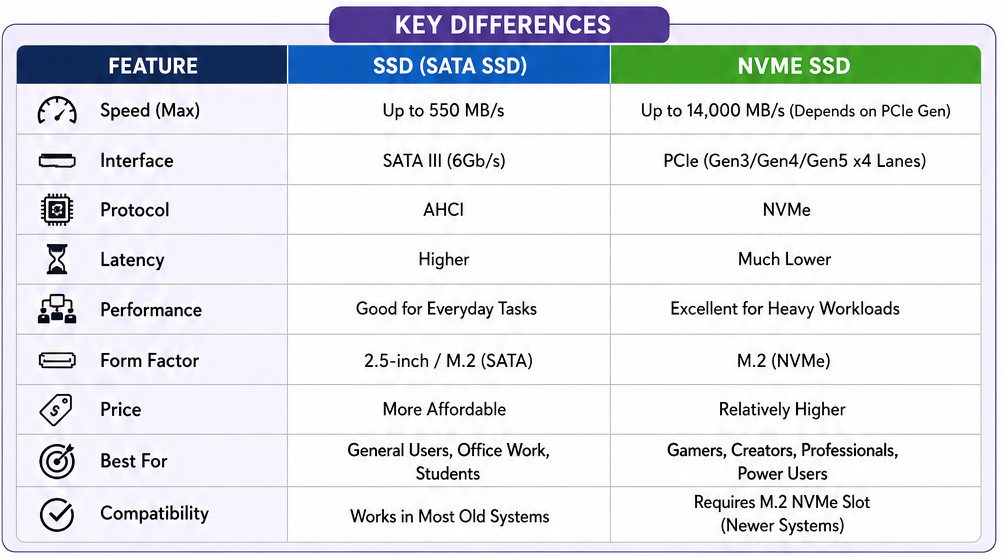
SATA SSD vs NVMe SSD Comparison
| Feature | SATA SSD | NVMe SSD |
|---|---|---|
| Interface | SATA III | PCI Express |
| Protocol | AHCI | NVMe |
| Maximum Speed | Around 550 MB/s | Up to 14,000 MB/s (PCIe Gen5) |
| Latency | Higher | Extremely Low |
| Ideal For | Everyday users | Professionals & gamers |
| Cost | Budget-friendly | Higher but dropping |
NVMe SSD vs SATA SSD Speed – Is It Really Noticeable?
One of the biggest discussions online is NVMe SSD vs SATA SSD speed.
On paper, the numbers look unbelievable.
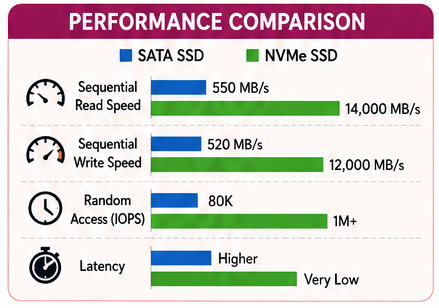
A SATA SSD generally reaches:
- 500–550 MB/s read speed
Modern NVMe drives can easily reach:
- 3,500 MB/s (PCIe Gen3)
- 7,000 MB/s (PCIe Gen4)
- 12,000–14,000 MB/s (Latest PCIe Gen5)
That means NVMe can be over ten times faster in sequential workloads. But here’s something many reviews don’t mention. If your daily activities include browsing the web, Microsoft Office, Netflix, or email, you may not always “feel” ten times faster. However, professionals transferring huge files certainly will. Developers compiling software also notice it. Gamers installing massive titles appreciate reduced loading times. Video editors absolutely love it.
SSD vs NVMe Performance in Real-Life Usage
Raw speed numbers don’t tell the whole story. The actual SSD vs NVMe performance depends on what you do every day.
For example:
Opening Chrome?
Almost identical.
Launching Windows?
Very close.
Copying a 100 GB video project?
NVMe wins comfortably.
Rendering 8K footage?
No contest.
Professional workflows involving digital workflow optimization, virtualization, databases, and creative applications benefit enormously from NVMe. Even companies implementing automated business processes increasingly rely on faster storage because every second saved adds up over thousands of operations.
Real-World Performance Comparison
| Activity | SATA SSD | NVMe SSD |
|---|---|---|
| Windows Boot | Fast | Slightly Faster |
| Office Work | Excellent | Excellent |
| Web Browsing | Excellent | Excellent |
| Game Loading | Very Good | Excellent |
| Video Editing | Good | Outstanding |
| Large File Transfers | Moderate | Extremely Fast |
| Software Development | Good | Excellent |
| AI & Virtual Machines | Limited | Outstanding |
PCIe SSD Explained – Why Is It So Fast?
Many people search for PCIe SSD explained, and the answer lies in bandwidth. PCI Express is the same high-speed connection used by graphics cards. Instead of passing data through older SATA controllers, PCIe communicates directly with the processor using multiple dedicated lanes. More lanes equal more bandwidth. That’s why modern PCIe drives can achieve incredible transfer rates while maintaining lower latency. This Modern storage interface is built specifically for flash storage rather than adapting older hard-drive technology.
The result?
Better responsiveness.
Lower delays.
Improved multitasking.
Superior efficiency.
Solid State Drive Comparison: SATA vs PCIe
A proper Solid State Drive comparison isn’t just about benchmark scores. Reliability between SATA and NVMe drives is generally excellent. Both use NAND flash memory, have long lifespans, and resist shocks far better than mechanical hard drives.
The biggest differences are:
- Speed
- Interface
- Price
- Professional workload performance
- Future upgrade potential
If you’re upgrading an older computer with only SATA support, buying an NVMe drive won’t help because the motherboard simply cannot use it. On the other hand, if your system supports M.2 PCIe slots, investing in NVMe makes much more sense for long-term value.
NVMe SSD Advantages: Why More Users Are Switching
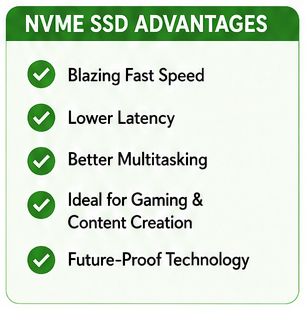
The popularity of NVMe drives has exploded over the last few years, and it’s easy to understand why. Beyond impressive benchmark scores, there are several practical NVMe SSD advantages that make everyday computing smoother.
One thing I’ve noticed after upgrading from a SATA SSD to an NVMe drive is that heavy multitasking simply feels effortless. Whether you’re running multiple browser tabs, editing videos, or opening large design files, everything responds more quickly.
Some of the biggest advantages include:
- Much higher SSD read and write speed
- Lower latency for faster responsiveness
- Better multitasking performance
- Reduced game loading times
- Excellent support for professional software
- Future-ready technology for upcoming applications
If you regularly work with 4K videos, virtual machines, software development, or artificial intelligence for remote work, an NVMe drive is more of a necessity than a luxury.
SATA SSD Benefits: Why They Still Make Sense
Although NVMe drives receive most of the attention today, the SATA SSD benefits shouldn’t be overlooked. For many users, a SATA SSD offers outstanding value without spending extra money. Here are some reasons why SATA SSDs remain popular:
- Lower purchase price
- Wide compatibility with older computers
- Easy installation
- Excellent reliability
- Significant improvement over traditional HDDs
For someone who mainly browses the internet, edits documents, watches videos, or attends online meetings, a SATA SSD still provides Faster boot and load times compared to mechanical hard drives. Sometimes, spending twice as much on storage doesn’t produce twice the real-world benefit. That’s worth remembering.
Best SSD for Gaming: Is NVMe Always Better?
Gamers often wonder about the Best SSD for gaming.
The answer depends on the type of games you play.
Modern AAA games with massive open worlds increasingly benefit from NVMe storage. Technologies like Microsoft’s DirectStorage are designed to take advantage of fast NVMe drives, reducing texture loading delays and improving streaming performance.
However, older games usually show only small improvements. If you’re building a high-end gaming PC today, an NVMe SSD is definitely the smarter investment. For budget gaming systems, a SATA SSD still delivers a fantastic experience compared to an HDD.
Which SSD Should You Buy?
| User Type | Recommended Drive | Reason |
|---|---|---|
| Office User | SATA SSD | Affordable and fast enough |
| Student | SATA SSD | Great value for daily tasks |
| Gamer | NVMe SSD | Faster game loading and future-ready |
| Video Editor | NVMe SSD | High transfer speeds |
| Software Developer | NVMe SSD | Better compilation performance |
| Graphic Designer | NVMe SSD | Handles large project files efficiently |
| Business Professional | NVMe SSD | Improves productivity and multitasking |
| Budget PC Upgrade | SATA SSD | Cost-effective solution |
PCIe Gen4 vs SATA SSD: Is the Upgrade Worth It?
Comparing PCIe Gen4 vs SATA SSD highlights just how far storage technology has evolved. A PCIe Gen4 SSD can deliver read speeds approaching 7,000 MB/s, while SATA SSDs remain limited to around 550 MB/s. That enormous bandwidth benefits users who frequently transfer large files, edit high-resolution videos, or work with complex datasets. If your motherboard supports PCIe Gen4, choosing an NVMe SSD is a smart long-term investment. However, if your workload is relatively light, the additional speed may not always be noticeable during everyday tasks.
M.2 SSD vs SATA SSD: Don’t Confuse Form Factor with Speed
One common misconception involves M.2 SSD vs SATA SSD.
Here’s the important part:
M.2 refers to the physical shape of the drive—not its speed.
An M.2 SSD can actually be either:
- SATA-based
- NVMe-based
Many buyers mistakenly assume every M.2 drive is an NVMe SSD. That’s not true. Always check whether the drive uses the SATA protocol or the PCIe/NVMe interface before purchasing.
NVMe SSD for Laptop: Is It a Good Upgrade?
Installing an NVMe SSD for laptop can completely transform an older machine—provided the laptop supports NVMe.
You’ll often notice:
- Faster startup
- Quicker software launches
- Improved multitasking
- Faster file transfers
- Better battery efficiency during certain workloads due to reduced processing time
Before buying, verify your laptop’s specifications to ensure it includes an M.2 PCIe slot.
Which SSD Is Faster?
So, Which SSD is faster?
The answer is simple. NVMe SSDs are significantly faster than SATA SSDs in nearly every benchmark. However, speed alone shouldn’t determine your decision. Think about your daily workload. If you mainly browse the web, write documents, stream videos, and check emails, a SATA SSD will already feel incredibly fast. If you edit videos, develop software, run virtual machines, process AI workloads, or handle large databases, NVMe is unquestionably the better option.
Choosing the right storage isn’t about buying the fastest product—it’s about buying the right one.
Internal SSD Buying Guide
This quick Internal SSD buying guide can help simplify your decision.
| Requirement | Recommended Choice |
|---|---|
| Lowest Budget | SATA SSD |
| Gaming PC | NVMe PCIe Gen4 SSD |
| Content Creation | NVMe SSD |
| Business Laptop | NVMe SSD |
| Older Desktop | SATA SSD |
| Future-Proof Build | PCIe Gen4 or Gen5 NVMe SSD |
Before purchasing, always check:
- Motherboard compatibility
- Available M.2 slots
- PCIe generation support
- Required storage capacity
- Warranty and endurance rating
Making the right choice today can save you from another upgrade in the near future.
Conclusion
Understanding the Difference Between SSD and NVMe SSD is no longer just for tech enthusiasts. As software becomes more demanding and users expect instant responsiveness, selecting the right storage has become increasingly important.
A SATA SSD remains an excellent option for everyday computing thanks to its affordability, reliability, and impressive performance compared to traditional hard drives. On the other hand, an NVMe SSD delivers a true High-speed storage solution by leveraging Flash memory technology and a Modern storage interface. Whether you’re seeking Faster boot and load times, performing a Computer storage upgrade, or improving workflows with digital workflow optimization, productivity enhancement technology, freelancer efficiency solutions, and automated business processes, NVMe provides exceptional long-term value.
Ultimately, the best choice depends on your budget, hardware compatibility, and computing needs. If performance is your priority, NVMe is hard to beat. If value matters most, a SATA SSD still offers an outstanding user experience.

Frequently Asked Questions (FAQ)
1. What is the main Difference Between SSD and NVMe SSD?
The main difference is the interface. SATA SSDs use the SATA protocol, while NVMe SSDs communicate through PCIe, offering significantly higher speeds and lower latency.
2. Is NVMe worth the extra cost?
Yes, especially for gaming, video editing, software development, and professional workloads. Casual users may find a SATA SSD sufficient.
3. Can I replace my SATA SSD with an NVMe SSD?
Only if your motherboard or laptop supports an M.2 PCIe NVMe slot.
4. Is an M.2 SSD always an NVMe SSD?
No. M.2 is only the physical form factor. An M.2 drive can use either SATA or NVMe technology.
5. Which SSD lasts longer?
Both SATA and NVMe SSDs have similar lifespans because they use comparable NAND flash memory. The quality of the drive matters more than the interface.