Difference Between EC Controller and BIOS: Everything You Need to Know. If you’ve ever updated a laptop’s firmware or tried fixing a motherboard that refused to power on, you’ve probably come across two important terms: the Embedded Controller (EC) and the BIOS. Many people assume they’re the same thing because both are firmware-related, but they actually perform very different jobs.
Understanding the Difference Between EC Controller and BIOS can save hours of troubleshooting, especially when dealing with laptops that won’t charge, won’t boot, or have unresponsive keyboards. Although these two components constantly communicate with each other, each has a unique responsibility during startup and normal operation.
Whether you’re a beginner curious about laptop hardware or a technician working on board-level repairs, this guide explains everything in plain English without sacrificing technical accuracy.
What Is BIOS in a Computer?
Before comparing the two, it’s important to understand What is BIOS in computer systems.
The BIOS, or Basic Input/Output System, is firmware stored inside SPI Flash Memory on the motherboard. Modern computers often use UEFI Firmware, which is an advanced replacement for the traditional BIOS while serving the same core purpose.
Its primary job is to initialize hardware during POST (Power-On Self-Test), detect installed components, and prepare the operating system to load.
Think of the BIOS as the computer’s startup manager. Every time you press the power button, it checks whether the processor, memory, storage devices, and other essential hardware are ready before handing control to Windows or Linux.
This BIOS firmware explained simply means that it provides the instructions needed before the operating system even begins loading.
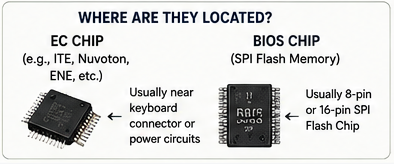
What Is EC Controller in Laptop?
Now let’s answer another common question: What is EC Controller in laptop hardware?
The Embedded Controller, often shortened to EC, is a dedicated microcontroller responsible for managing many low-level hardware functions that happen before and after the operating system starts.
Its responsibilities include:
- Power button detection
- Battery charging management
- Fan control
- Keyboard scanning
- Touchpad initialization
- Sleep and wake operations
- Thermal monitoring
- Communication with the Power Management IC (PMIC)
Unlike the BIOS, the EC continues working even while Windows is running.
Many laptops use controllers manufactured by companies such as ITE EC Chip, Nuvoton EC Controller, and ENE Embedded Controller, each programmed with firmware specific to the motherboard model.
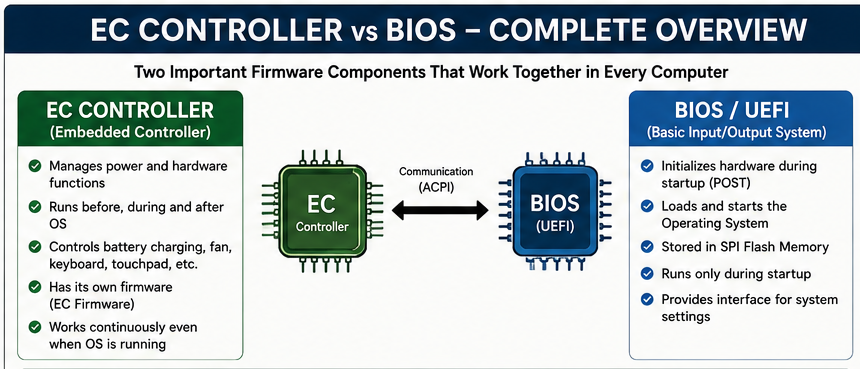
Difference Between EC Controller and BIOS
At first glance, both firmware components seem similar. However, their responsibilities are quite different.
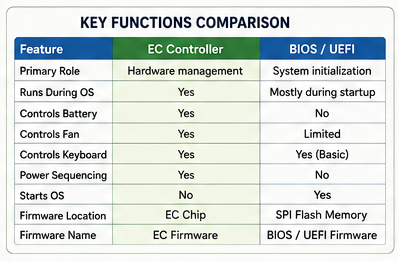
| Feature | EC Controller | BIOS |
|---|---|---|
| Primary Role | Controls hardware functions | Initializes system startup |
| Firmware | Embedded Controller Firmware | BIOS/UEFI Firmware |
| Runs During Windows | Yes | Mostly during startup |
| Controls Battery | Yes | No |
| Controls Cooling Fan | Yes | Limited |
| Starts Operating System | No | Yes |
| Hardware Location | EC Chip | SPI Flash Memory |
This simple comparison highlights the real EC Controller vs BIOS relationship. They cooperate closely, but neither replaces the other.
Embedded Controller vs BIOS: How They Work Together
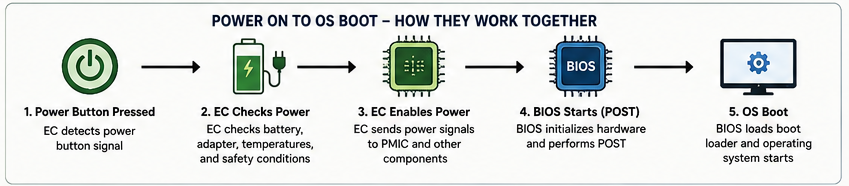
One of the biggest misconceptions is that the EC boots the computer.
That’s only partially true.
When you press the power button, the EC detects the button press first. After checking battery status, adapter voltage, thermal conditions, and several safety signals, it supplies power to the motherboard.
Only then does the BIOS begin executing the startup process.
This Motherboard BIOS and EC communication happens within milliseconds, yet it’s essential. If either firmware becomes corrupted, the laptop may never display a logo or reach Windows.
You can think of it like this:
- The EC unlocks and powers the building.
- The BIOS turns on the lights and prepares everyone for work.
- Windows is the employee who arrives afterward.
That analogy isn’t technically perfect, but it’s close enough to explain why both components are necessary.
BIOS Function in Motherboard
The BIOS function in motherboard includes much more than displaying a manufacturer logo.
Its responsibilities include:
- Detecting RAM
- Identifying storage drives
- Initializing the CPU
- Configuring PCIe devices
- Reading boot priorities
- Loading boot managers
- Starting the operating system
Modern UEFI firmware also supports secure boot, TPM security, graphical interfaces, and larger storage devices.
Without working BIOS firmware, a computer cannot begin the normal boot process.
EC Controller Function
The EC Controller function is focused on hardware management rather than operating system startup.
Typical responsibilities include:
- Reading battery temperature
- Managing charging circuits
- Controlling cooling fans
- Monitoring CPU temperatures
- Detecting lid open/close sensors
- Controlling keyboard backlight
- Handling power sequencing
- Supporting ACPI (Advanced Configuration and Power Interface) features
Because of these responsibilities, a faulty EC can create strange symptoms even if the BIOS is perfectly healthy.
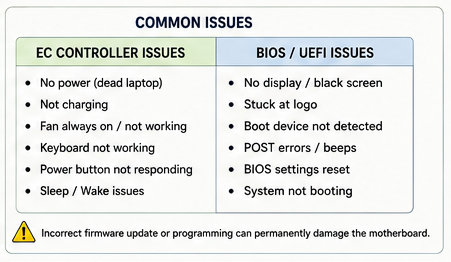
Common Signs of EC Firmware Problems
When Embedded Controller Firmware becomes corrupted, technicians often notice symptoms that don’t immediately point to the EC itself.
Common warning signs include:
- Laptop completely dead
- Battery not charging
- Fans spinning at maximum speed
- Keyboard not responding
- Power button inactive
- Random shutdowns
- Sleep mode failures
- Laptop powers on but never boots
These are classic situations requiring EC Controller troubleshooting, especially after liquid damage or an interrupted firmware update.
BIOS and EC Firmware Difference
Understanding the BIOS and EC firmware difference becomes much easier when you look at what each firmware actually controls.
The BIOS firmware is responsible for preparing the computer to start the operating system. The EC firmware, on the other hand, focuses on the hardware that keeps the laptop powered, cooled, and responsive throughout its operation.
Although both firmware images may be updated during servicing, they are usually stored separately and programmed independently. That distinction becomes especially important when diagnosing startup failures or performing board-level repairs.Step-by-Step Solutions for EC and BIOS Issues
If your laptop refuses to start, doesn’t charge properly, or behaves strangely after a firmware update, don’t assume the BIOS is always at fault. Many motherboard repairs reveal that the Embedded Controller is the real culprit. Working through the problem methodically can save time and reduce the risk of making things worse.
1. Check the Power Source
Start with the basics. Test the AC adapter, inspect the charging port, and verify that the battery isn’t completely depleted. If the laptop shows no signs of life, use a multimeter to confirm that power is reaching the motherboard.
2. Perform an EC Reset
Many laptops support an EC Reset, which clears temporary faults stored by the Embedded Controller. Depending on the manufacturer, this might involve disconnecting the battery, holding the power button for 20–30 seconds, or pressing a dedicated reset pin.
This simple procedure often resolves charging issues, fan problems, or a laptop that appears frozen after waking from sleep.
Warning: An EC Reset does not erase your files, but updating firmware incorrectly can permanently damage the motherboard. Always follow the manufacturer’s instructions.
3. Verify BIOS Settings
If the laptop powers on but won’t boot, enter the BIOS or UEFI setup and check that the storage drive is detected, the boot order is correct, and any recent configuration changes haven’t caused the issue.
If necessary, restore the default BIOS settings before trying more advanced repairs.
4. Update the Correct Firmware
One of the most common mistakes is confusing a BIOS update with an EC firmware update. Although they’re related, they’re not interchangeable.
BIOS Update vs EC Update
| Feature | BIOS Update | EC Update |
|---|---|---|
| Updates startup firmware | ✔ | ✘ |
| Updates Embedded Controller firmware | ✘ | ✔ |
| Affects boot process | ✔ | Indirectly |
| May improve hardware compatibility | ✔ | Sometimes |
| Can fix charging or fan issues | Rarely | Often |
| Usually provided by laptop manufacturer | ✔ | ✔ |
Always install the firmware designed specifically for your laptop model. Flashing the wrong file can leave the system unable to start.
Advanced Troubleshooting
If basic steps don’t solve the problem, it’s time to dig deeper.
Experienced technicians usually inspect:
- BIOS firmware integrity
- Embedded Controller firmware
- SPI Flash Memory contents
- Power rails
- Clock signals
- Reset signals
- Communication between the EC and chipset
In many cases, Firmware Programming tools such as external SPI programmers are required to rewrite corrupted firmware.
If a motherboard has suffered electrical damage or liquid exposure, replacing the EC chip itself may be necessary before programming new firmware.
Understanding EC Controller Programming
EC Controller programming involves writing firmware directly to the Embedded Controller. Unlike a standard BIOS update performed inside Windows, this process often requires specialized hardware programmers and firmware files supplied by the motherboard manufacturer or extracted from a working board.
Technicians frequently perform EC programming after replacing an ITE EC Chip, Nuvoton EC Controller, or ENE Embedded Controller.
Because these chips manage power sequencing and hardware control, programming them incorrectly can prevent the laptop from powering on at all.
Laptop EC Chip Explained
If you’ve ever looked at a laptop motherboard, you may have noticed a square integrated circuit near the keyboard connector or charging circuitry. That’s often the EC.
This Laptop EC chip explained in simple terms: it’s a tiny computer inside your computer. It runs its own firmware, monitors hardware in real time, and continues working even after Windows has finished loading.
Without a functioning EC, features such as battery charging, keyboard input, cooling fans, and sleep mode may stop working correctly.
BIOS Chip vs EC Chip
Although both chips contain firmware, they serve different purposes.
| Feature | BIOS Chip | EC Chip |
|---|---|---|
| Stores BIOS/UEFI firmware | ✔ | ✘ |
| Stores Embedded Controller firmware | ✘ | ✔ |
| Starts operating system | ✔ | ✘ |
| Controls battery charging | ✘ | ✔ |
| Controls keyboard and fan | Limited | ✔ |
| Requires external programming when corrupted | Sometimes | Sometimes |
Understanding the BIOS chip vs EC chip distinction makes motherboard diagnostics much easier, especially during component-level repairs.
When Should You Perform BIOS Recovery?
If a BIOS update fails or the firmware becomes corrupted, many systems support BIOS Recovery using a USB drive or a built-in recovery mode.
Attempt BIOS Recovery if:
- The BIOS update was interrupted.
- The system powers on but never reaches POST.
- The manufacturer specifically provides a recovery procedure.
If BIOS Recovery fails, external firmware programming may be the only remaining solution.
Prevention Tips
Preventing firmware problems is much easier than repairing them later.
- Download firmware only from the laptop manufacturer’s official support page.
- Never interrupt a BIOS or EC firmware update.
- Keep the battery charged before flashing firmware.
- Use a reliable power source during updates.
- Avoid forcing firmware from another laptop model, even if the hardware looks identical.
- Create backups whenever firmware tools allow it.
- Keep the cooling system clean to reduce stress on the motherboard and controller.
These habits greatly reduce the risk of firmware corruption and expensive motherboard repairs.
Quick Summary
Here’s the simplest way to remember the Difference Between EC Controller and BIOS:
- The BIOS prepares the computer to boot.
- The EC manages hardware before, during, and after startup.
- Both rely on separate firmware.
- They constantly communicate to ensure the laptop operates correctly.
- A problem in either component can prevent the system from functioning normally.
Conclusion
Understanding the Difference Between EC Controller and BIOS is valuable whether you’re replacing a motherboard, updating firmware, or simply trying to understand how a laptop works behind the scenes. While the BIOS is responsible for initializing hardware and launching the operating system, the Embedded Controller quietly handles power management, battery charging, keyboard input, thermal control, and many other tasks users rarely notice until something goes wrong.
For technicians, recognizing this distinction speeds up diagnosis and prevents unnecessary part replacements. For everyday users, it helps explain why a laptop can fail to power on even when the BIOS itself isn’t damaged. Once you understand how these two firmware components cooperate, troubleshooting becomes far more logical and far less frustrating.
Frequently Asked Questions
1. Can a laptop start without an EC Controller?
No. Most modern laptops depend on the Embedded Controller to manage power sequencing before the BIOS begins executing.
2. Is the BIOS stored inside the EC chip?
No. The BIOS is typically stored in SPI Flash Memory, while the Embedded Controller has its own firmware storage.
3. Does updating the BIOS also update the EC firmware?
Not always. Some manufacturers combine both updates, but many provide separate firmware packages.
4. What causes EC firmware corruption?
Interrupted firmware updates, power failures, electrical damage, failed programming, and motherboard faults are common causes.
5. Can I program an EC chip myself?
Yes, but only with the proper programming tools, firmware files, and technical knowledge. Incorrect programming can render the motherboard unusable.
6. What happens if the BIOS becomes corrupted?
The computer may fail POST, display a black screen, or become completely unbootable. In some cases, BIOS Recovery or external programming is required.
7. How do technicians identify whether the EC or BIOS is faulty?
They examine power rails, firmware integrity, POST behavior, communication signals, and motherboard diagnostics before deciding which component requires repair.
8. Which is more important: the EC Controller or the BIOS?
Neither is more important—they perform different jobs. A modern laptop depends on both working together for stable startup, power management, and everyday operation.