Difference Between Firmware And Software. Have you ever wondered why your computer needs both software updates and firmware updates? Many people use these terms interchangeably, but they actually serve very different purposes. Understanding the Difference Between Firmware And Software can help you troubleshoot devices, perform safer updates, and make smarter technology decisions.
Whether you’re using a Windows PC, a smartphone, a smart TV, or even a Wi-Fi router, both firmware and software work together behind the scenes. One controls the hardware at a fundamental level, while the other provides the features you interact with every day.
In this guide, I’ll explain everything in plain English, using practical examples instead of confusing technical jargon. If you’ve ever asked “What is Firmware” or “What is Software”, you’re in the right place.
Quick Answer: Difference Between Firmware And Software
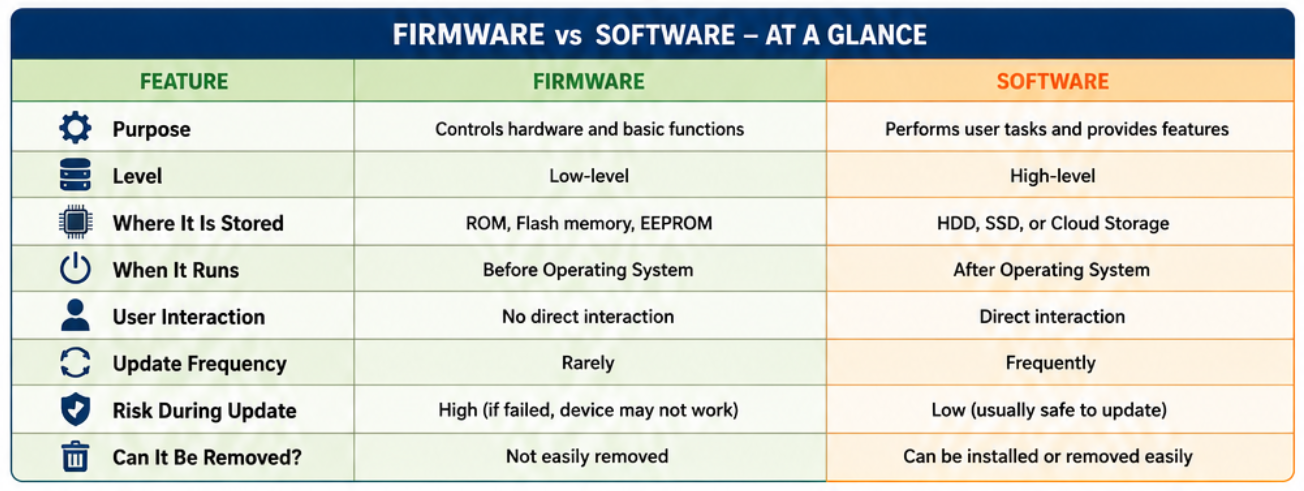
| Feature | Firmware | Software |
|---|---|---|
| Purpose | Controls hardware directly | Performs user tasks |
| Storage | Stored in ROM, Flash memory, EEPROM | Installed on HDD or SSD |
| Updates | Less frequent | Updated regularly |
| User Access | Usually hidden | Directly used by users |
| Examples | BIOS, router firmware, SSD firmware | Windows, Chrome, Microsoft Office |
Simple explanation: Firmware tells hardware how to work, while software tells hardware what to do.
What Is Firmware?
Before discussing the Difference Between Firmware And Software, it’s important to understand firmware itself.
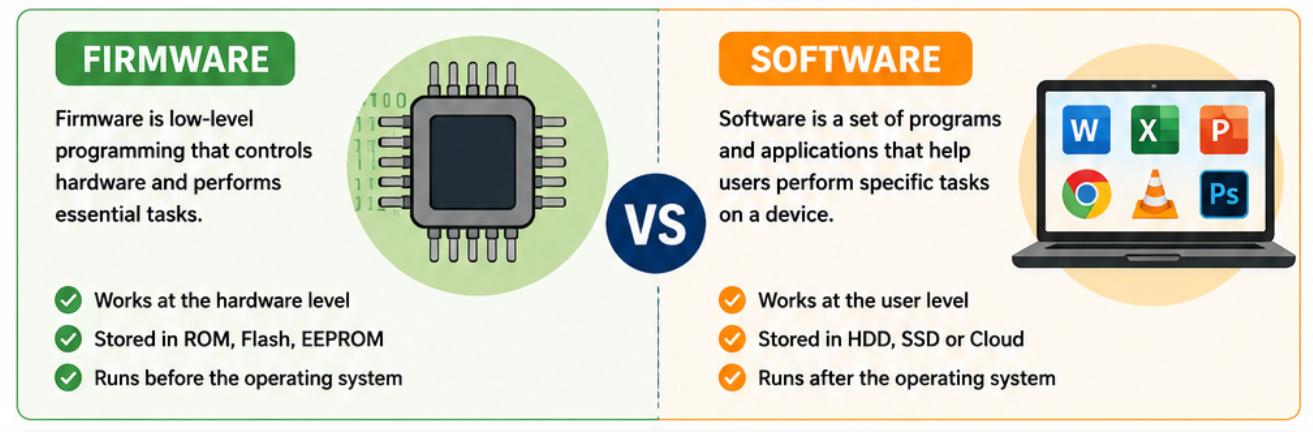
What is Firmware? Firmware is a small but essential program permanently stored inside electronic devices. It initializes hardware, performs low-level operations, and allows components to communicate correctly before an operating system even starts.
For example, when you press the power button on your laptop, the BIOS Firmware vs Software comparison becomes obvious. The BIOS firmware checks your RAM, processor, storage drive, and other hardware before Windows loads.
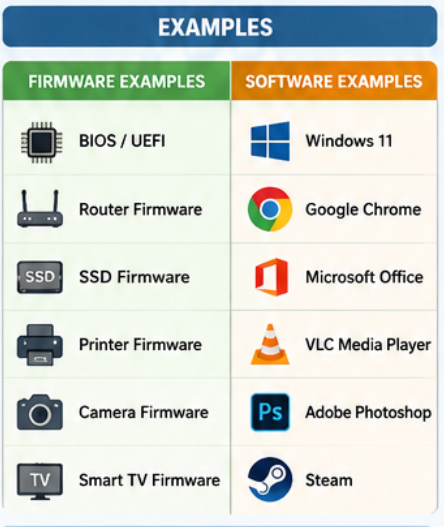
Some common Firmware Examples include:
- BIOS or UEFI firmware
- SSD firmware
- Router firmware
- Printer firmware
- Camera firmware
- Smart TV firmware
- Embedded controller firmware
This is why Embedded Firmware Explained often focuses on reliability rather than fancy features. Once installed, firmware rarely changes unless a manufacturer releases an important update.
How Firmware Works?
Understanding How Firmware Works makes the overall concept much easier.
Think of firmware as the device’s built-in instruction manual. The moment power reaches the hardware, firmware begins executing. It checks whether every component is functioning properly before handing control over to the operating system.
For example:
- You press the power button.
- BIOS firmware starts.
- Hardware is tested.
- Storage devices are detected.
- Windows begins loading.
Without firmware, your computer wouldn’t even know how to start.
Common Devices That Use Firmware
| Device | Firmware Role | Update Frequency |
|---|---|---|
| Laptop | Starts hardware and boots Windows | Rare |
| SSD | Improves storage reliability | Occasionally |
| Router | Controls networking functions | Few times a year |
| Smart TV | Manages display and hardware | Occasionally |
| Printer | Controls printing hardware | Rare |
| Camera | Operates sensors and autofocus | Rare |
What Is Software?
Now let’s answer the second common question: What is Software?
Software refers to programs created for users. Unlike firmware, software isn’t permanently tied to hardware. You can install it, uninstall it, update it, or replace it whenever you like.
Windows 11, Microsoft Word, Adobe Photoshop, Google Chrome, VLC Media Player, and games are all examples of software.
Some popular Software Examples include:
- Windows 11
- Linux
- Microsoft Office
- Adobe Photoshop
- Google Chrome
- VLC Media Player
- Steam
Software depends on firmware to communicate with hardware correctly. Without firmware, software wouldn’t have a reliable way to interact with your processor, memory, storage, or other components.
How Software Works?
Unlike firmware, How Software Works is much more flexible.
Software runs on top of an operating system and performs tasks requested by the user. Every time you open a browser, edit a document, or watch a video, software communicates with Windows, which then relies on firmware and hardware to complete the task.
Think of it like driving a car.
- Firmware is the engine management system.
- Windows is the dashboard.
- Applications are the driver deciding where to go.
Each layer depends on the one beneath it.
Firmware vs Software
When comparing Firmware vs Software, the biggest difference is their role.
Firmware is responsible for hardware initialization and low-level control, whereas software focuses on providing features and functionality for users. Firmware changes infrequently because stability is critical. Software evolves constantly with new features, security patches, and performance improvements.
Many beginners also confuse Firmware vs Operating System, but they’re very different. The operating system itself is software that relies on firmware to start the computer and communicate with hardware properly.
Firmware vs Software Comparison
| Comparison Point | Firmware | Software |
|---|---|---|
| Installed By | Manufacturer | User |
| Runs Before OS | ✔ Yes | ✖ No |
| Can Be Removed Easily | Rarely | Yes |
| Hardware Dependent | Highly | Less dependent |
| Upgrade Frequency | Low | High |
| Failure Impact | Device may not boot | Program may stop working |
Difference Between Firmware And Software with Examples
The easiest way to understand the Difference Between Firmware And Software is by looking at real-life examples. Imagine buying a new laptop. The firmware is already installed by the manufacturer, allowing the system to recognise the keyboard, memory, processor, and storage. Without it, the computer wouldn’t even reach the Windows loading screen.
Software, on the other hand, is what you add later. Windows 11, Microsoft Office, VLC Media Player, Photoshop, or your favourite browser are all software applications that rely on firmware and hardware to function properly.
Here’s a simple comparison:
- BIOS starts the computer → Firmware
- Windows loads after BIOS → Software
- Google Chrome opens websites → Software
- Router boot program controls network hardware → Firmware
This practical distinction clears up much of the confusion around Firmware and Software Differences Explained.
Firmware Update vs Software Update
One of the most common questions I hear is whether firmware updates are the same as software updates. They aren’t.
A Firmware Update vs Software Update comparison shows that firmware updates modify the low-level code stored inside a device, while software updates improve applications or operating systems.
For example, updating your SSD firmware might improve stability or fix hardware compatibility issues. Updating Windows 11, however, adds new features, patches security vulnerabilities, and improves overall performance.
Expert Tip: Only update firmware when recommended by the device manufacturer. Interrupting a firmware update can make a device temporarily—or sometimes permanently—unusable.
Firmware Update vs Software Update
| Feature | Firmware Update | Software Update |
|---|---|---|
| Updates Hardware Control | ✔ Yes | ✖ No |
| Adds New Features | Sometimes | Frequently |
| Security Improvements | Yes | Yes |
| Risk Level | Higher | Lower |
| Update Frequency | Rare | Frequent |
| User Installation | Occasionally | Regularly |
Firmware vs Operating System
Many beginners confuse Firmware vs Operating System, but their responsibilities are very different.
Firmware runs first and prepares the hardware. Once everything is ready, it hands control to the operating system.
Think of firmware as the foundation of a house. The operating system is the house itself, while applications are the furniture inside. Without a strong foundation, nothing above it works reliably.
Firmware vs Driver vs Software
Another topic that often causes confusion is Firmware vs Driver vs Software.
- Firmware lives inside hardware and controls basic operations.
- Drivers act as translators between hardware and the operating system.
- Software provides the applications and features users interact with.
For instance, your graphics card contains firmware. Windows uses a graphics driver to communicate with it, and a game such as Minecraft or Adobe Premiere Pro is the software that makes use of both.
Can Firmware Be Updated?
Yes. Can Firmware Be Updated? Absolutely—but with care.
Manufacturers release firmware updates to fix bugs, improve security, increase hardware compatibility, or enhance performance. You may have updated the BIOS on a motherboard, installed a firmware update for a router, or upgraded SSD firmware without even realising it.
Before updating firmware:
- Read the manufacturer’s instructions carefully.
- Ensure the device has stable power.
- Back up important data whenever possible.
- Never interrupt the update process.
Unlike software updates, firmware updates aren’t something you should install simply because they’re available.
Expert Recommendations
After working with PCs and embedded devices for years, one lesson stands out: don’t rush firmware updates. If your hardware is working perfectly and the update doesn’t address a problem you have, waiting is often the safer choice.
Software updates are different. Keeping Windows, browsers, and security applications up to date is generally a good habit because they frequently include security patches and performance improvements.
A balanced approach is usually the best one.
Conclusion
Understanding the Difference Between Firmware And Software isn’t just useful for IT professionals—it helps every computer user make better decisions.
Firmware is the invisible layer that prepares and controls hardware, while software is what you interact with every day to browse the web, edit documents, or play games. Once you understand how they work together, topics like BIOS updates, operating systems, device drivers, and hardware troubleshooting become much easier to understand.
The next time someone asks whether firmware and software are the same thing, you’ll know the answer: they work together, but each has a completely different purpose.
Frequently Asked Questions (FAQ)
1. What is the main difference between firmware and software?
Firmware controls hardware directly and starts the device, while software performs user-facing tasks after the operating system loads.
2. Is BIOS firmware or software?
BIOS is firmware because it is stored on the motherboard and runs before the operating system starts.
3. Can firmware be replaced?
In most cases, firmware can be updated or reflashed, but it cannot be removed like ordinary software.
4. Is Windows 11 firmware?
No. Windows 11 is an operating system, which is a type of software.
5. Why are firmware updates less common?
Firmware is designed for stability, so manufacturers only release updates when necessary for bug fixes, compatibility, or security.
6. Do smartphones use firmware?
Yes. Every smartphone contains firmware that controls hardware components before Android or iOS loads.
7. Is a device driver the same as firmware?
No. A driver allows the operating system to communicate with hardware, while firmware is the code built into the hardware itself.
8. Why is understanding firmware important?
Knowing the role of firmware helps you troubleshoot hardware problems, perform safer updates, and understand how computers and electronic devices operate more effectively.