Understanding ACPI and EC Communication. Have you ever wondered how a laptop knows when to enter sleep mode, report battery status, control its cooling fan, or respond when you press the power button? These functions depend on several hardware and firmware components working together behind the scenes. Two important parts of this process are ACPI and the Embedded Controller (EC).
Understanding ACPI and EC Communication helps explain how a laptop coordinates power management, hardware events, temperature monitoring, and other low-level operations. This knowledge is particularly useful for laptop repair technicians, BIOS programmers, firmware developers, and anyone troubleshooting unusual hardware behavior.
Although ACPI and the EC have different responsibilities, they often work together to keep a laptop operating correctly. When their interaction fails, symptoms may include battery reporting errors, sleep problems, unresponsive buttons, or abnormal fan behavior.
Let’s explore how this communication works and what you should know when diagnosing firmware-related issues.
What Are ACPI and the Embedded Controller?
ACPI stands for Advanced Configuration and Power Interface. It is an industry specification that defines how an operating system discovers hardware and manages supported power and configuration functions.
The Embedded Controller is a small controller integrated into or associated with a laptop’s motherboard. It typically runs its own firmware and manages selected low-level tasks independently of the main processor.
Understanding ACPI
ACPI in laptop motherboard designs provides a standardized way for the operating system to interact with firmware-defined hardware functions.
ACPI commonly supports:
- Power states and device power management.
- Battery and charging information.
- Thermal zones and cooling policies.
- Sleep, wake, and power-button events.
- Hardware configuration through firmware-defined methods.
ACPI implementations rely on firmware tables, control methods, and operating-system support. The exact features depend on the laptop’s hardware and firmware design.
Understanding the Embedded Controller
The Embedded Controller (EC) in laptops often handles tasks such as keyboard scanning, battery-related operations, fan control, charging coordination, and power-button signals.
Not every laptop assigns these tasks to the EC in the same way. Some functions may instead be handled by other dedicated controllers or system-on-chip components.
The EC usually runs independently of Windows or Linux. This allows certain hardware operations to continue even when the main operating system is not running.
How ACPI and EC Communication Works
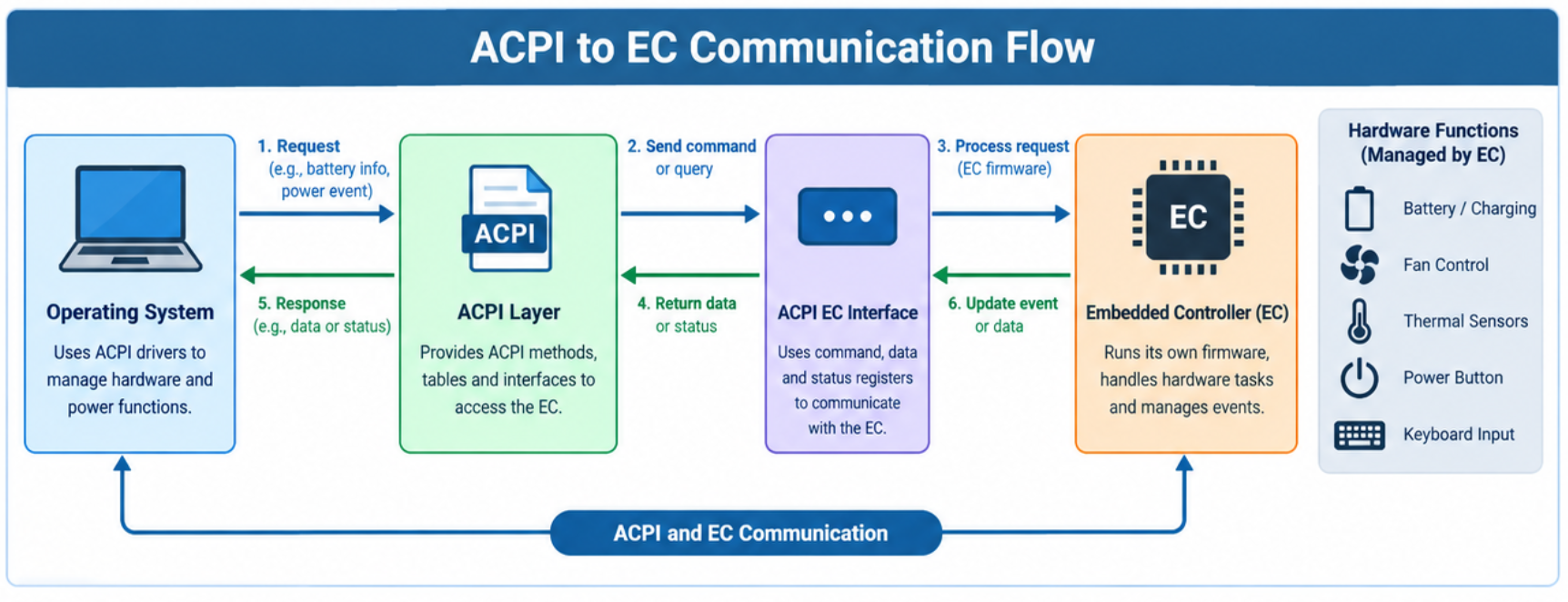
ACPI and EC Communication connects operating-system power management with hardware functions managed by the embedded controller.
In many traditional laptop designs, the operating system communicates with the EC through an ACPI-defined Embedded Controller interface. Firmware provides ACPI control methods that allow the operating system to access EC data and respond to events.
The interface may use hardware registers and status flags, while system firmware defines the behavior expected by the operating system.
The communication process
- A hardware event occurs. For example, the user connects a charger or presses the power button.
- The EC detects or processes the event. Its firmware updates internal state or performs the relevant hardware operation.
- The event is reported when required. Depending on the design, the EC may signal the system through an interrupt or another event mechanism.
- The operating system responds. The ACPI subsystem evaluates the appropriate firmware-defined methods or processes the event.
- The system updates its behavior. Windows may refresh battery information, adjust power policy, or initiate a supported sleep or wake action.
This is a simplified explanation. The actual sequence varies by hardware platform, firmware implementation, and event type.
ACPI vs. Embedded Controller
| Feature | ACPI | Embedded Controller (EC) |
|---|---|---|
| Main role | Defines OS-to-firmware hardware and power interfaces | Executes dedicated low-level controller functions |
| Runs on | Primarily implemented through OS and platform firmware | Dedicated controller hardware |
| Firmware component | ACPI tables and control methods | EC firmware |
| Typical responsibilities | Power states, device configuration, thermal policy interfaces | Keyboard scanning, selected power signals, battery-related tasks |
| Communication | OS evaluates ACPI interfaces and methods | Exchanges data and events through platform-defined mechanisms |
| Common problems | ACPI errors, incorrect device behavior | EC firmware faults, controller or hardware issues |
The Difference between ACPI and EC is therefore mainly about their roles: ACPI defines interfaces and behavior, while the EC performs specific controller functions. They cooperate, but they are not interchangeable.
Understanding the ACPI EC Interface and Firmware Interaction
The ACPI EC interface defines how compatible operating-system components exchange information with an embedded controller. On many systems, this involves an EC address space with command, data, and status registers.
The ACPI specification describes standard EC operation, but motherboard vendors still determine many platform-specific details.
ACPI methods and EC communication
Firmware may use ACPI control methods to retrieve information, process events, or coordinate device behavior. These methods are often represented by AML bytecode compiled from ACPI Source Language (ASL).
For example, a firmware method may retrieve battery-related information from an EC-managed data structure. The operating system can then use that information to display the battery percentage or charging state.
EC firmware and ACPI interaction must be designed consistently. If firmware expects a particular data layout but the EC supplies different values, the operating system may interpret the information incorrectly.
Why firmware compatibility matters
ACPI tables, EC firmware, BIOS firmware, and the operating system must work together as intended. A mismatch can cause problems even if individual components appear functional.
The following components play different roles:
- BIOS/UEFI firmware: Initializes the platform and provides system firmware interfaces.
- EC firmware: Handles controller-specific tasks and hardware state.
- ACPI tables and methods: Describe supported devices, events, and firmware operations.
- Operating-system ACPI subsystem: Evaluates methods and coordinates supported hardware and power functions.
This broader Laptop power management architecture explains why a laptop problem cannot always be fixed by changing a Windows setting.
How ACPI Handles Power, Battery, and Thermal Events
One of the most useful applications of ACPI power management is coordinating the operating system’s response to changing hardware conditions.
Battery and charging information
The EC may monitor charging signals, battery communication, and related hardware status. ACPI interfaces allow the operating system to obtain battery information when the platform implements those interfaces.
ACPI battery status reporting may include the remaining charge, charging state, or other battery characteristics. Incorrect readings can result from faulty battery hardware, EC problems, firmware defects, or communication issues.
Sleep and wake events
Laptop sleep and wake events depend on several components, including the operating system, platform firmware, and hardware power controls.
The EC may detect a power-button press or another supported wake-related event. Firmware and the operating system then coordinate the appropriate action, depending on the configured power state.
Thermal management
ACPI thermal management provides interfaces through which the operating system can evaluate thermal conditions and apply supported cooling policies.
The EC may control fans or monitor temperature-related signals on some platforms. However, fan control is not universally performed by the EC; other controllers or firmware components may participate.
Common ACPI and EC functions
| Function | Possible EC responsibility | ACPI or OS involvement |
|---|---|---|
| Battery reporting | Monitor or retrieve battery-related data | Expose battery information to the OS |
| Power button | Detect or process button signals | Apply the configured power-button action |
| Fan control | Operate fans on supported platforms | Apply thermal policy through supported interfaces |
| Sleep and wake | Handle selected power signals | Coordinate system power-state transitions |
| Keyboard input | Scan keys on many laptops | Receive keyboard input through the relevant device path |
Common ACPI and EC Communication Problems
When ACPI and EC Communication does not behave as expected, the symptoms can resemble ordinary hardware failures. The key is to identify which component or interaction is responsible before attempting a repair.
Troubleshooting ACPI and EC issues
| Symptom | Possible causes | Recommended first step |
|---|---|---|
| Battery percentage is incorrect | Battery wear, reporting error, firmware issue | Check battery health and compare readings |
| Laptop fails to sleep properly | Driver, firmware, wake source, or device issue | Review power settings and wake events |
| Fan runs unusually fast | High temperature, sensor issue, firmware policy | Check temperatures and fan behavior |
| Power button behaves incorrectly | Button hardware, EC logic, or configuration issue | Check button operation and system settings |
| ACPI-related Device Manager warning | Missing, incompatible, or faulty driver/firmware | Record the device hardware ID and error code |
| Laptop has intermittent power issues | Firmware, battery, board-level, or power circuitry fault | Test power sources and inspect service diagnostics |
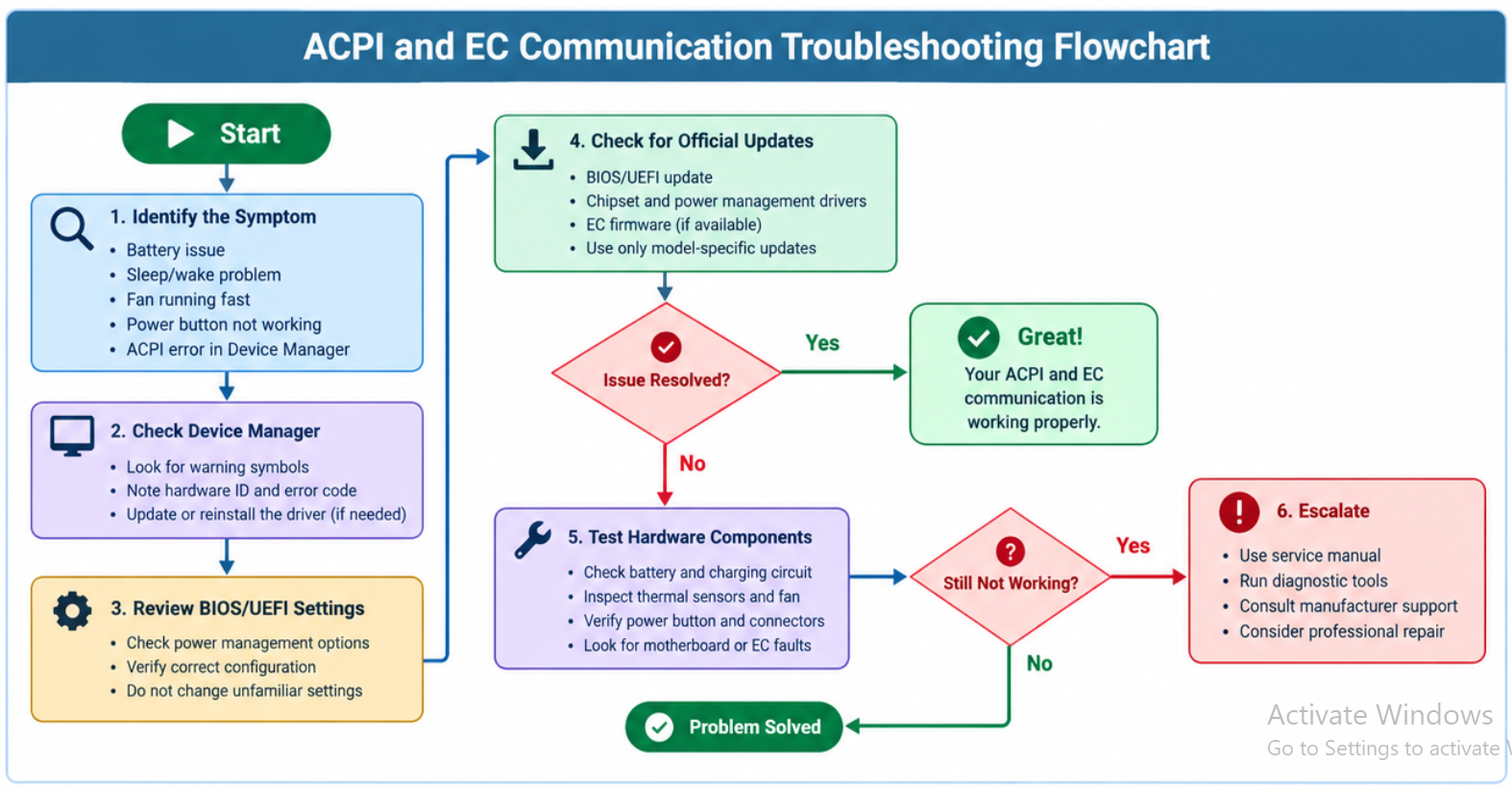
Step-by-step troubleshooting guide
Step 1: Identify the exact symptom.
Determine whether the issue affects charging, keyboard input, sleep, fan operation, or power-on behavior. A clear symptom helps narrow the diagnosis.
Step 2: Check Windows device information.
Open Device Manager and look for warning symbols. Record the device name, hardware ID, and error code before changing drivers.
Step 3: Review BIOS/UEFI settings.
Check available power-management settings and confirm that the laptop is using the expected configuration. Do not change unfamiliar firmware options without understanding their effects.
Step 4: Check for official updates.
Visit the laptop manufacturer’s support page and look for relevant BIOS/UEFI, chipset, power-management, or EC-related updates. Install only packages intended for the exact model and hardware revision.
Step 5: Test after each change.
Restart the laptop and repeat the test that originally failed. Changing one thing at a time makes it easier to identify the actual cause.
Step 6: Escalate hardware-level faults.
If the issue persists, investigate the battery, charging circuitry, sensors, motherboard, or EC subsystem using model-specific service documentation and suitable diagnostic tools.
Warning: Never flash EC firmware intended for a different laptop model or motherboard revision. An interrupted or incompatible firmware update can leave the system unable to start. Follow the manufacturer’s procedure and maintain reliable power during supported updates.
Practical Tips for Technicians and Firmware Learners
If you are learning How ACPI communicates with EC, focus on the relationship between hardware events, controller state, ACPI methods, and operating-system behavior.
- Start with the laptop’s service manual and firmware documentation.
- Learn basic ACPI concepts, including namespace objects, control methods, and event handling.
- Understand EC registers and status flags before attempting low-level debugging.
- Use operating-system logs and hardware diagnostics to establish a baseline.
- Compare behavior before and after a firmware change.
- Avoid assuming that every ACPI error indicates a defective EC.
For advanced debugging, the ACPI specification and platform-specific documentation are more reliable than generic register maps. EC register layouts, commands, and vendor-defined methods may differ significantly between laptop families.
Frequently Asked Questions
1. What is ACPI and EC communication?
It is the interaction between operating-system ACPI interfaces and embedded-controller functions that helps a laptop manage supported hardware events, power behavior, and device information.
2. How does ACPI communicate with the EC?
On many traditional platforms, ACPI-defined EC interfaces use command, data, and status registers. Firmware methods and event mechanisms let the operating system exchange information with the controller.
3. What is the role of an EC in a laptop?
An embedded controller may manage keyboard scanning, selected power signals, battery-related functions, and fan control. Its exact responsibilities depend on the laptop design.
4. Can BIOS updates fix ACPI errors?
Sometimes. A suitable BIOS/UEFI update may correct firmware compatibility problems or bugs, but ACPI errors can also originate from drivers, hardware, or operating-system configuration.
5. Can faulty EC firmware prevent a laptop from starting?
Yes. Incompatible or corrupted EC firmware can interfere with power sequencing or other essential controller functions. However, a no-start condition can have many other causes.
6. Is the ACPI EC driver the same as EC firmware?
No. The ACPI EC driver in Windows is part of the operating system’s interface to compatible EC hardware. EC firmware runs on the controller itself and manages its programmed functions.
7. How can I troubleshoot ACPI and EC communication?
Start by identifying the symptom, checking device errors and system logs, reviewing firmware settings, and installing only official model-specific updates. Escalate to hardware diagnostics if the problem continues.
8. Does every laptop use the same ACPI and EC design?
No. Laptop manufacturers use different controllers, firmware implementations, ACPI methods, and hardware interfaces. Always consult documentation for the specific platform.
Conclusion
Understanding ACPI and EC Communication gives you a clearer picture of how laptop firmware connects low-level hardware operations with the operating system. ACPI defines interfaces and power-management behavior, while the embedded controller handles selected hardware tasks and communicates through platform-specific mechanisms.
When problems arise, battery reporting errors, sleep failures, fan issues, and unexpected power behavior can all provide useful diagnostic clues. Rather than immediately replacing hardware or flashing firmware, identify the symptom, check official documentation, and test changes methodically.
For anyone working with laptop repair, BIOS programming, or embedded-controller firmware, understanding this relationship is an important step toward diagnosing problems accurately and building deeper firmware knowledge.
EC Controller Programming Guide for Beginners
Difference Between BIOS Update vs EC Update