Difference Between BIOS Update vs EC Update: What’s the Difference? If your laptop manufacturer recommends a BIOS update or an EC firmware update, it is easy to assume they are basically the same thing. After all, both involve firmware and can affect how your laptop works. But they handle very different parts of the system.
Understanding the Difference Between BIOS Update vs EC Update matters because installing the wrong firmware, interrupting an update, or ignoring an important compatibility requirement can cause serious problems.
In simple terms, a BIOS update primarily improves the firmware responsible for initializing hardware and starting the operating system, while an EC update updates the Embedded Controller that manages low-level functions such as power, charging, keyboard input, fans, and thermal behavior.
Let’s break down exactly how they differ, when you need them, and what to do if an update goes wrong.
Quick Answer: Difference Between BIOS Update vs EC Update
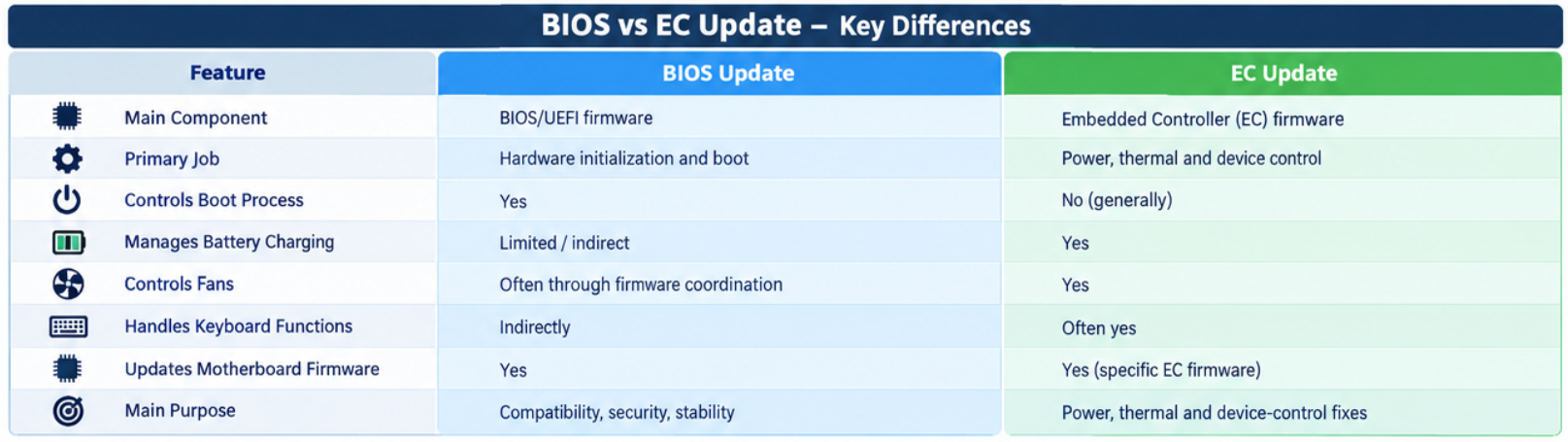
The easiest way to understand the Difference Between BIOS Update vs EC Update is to look at what each firmware component controls.
| Feature | BIOS Update | EC Update |
|---|---|---|
| Main component | BIOS/UEFI firmware | Embedded Controller |
| Primary job | Hardware initialization and boot | Low-level hardware and power management |
| Controls boot process | Yes | No, generally |
| Manages battery charging | Limited/indirect | Yes |
| Controls fans | Often through firmware coordination | Yes |
| Handles keyboard functions | Indirectly | Often yes |
| Updates motherboard firmware | Yes | Yes, but specifically the EC |
| Main purpose | Compatibility, security, stability | Power, thermal and device-control fixes |
So, BIOS firmware vs EC firmware isn’t simply a matter of two different versions of the same software. They are separate firmware components that work together.
How to Unlock BIOS Password on Any Laptop
What Is a BIOS Update?
A BIOS, or modern UEFI firmware, is low-level software stored on the motherboard. It runs before Windows and prepares the computer’s hardware, so the operating system can start correctly.
A BIOS firmware update can add support for newer processors, improve hardware compatibility, fix bugs, enhance system stability, or address security vulnerabilities.
A BIOS update replaces or modifies the firmware stored on the motherboard’s BIOS/UEFI chip. During startup, this firmware initializes components such as the CPU, memory, storage devices, and other hardware before handing control to Windows.
For example, a manufacturer might release a laptop BIOS update because a new processor revision needs better firmware support or because a boot-related problem has been discovered.
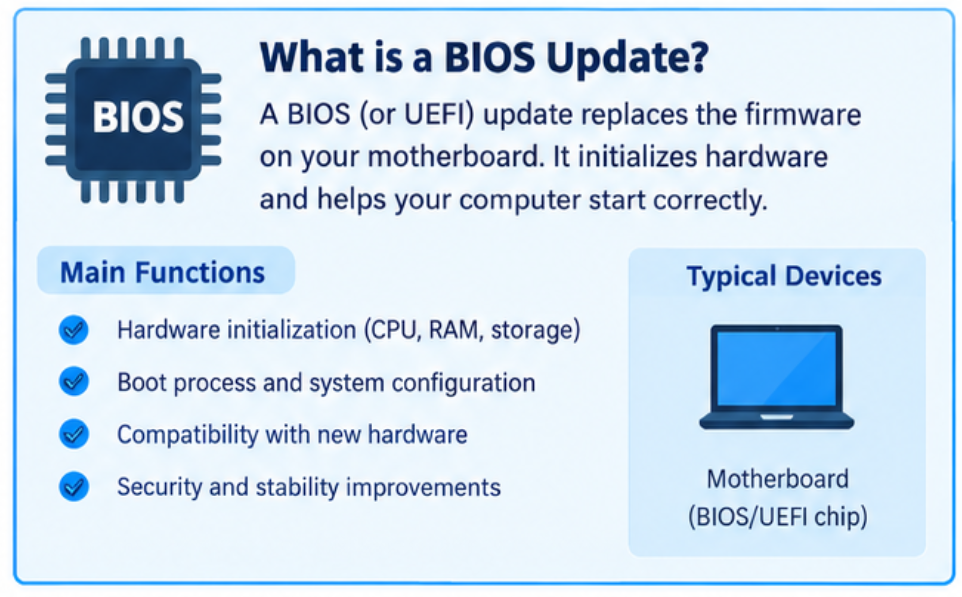
Common BIOS update benefits
A BIOS update may provide:
- Better hardware compatibility
- Improved system stability
- Support for new CPUs or memory
- Security fixes
- Boot and startup improvements
- Bug fixes
- Improved compatibility with Windows updates
However, newer firmware isn’t automatically better for every user. If your laptop is stable and the update doesn’t address a problem you have, there may be little reason to rush.
What Is an EC Update?
The Embedded Controller, commonly called the EC, is a separate microcontroller found in many laptops and other computers.
The Embedded Controller (EC) update changes the firmware running on this controller. Unlike BIOS firmware, the EC is heavily involved in everyday low-level hardware functions.
An EC update updates the firmware responsible for managing functions such as power states, battery charging, keyboard input, fan behavior, thermal controls, and other hardware-level operations.
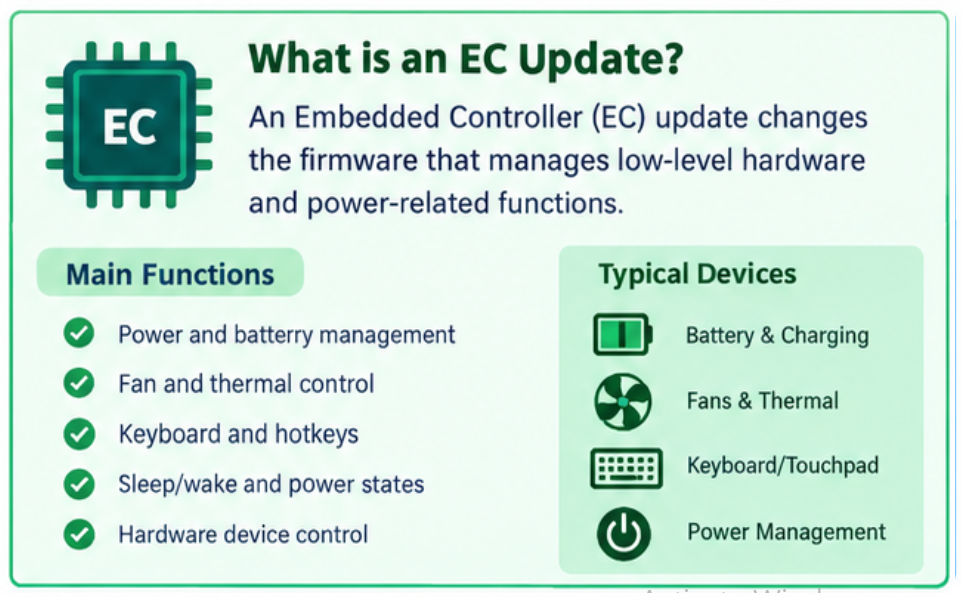
That is why an EC firmware update can sometimes solve strange problems that don’t appear to be related to firmware at first.
For instance, if a laptop suddenly has unusual charging behavior, keyboard problems, fan-control issues, or incorrect power-state behavior, the manufacturer may provide an EC firmware update.
BIOS vs Embedded Controller: What’s the Difference?
The BIOS vs Embedded Controller comparison becomes much clearer when you think of the laptop as a team.
The BIOS/UEFI handles the computer’s startup and hardware initialization. The EC continuously handles many low-level hardware-management tasks while the system is running.
In other words, the difference between BIOS and EC firmware is mainly about responsibility.
BIOS firmware is closely connected with booting and system configuration, whereas EC firmware is closely connected with power, thermal, input, and hardware-control functions.
BIOS and EC firmware differences at a glance
| Area | BIOS/UEFI | Embedded Controller |
|---|---|---|
| Boot initialization | Primary responsibility | Supporting role |
| CPU initialization | Yes | No |
| RAM initialization | Yes | No |
| Battery management | Coordinates with EC | Major responsibility |
| Charging control | Coordinates with EC | Major responsibility |
| Keyboard control | Limited | Common responsibility |
| Fan management | Firmware coordination | Common responsibility |
| Thermal behavior | Coordinates with hardware | Common responsibility |
| Power states | Coordinates with EC | Major responsibility |
When Should You Update BIOS and EC?
One of the most common mistakes is updating firmware simply because a newer version exists.
Instead, check the manufacturer’s release notes first. If the update fixes a problem you’re experiencing, adds hardware support you need, or addresses an important security issue, updating makes more sense.
When to update BIOS firmware
Consider a BIOS update when:
- The manufacturer recommends it for your exact laptop model.
- It fixes a problem you’re experiencing.
- You need support for new hardware.
- It contains an important security or stability fix.
- The manufacturer specifically requires it before another firmware or driver update.
When to perform an EC update
An EC update may be appropriate when you’re experiencing problems involving:
- Battery charging
- Keyboard or hotkeys
- Fan behavior
- Sleep or wake functions
- Power management
- Thermal behavior
- Unexpected shutdowns
- Hardware control functions
The exact symptoms vary by manufacturer and laptop model, so always read the firmware documentation before proceeding.
BIOS and EC Update Process
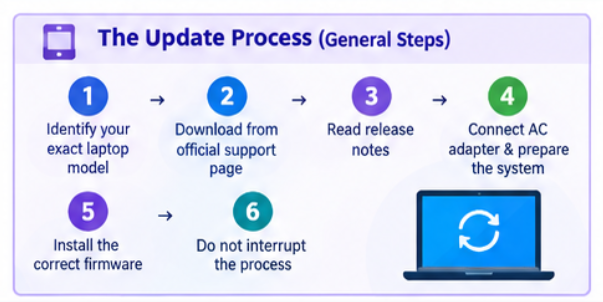
The BIOS and EC update process varies between manufacturers, but the general procedure is similar.
Step 1: Identify your exact laptop model
Check the model number and, where applicable, the exact motherboard or machine type. Never install firmware designed for a similar-looking model.
Step 2: Visit the manufacturer’s support page
Download firmware only from the official manufacturer or a trusted support utility provided by the manufacturer.
Step 3: Read the release notes
Look for information about fixes, prerequisites, firmware dependencies, and whether a BIOS update must be installed before or alongside an EC update.
Step 4: Prepare the laptop
Connect the AC adapter and make sure the battery has sufficient charge. Close unnecessary applications and avoid performing firmware updates during unstable power conditions.
Step 5: Install the correct firmware
Follow the manufacturer’s instructions exactly. Some updates run through Windows, while others use a BIOS/UEFI utility or bootable recovery environment.
Step 6: Do not interrupt the process
Never turn off the laptop, unplug it, or force a restart while firmware is being written.
Warning: A failed firmware update can prevent a computer from booting. Always use firmware intended specifically for your device.
Can BIOS and EC Be Updated Together?
Yes, can BIOS and EC be updated together? In some laptops, absolutely. Manufacturers sometimes release BIOS and EC firmware as part of the same update package or recommend installing them in a particular order.
However, this does not mean every BIOS update automatically updates the EC.
Whether they are bundled together depends on the laptop manufacturer, model, firmware package, and release instructions.
Does updating BIOS update the EC?
Not necessarily.
Some manufacturers package BIOS and EC firmware together, while others provide separate downloads. Therefore, don’t assume the EC has been updated just because you installed a new BIOS version.
Check the release notes or installed firmware versions if you need to verify both.
BIOS Update Problems vs EC Firmware Update Problems
Firmware problems can look similar, but the symptoms often provide useful clues.
| Problem | Possible Cause | What to Check |
|---|---|---|
| Laptop won’t boot after update | BIOS/UEFI firmware issue | Recovery procedure |
| Battery won’t charge correctly | EC firmware or hardware | EC version and charging hardware |
| Fan constantly running | EC/thermal control | EC firmware and thermal settings |
| Keyboard/hotkeys malfunction | EC firmware | EC update and keyboard drivers |
| Sleep/wake problems | BIOS or EC | Both firmware versions |
| New CPU not detected | BIOS compatibility | BIOS release notes |
| Random shutdowns | Power/thermal firmware | BIOS, EC, and temperatures |
| Update fails repeatedly | Wrong package or system issue | Exact model and manufacturer instructions |
How to Fix Laptop Not Starting Due to BIOS Failure
BIOS Firmware vs EC Firmware: Which Is More Important?
Neither is universally “more important.” They perform different jobs.
Think of BIOS firmware as the system’s startup and hardware-initialization layer, while the EC acts more like a low-level hardware management controller.
A laptop can have a perfectly updated BIOS while still having outdated EC firmware. Likewise, updating the EC won’t necessarily solve a BIOS compatibility problem.
The important thing is matching the firmware update to the actual problem.
Expert Tips Before Updating Firmware
A few simple precautions can prevent a lot of headaches.
- Back up important files before any major firmware update.
- Use the official firmware package for your exact model.
- Keep the AC adapter connected.
- Don’t interrupt the update.
- Read the manufacturer’s release notes.
- Don’t downgrade firmware unless the manufacturer specifically supports it.
- Record your existing BIOS and EC versions before updating.
- If the laptop is working perfectly, don’t update blindly just because a newer version exists.
For experienced users, checking the firmware changelog is especially useful. It can tell you whether an update actually addresses your hardware configuration.
How to Reset BIOS Without Removing Battery
BIOS and EC Firmware Troubleshooting
If you’re experiencing problems after an update, don’t immediately install another firmware package.
First, restart the system and allow it to complete any pending firmware configuration. Then check whether the issue is related to BIOS settings, Windows drivers, power management, or the firmware itself.
For BIOS update problems, the manufacturer’s recovery options may include BIOS recovery, restoring default firmware settings, or reinstalling the approved BIOS version.
For EC firmware update problems, the manufacturer may provide a specific EC reset or recovery procedure. Because EC behavior is closely tied to power management, blindly repeating an EC flash is not recommended.
If the computer no longer powers on after a failed firmware update, consult the manufacturer’s official recovery instructions or authorized service support.
BIOS Recovery Methods | Complete Guide
FAQ: BIOS and EC Firmware
What is the difference between a BIOS update and an EC update?
A BIOS update modifies BIOS/UEFI firmware responsible mainly for hardware initialization, configuration, and booting. An EC update modifies Embedded Controller firmware responsible for functions such as power management, charging, fans, keyboard controls, and thermal behavior.
Is an EC update the same as a BIOS update?
No. They are different firmware components. Some manufacturers may distribute them together, but the BIOS and EC perform different functions.
What does an EC firmware update do?
It updates the Embedded Controller’s software and can improve or fix functions such as battery charging, fan control, keyboard behavior, power states, and thermal management.
When should you update BIOS firmware?
Update BIOS when the manufacturer recommends it for your model, particularly when it fixes a known issue, adds required hardware compatibility, or addresses an important security or stability problem.
Does updating BIOS update the EC?
Not always. Some manufacturers bundle BIOS and EC updates, while others distribute them separately. Check the specific firmware package and release notes.
Can an EC update fix laptop keyboard or charging problems?
Yes, it can. Because the EC often manages keyboard input, hotkeys, battery charging, and power-related functions, an EC firmware update may resolve certain hardware-control problems.
What happens if a BIOS or EC update fails?
A failed firmware update can cause boot problems or, in serious cases, prevent the laptop from starting. Manufacturers may provide recovery procedures, but firmware recovery differs between models.
Do you need both BIOS and EC updates?
Not necessarily. You should install both only when the manufacturer recommends both or when the documented fixes apply to your situation. Never assume that one update is required simply because the other exists.
Final Verdict
The Difference Between BIOS Update vs EC Update comes down to what each firmware component controls. BIOS/UEFI firmware focuses heavily on startup, hardware initialization, system configuration, compatibility, and security, while the Embedded Controller handles many low-level functions involving power, charging, fans, keyboard input, and thermal management.
The safest approach is simple: identify your exact laptop model, read the manufacturer’s release notes, and install only the firmware you actually need.
If you’re troubleshooting a specific problem, don’t automatically flash the newest BIOS or EC firmware. First identify whether the symptoms point toward boot and hardware initialization or toward power and device-control functions. That small distinction can save you from a lot of unnecessary troubleshooting—and potentially a much bigger firmware problem.
How To Disable NetBIOS In Windows 10