Best SSD for Faster Windows Performance. When your Windows PC starts to feel sluggish, upgrading to a solid-state drive (SSD) can be one of the most effective solutions. Unlike traditional hard drives (HDDs), SSDs provide lightning-fast boot times, quicker app launches, and smoother multitasking. In fact, choosing the Best SSD for Faster Windows Performance can transform even an older computer into a near-modern machine.
With plenty of options on the market; ranging from Best SSD for Windows 11 to Best SSD for Windows 10, it’s essential to pick one that matches your budget, system requirements, and performance expectations. This guide will explore the top SSDs, compare different types, and help you make the right choice.
Why an SSD is Essential for Faster Windows Performance?
Windows systems, especially Windows 10 and Windows 11, rely heavily on storage performance for smooth operation. A high-speed SSD for faster boot times doesn’t just accelerate startup—it also improves file transfers, gaming performance, and productivity applications.
Key Benefits of SSDs for Windows Users:
Instant Boot – Start your PC in under 10 seconds.
Quick App Launch – Run heavy apps like Photoshop or MS Office without delays.
Better Multitasking – Handle multiple browser tabs, apps, and background tasks efficiently.
Reliability – SSDs have no moving parts, making them more durable than HDDs.
Gaming Advantage – Reduce loading screens with the Top SSD for gaming and Windows performance.
Best SSD for Faster Windows Performance:
1.Samsung 980 Pro NVMe SSD
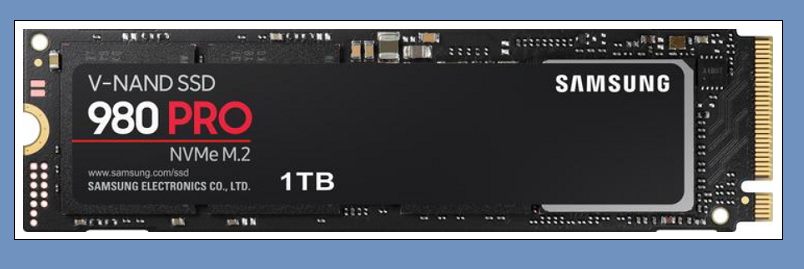
-PCIe Gen 4 technology
-Excellent for gaming and productivity
-Up to 7,000 MB/s read speed
2.Crucial MX500 SATA SSD
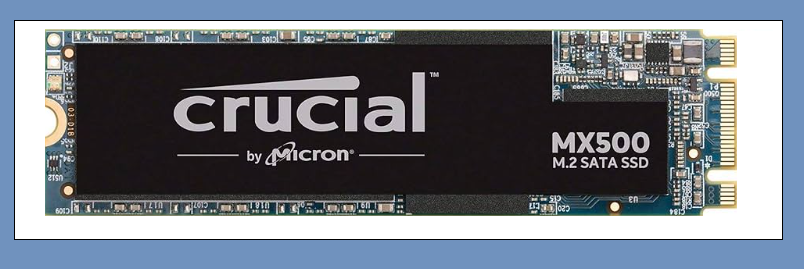
-Affordable yet reliable
-Works great as the Best SSD for Windows 10 upgrades
-560 MB/s read speed
3.WD Black SN850X NVMe SSD
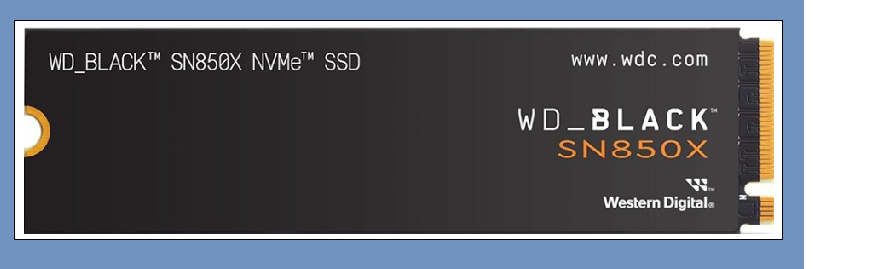
-Tailored for Best SSD for Windows 11 and gaming
-7,300 MB/s read speed
-Heat sink option for heavy workloads
Comparison of Top SSDs for Windows Performance:

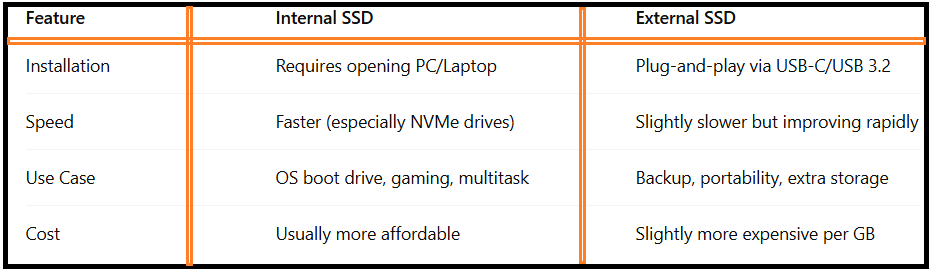
Best Internal SSD for PC vs Best External SSD for Windows:
When selecting the Best SSDs for Faster Windows Performance, you must decide between internal and external storage solutions.
Best Internal SSD:
Installed inside your laptop or desktop, providing maximum speed and reliability. Ideal for boot drives and daily use.
Best SSD External:
Portable, useful for backups, file transfers, and carrying projects between devices.
Internal SSDs vs External SSDs:
Best SSD for Windows 11: Recommended Picks
Windows 11 demands more system resources compared to its predecessor, so upgrading to the Best SSD for Windows 11 ensures smooth performance. NVMe drives like Samsung 980 Pro and WD SN850X are excellent choices due to their high-speed SSD for faster boot times.
Best SSD for Windows 10: Budget-Friendly Options
If you’re still on Windows 10, you don’t necessarily need the latest PCIe Gen 4 drives. Instead, affordable SATA SSDs like Crucial MX500 and Kingston A2000 still count among the Best SSDs for Faster Windows Performance for budget-conscious users.
SSD Recommendations by Use Case:

How to Choose the Best SSD for Faster Windows Performance:
When deciding which SSD to buy, consider:
Compatibility – Ensure your PC supports NVMe (M.2 slot) or SATA.
Storage Needs – 512GB minimum is ideal for Windows + applications.
Budget – SATA SSDs are cheaper, while NVMe SSDs provide top-tier performance.
Usage Type – Gamers and professionals benefit most from NVMe; casual users may prefer budget-friendly SATA options.
Optimizing SSD Performance on Windows:
Even the Best SSDs need occasional optimization for peak performance:
-Enable TRIM command in Windows.
-Update SSD firmware regularly.
-Avoid filling SSD beyond 80% capacity.
-Use built-in tools like Windows Optimize Drives.
FAQ – Best SSD for Faster Windows Performance
Q1:Is upgrading to an SSD worth it for Windows 10 or 11?
Yes. Both Best SSD for Windows 10 and Best SSD for Windows 11 options drastically cut down boot and load times compared to HDDs.
Q2:Which is better for gaming: NVMe or SATA SSD?
NVMe SSDs are much faster and provide shorter loading screens, making them the Top SSD for gaming and Windows performance.
Q3:Can I use an external SSD as a boot drive?
Yes, with the right setup, the Best SSD external can serve as a bootable Windows drive, though internal SSDs are faster.
Q4:How much storage do I need in my SSD for Windows?
At least 512GB is recommended for OS, essential applications, and smooth performance.
Q5:Do SSDs improve overall Windows speed or just boot times?
They improve both. From faster Windows startup to quicker file transfers, SSDs enhance every aspect of system responsiveness.
Conclusion:
Upgrading to the Best SSD for Faster Windows Performance is one of the smartest investments for any PC user in 2025. Whether you need the Best internal SSD for PC, a Best SSD external option, or high-speed NVMe drives for gaming and productivity, the right SSD will give your Windows system a significant speed boost.