Common BIOS Error Codes and Their Meaning. If your computer fails to start and emits a series of beeps or displays cryptic numbers on the screen, it’s likely trying to tell you something through BIOS error codes. Understanding these common BIOS error codes and their meaning is essential for diagnosing hardware-related issues before your operating system even loads, especially on systems like Windows 11 and modern motherboards.
How To Fix BIOS Not Detecting Hard Drive
These codes are part of the POST (Power-On Self-Test) process, a diagnostic routine that the BIOS runs every time the system boots. If a problem is detected, your system halts and shows either a beep code or a numeric/hexadecimal error on the screen or the LED display.
What Are Common BIOS Error Codes?
Common BIOS error codes are signals used by your system’s BIOS firmware to indicate hardware-related problems during the boot process. These codes are either audible BIOS beep codes or visible messages shown on a debug screen or LED display on the motherboard.
Each BIOS manufacturer, like AMI, Award, Phoenix, or UEFI-based BIOSes has its own unique set of error indicators.
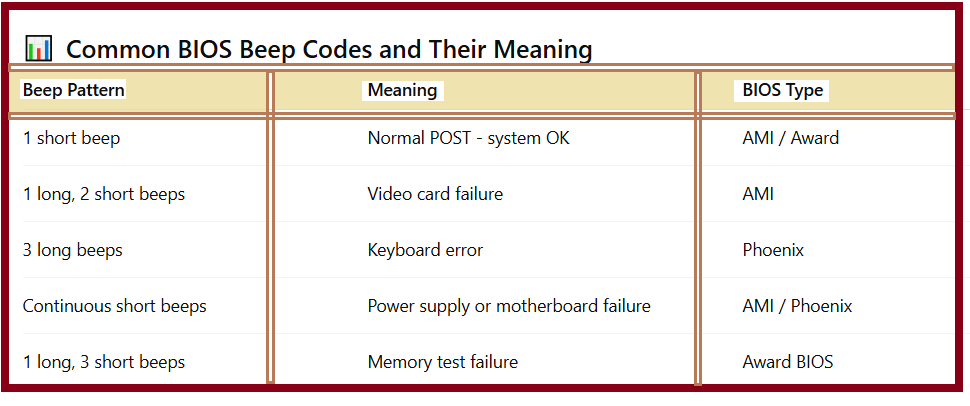
These BIOS POST error codes can vary, so always check your motherboard’s manual for the exact meanings.
Why Understanding BIOS Error Codes Matters:
Understanding common BIOS error codes and their meaning can help you:
-Diagnose hardware problems quickly
-Avoid unnecessary replacements
-Fix issues without accessing the OS
-Save money on professional repairs
Even brands like Dell, HP, and Lenovo use manufacturer-based beep and LED code systems. For example, Dell BIOS error codes often display numbers on the power LED, while HP BIOS beep codes may combine beeps and flashes.
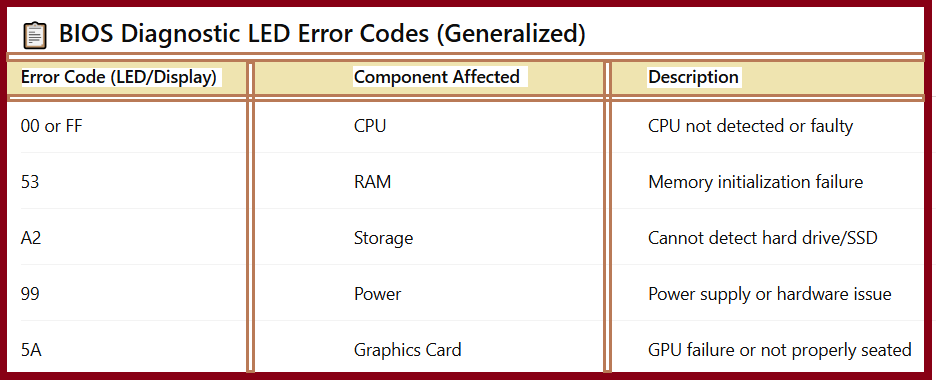
These are commonly seen on motherboard error codes from brands like ASUS, Gigabyte, or MSI.
Common BIOS Error Codes and Their Meaning:
How to Fix BIOS Error Codes:
Here’s how to approach how to fix BIOS error codes:
-Check the beep pattern or LED code using your motherboard manual.
-Reseat all hardware components—especially RAM, GPU, and CPU.
-Clear CMOS to reset the BIOS settings.
-Test components individually (RAM, power supply, etc.).
-Update the BIOS if needed, using a USB or motherboard recovery tool.
If you’re unsure of the BIOS code meanings, look them up for your specific BIOS type. For instance, AMI BIOS beep codes differ from those used by Phoenix BIOS.
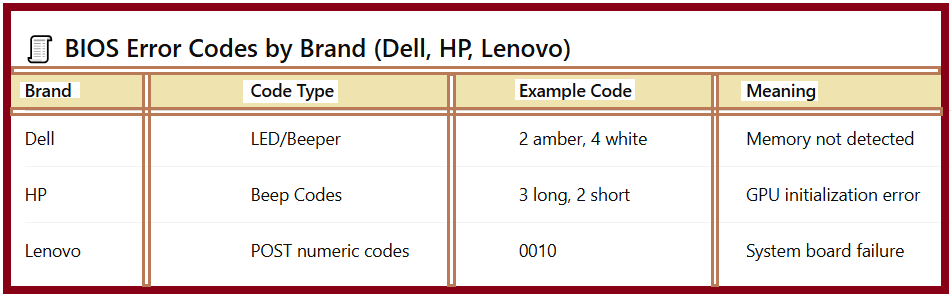
These brands customize error reporting for their hardware, especially for corporate laptops using BIOS diagnostic codes.
Types of BIOS Beep Codes:
You’ll typically find three main categories:
-Single beep – Normal boot.
-Short series of beeps – Minor hardware issue.
-Long or continuous beeps – Major component failure.
These types of beep codes are a first step in BIOS troubleshooting.
Additional BIOS Troubleshooting Tips:
-CMOS checksum error:-Replace CMOS battery or reset BIOS.
-No display, but beeps:-Faulty RAM or GPU.
-Stuck on POST:-Faulty boot device or corrupted BIOS.
–Reset BIOS password:-Use motherboard jumper or contact OEM.
-UEFI BIOS settings:-Access via F2, Del, or Esc depending on manufacturer.
If you can’t access the BIOS with a keyboard, explore how to boot into BIOS without a keyboard or change BIOS settings remotely.
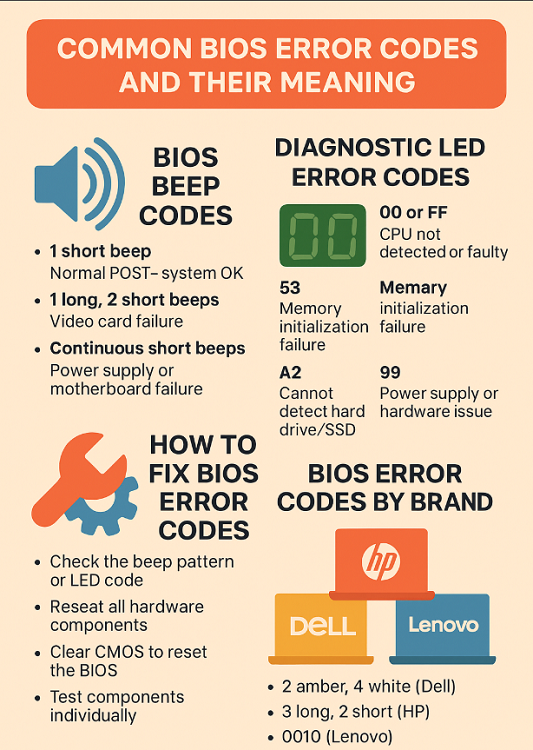
FAQ – Common BIOS Error Codes and Their Meaning:
Q1:-What are BIOS beep codes used for?
They help diagnose hardware issues during boot when there’s no display output.
Q2:-Can BIOS error codes be fixed without replacing hardware?
Yes, many are caused by loose connections, corrupted BIOS settings, or dead CMOS batteries.
Q3:-How do I reset BIOS if my laptop won’t turn on?
Use the CMOS reset jumper or remove the battery (if accessible), or refer to your OEM’s recovery steps.
Q4:-Are BIOS error codes different for Windows 11 systems?
Answer: No, BIOS codes are independent of the operating system, though newer systems may use UEFI for more advanced diagnostics.
Final Thoughts:
Learning the common BIOS error codes and their meaning gives you the power to fix startup issues before you ever reach your desktop. Whether you’re working with BIOS POST error codes, BIOS beep codes, or boot error codes, knowing how to interpret them can save you valuable time and prevent data loss.
From Dell BIOS error codes to Lenovo beep patterns, these diagnostics are your system’s first line of defense in revealing what’s wrong and how to fix it.