How To Block A Website On Chrome. In this article, you will read methods to block a website in Chrome. There can be many reasons that you want to block a particular website. There is no inbuilt feature to block specific sites on Chrome. You can block a website by adding the website blocker extensions to Chrome. Just specify the URL of the sites you want to ban and restart your browser.
How To Block A Website On Chrome?
To block a website on Chrome, you have to add the extensions to your browser. Follow the instructions below:
1.Open ‘Chrome’.
2.Click on ‘Menu’ button or three parallel dots.
3.Select ‘More tools’.
4.Go to ‘Extensions’.

5.Scroll down on the Extension page.
6.Select ‘Get more extensions’.
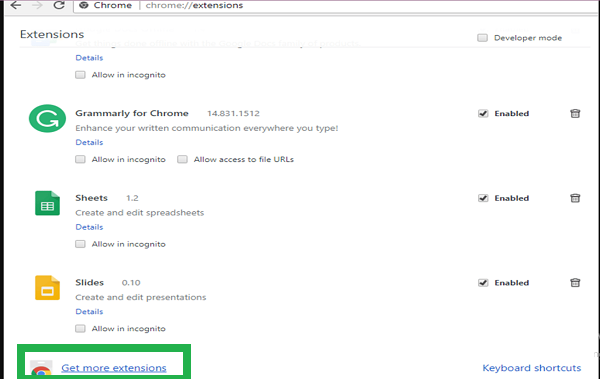
7.The new page will open.
8.Type ‘block site’ in the search box.
9.Press ‘Enter’.
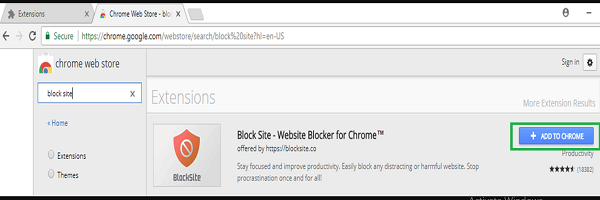
10.You can see the list of extensions.
11.Select ‘Block Site – Website Blocker for Chrome’.
12.You can choose any other extension.
13.Click on ‘ADD TO CHROME’.

14.You can see this dialog box on the screen.
15.Select ‘Add extension’.
16.Wait for few minutes till the process is done.
17.It will take you to the official site and display a message.
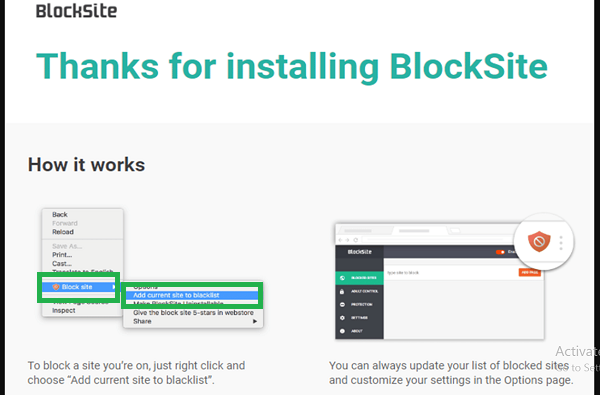
18.Follow the instructions to block a website on Chrome.
To Know How To Use Block Site, Click The Link.
Popular Site Blocking Extensions For Google Chrome:
-StayFocusd
-Web Blocker
-Web Nanny
-Site Blocker
-Website Blocker