How to Build a Privacy-Focused Personal Cloud. In today’s digital world, privacy is one of the biggest concerns when it comes to data storage. While public cloud services like Google Drive, Dropbox, or iCloud are convenient, they come with privacy risks, data tracking, third-party access, and limited control over your files. This is why more people are learning how to build a privacy-focused personal cloud.
Best Cloud Storage with Lifetime Plan
A personal cloud storage system allows you to keep your files, photos, and documents accessible from anywhere while retaining complete control over your data. Unlike public cloud providers, a private cloud server ensures that you are the only one who decides how, where, and when your data is used. In this article, we’ll explain how to build your own cloud storage, compare solutions, and provide practical steps to set up a secure, private system.
Why Choose a Privacy-Focused Personal Cloud?
Before diving into DIY cloud storage, let’s explore the advantages of building your own secure environment.
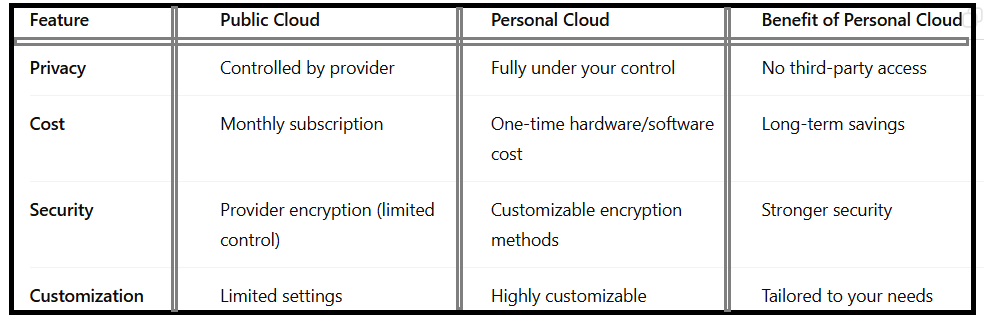
How to Build a Privacy-Focused Personal Cloud?
A personal cloud server puts you in charge of encryption, user access, and storage capacity, giving you a level of privacy that even the best subscription-based services cannot guarantee.
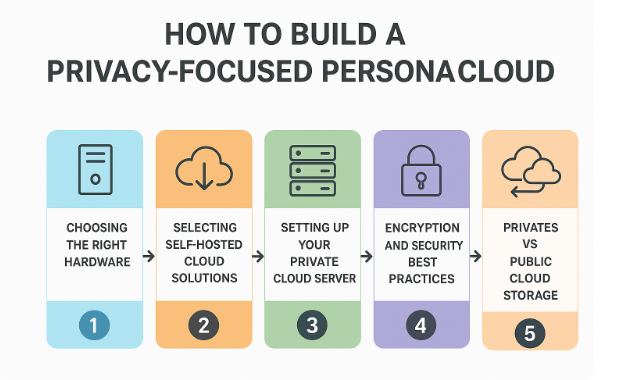
Step 1:-Choosing the Right Hardware
To begin how to build a privacy-focused personal cloud, you need the right hardware. Options include:
Home Cloud Server – A dedicated mini-PC or server machine running 24/7.
Network Attached Storage (NAS) – A storage device with cloud software integration.
Raspberry Pi or DIY Setup – Affordable option for small-scale private clouds.
Home cloud server setups are preferred because they balance cost, performance, and reliability.
Step 2:-Selecting Self-Hosted Cloud Solutions
The heart of a personal cloud is the software you use. Several self-hosted cloud solutions are available:
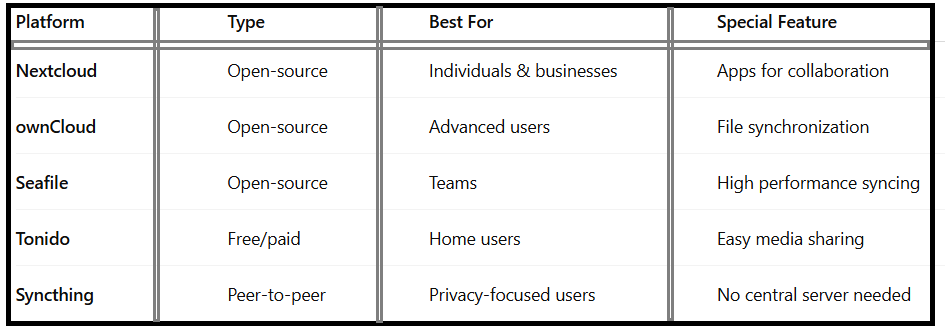
If you want the best self-hosted cloud platforms, Nextcloud and ownCloud are industry favorites because they allow features like calendar integration, file sharing, and advanced security.
Step 3:-Setting Up Your Private Cloud Server
Here’s a step-by-step guide on how to build your own cloud storage:
•Choose Your Hardware:
NAS, home server, or Raspberry Pi.
•Install the OS:
Linux-based distributions are most common.
•Install Cloud Software:
For example, Nextcloud or ownCloud.
•Enable Encryption:
This is crucial for how to set up an encrypted personal cloud at home.
•Set Access Controls:
Decide who can access your files.
•Configure Remote Access:
Use Dynamic DNS or VPN for outside access.
•Backup Regularly:
Prevents data loss in case of failure.
By following these steps, you can create a cloud server at home that rivals commercial services in security while being cost-effective.
Step 4:-Encryption and Security Best Practices
When learning how to build a privacy-focused personal cloud, security is non-negotiable.
Personal Cloud Security Tips:
-Use end-to-end encryption for all file transfers.
-Regularly update software to patch vulnerabilities.
-Enable two-factor authentication (2FA).
-Restrict access using firewalls and VPNs.
-Keep multiple backups; both local and offsite.
A truly encrypted personal cloud at home means that even if your device is hacked, your files remain unreadable to unauthorized users.
Step 5:-Private vs Public Cloud Storage
It’s important to compare private vs public cloud storage when deciding which solution works best.
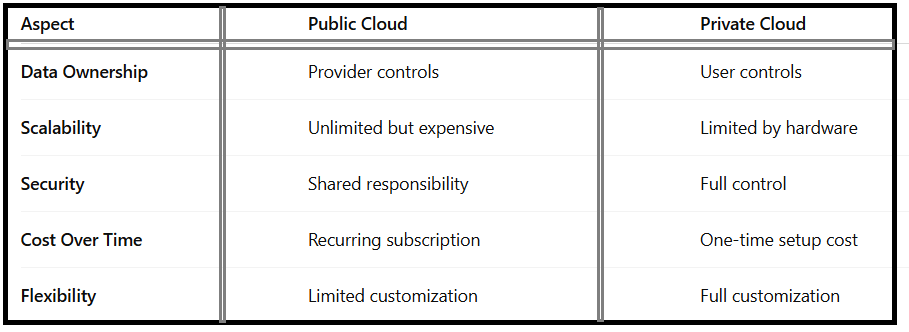
For users who value data privacy, a private cloud server clearly wins.
Additional Benefits of Building Your Own Personal Cloud:
Cost Savings:
No recurring subscription fees.
Custom Control:
Tailor storage size, encryption, and user access.
Learning Opportunity:
Building a DIY cloud storage solution improves technical skills.
Scalable:
You can expand your home cloud server as needed.
By choosing to build your own secure personal cloud, you’re not only gaining privacy but also investing in a long-term solution for safe data management.
Best Use Cases of a Privacy-Focused Personal Cloud
Personal File Storage – Photos, documents, and backups.
Business Collaboration – Shared workspaces and remote access.
Media Streaming – Turn your personal cloud server into a private Netflix.
IoT Device Integration – Store smart home data securely.
Remote Work – A reliable option for accessing files outside the office.
FAQ – How to Build a Privacy-Focused Personal Cloud
Q1:Can I create my own cloud storage for free?
Yes, with open-source software like Nextcloud and a spare computer, you can learn how to create your own cloud storage for free.
Q2:What is the easiest way to build a personal cloud?
Using a NAS with pre-installed cloud software is the simplest option for beginners.
Q3:Is a home cloud server secure?
Yes, provided you follow personal cloud security tips like encryption, regular updates, and 2FA.
Q4:How much does it cost to set up a private cloud server?
Costs range from $100 for a DIY setup with Raspberry Pi to $500+ for advanced self-hosted cloud solutions.
Q5:What is the difference between private vs public cloud storage?
A private cloud server gives you full ownership of your data, while public clouds rely on third-party providers.
Conclusion:
Learning how to build a privacy-focused personal cloud is a worthwhile investment in digital privacy and independence. By combining the right hardware, self-hosted cloud solutions, and strong encryption practices, you can create a home cloud server that rivals commercial providers.
Whether you want to build your own secure personal cloud for family photos, business documents, or personal projects, the steps are straightforward and cost-effective. In an era where data is more valuable than ever, building your own personal cloud storage ensures you stay in control of your privacy and security.