How To Hide Tabs And Remove Thumbnails In Chrome. In this article, you will get to know how to hide tabs in Chrome and how to remove thumbnails in Chrome.
How To Hide Tabs And Remove Thumbnails In Chrome
How To Hide Tabs In Chrome?
To hide tabs in Chrome:
1.Press the F11 key on your keyboard.
2.This will make Chrome go full screen and the tabs will become hidden from view.
3.You can also use the panic button extension to hide tabs in Chrome.
4.Click on the panic button beside the address bar to hide tabs in Chrome, after installing the extension.
5.Download the extension from the Chrome web store.
How To Remove Thumbnails From Chrome?
1.Open Chrome.
2.Hover the mouse over the preview image on the Chrome home page.
3.Select the 3 dot menu button.
4.Click on the Remove option.
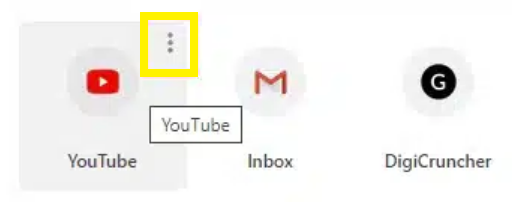
5.This will remove the shortcut website from your home page also.
featured image source: forbes.com