Legacy vs UEFI for Gaming Performance: Which is Better? When building or upgrading a gaming PC, one important yet often overlooked choice is between Legacy BIOS and UEFI firmware. This decision can affect boot speed, hardware compatibility, and even overall gaming performance. Understanding the difference between Legacy and UEFI is essential for gamers aiming to get the most out of their system.
In this guide, we’ll break down Legacy vs UEFI for Gaming Performance, their pros and cons, and how to optimize your setup for better results.
Understanding the Difference Between Legacy and UEFI
Before diving into performance, let’s clarify what these terms mean:
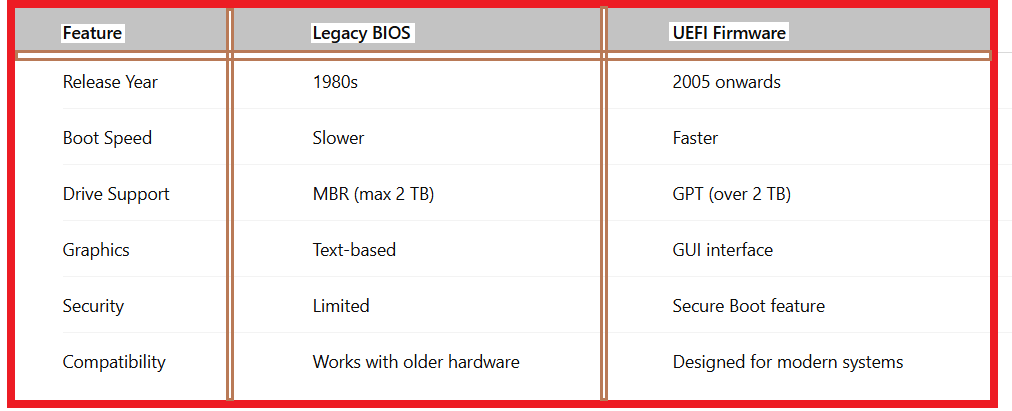
Legacy BIOS is the older firmware interface that initializes hardware during boot. It’s simple, reliable, and ideal for older systems.
UEFI (Unified Extensible Firmware Interface) is the modern replacement with faster boot times, advanced settings, and support for large drives.
Legacy vs UEFI Performance for Gaming Performance:
When comparing Legacy vs UEFI performance, the differences become more noticeable in areas like boot time and hardware optimization.
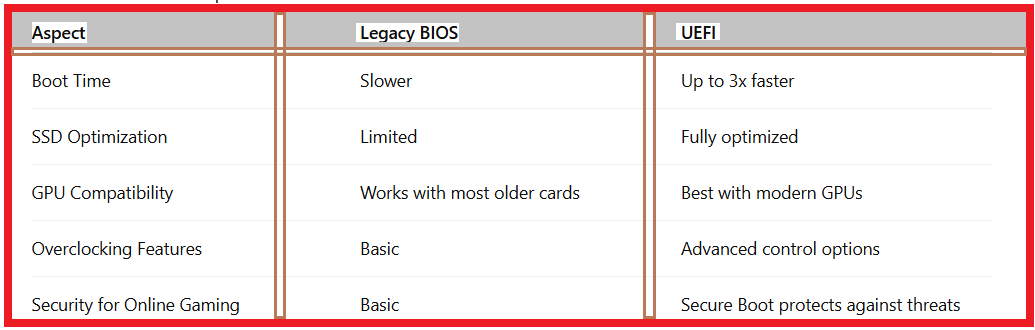
UEFI advantages for gamers include faster system startup, better SSD handling, and more overclocking options.
Legacy advantages for gamers are its simplicity and ease of setup, especially for older hardware that doesn’t support UEFI.
Why UEFI is Better Than Legacy for Gaming?
Faster Boot Times – Reduces wait time before launching games.
Better Hardware Support – Works seamlessly with modern GPUs, NVMe SSDs, and large storage drives.
Enhanced Overclocking – Offers more precise CPU and GPU tuning for high-end gaming rigs.
Improved Security – Secure Boot protects against malicious code before Windows loads.
For gamers using SSDs and modern components, UEFI firmware offers a noticeable performance edge.
When to Use Legacy BIOS for Gaming:
While Legacy BIOS vs UEFI for gaming leans heavily in UEFI’s favor, there are still scenarios where Legacy is better:
1.Older motherboards and CPUs without UEFI support.
2.Running older operating systems that don’t support UEFI boot.
3.Simplicity for non-technical users.
How to Switch from Legacy BIOS to UEFI for Gaming?
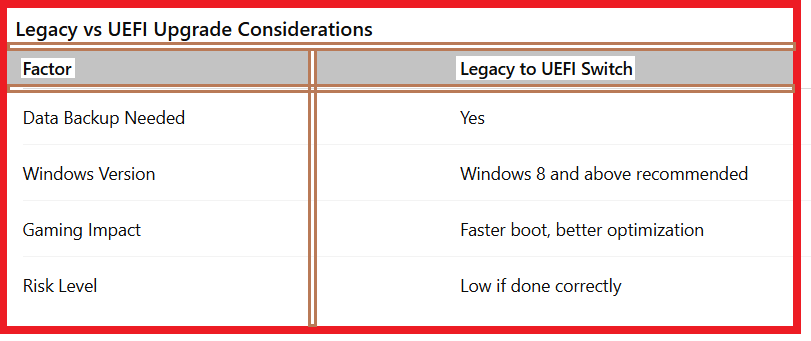
If your hardware supports it, upgrading to UEFI can improve system responsiveness.
Steps to Switch from Legacy to UEFI:
1.Check compatibility – Ensure your motherboard supports UEFI.
2.Backup your data – The process may require repartitioning the drive.
3.Enable UEFI mode in BIOS settings.
4.Convert MBR to GPT – Use Windows mbr2gpt tool.
5.Reboot and confirm changes.
Legacy vs UEFI Upgrade Considerations:
Best UEFI Settings for Gaming
To get the most out of UEFI, tweak these settings:
Enable XMP Profile – Boosts RAM speed for better FPS.
Turn on Secure Boot – Protects against malware in online gaming.
Enable Fast Boot – Reduces boot time.
Adjust Fan Curves – Keeps the system cool under load.
Legacy vs UEFI for Gaming Performance: Final Verdict
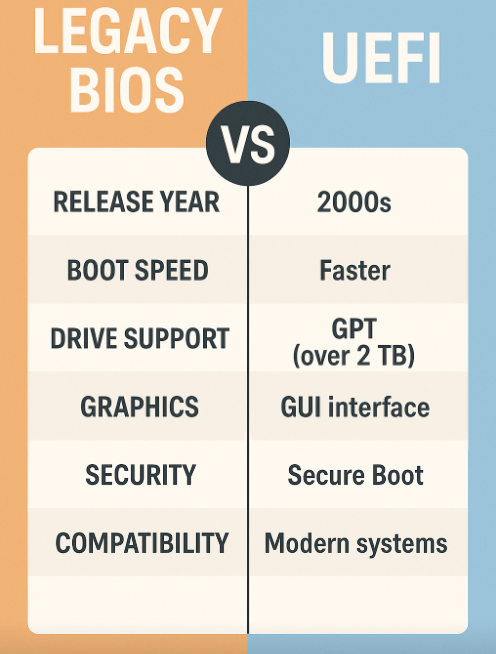
For modern gamers, UEFI offers better boot speed, hardware support, and performance tuning. Legacy BIOS is still useful for older systems, but lacks the optimization needed for high-end gaming.
If your hardware supports UEFI, switching is highly recommended, especially if you use SSD storage and modern GPUs.
FAQ – Legacy vs UEFI for Gaming Performance
Q1:Does UEFI increase FPS in games?
Not directly, but faster boot, better hardware handling, and optimized settings can improve game loading times and stability.
Q2:Can I use UEFI on an older motherboard?
Only if the motherboard firmware supports it.
Q3:Is switching from Legacy to UEFI risky?
The process is safe if done correctly, but always back up data first.
Q4:Why UEFI is better than Legacy for gaming?
It supports modern hardware, offers faster boot times, and includes advanced tuning features for better performance.