If you’re looking for the RT809F Programmer Software Free Download, you’ve come to the right place. The RT809F Programmer is one of the most trusted universal programmers used by electronics technicians, motherboard repair professionals, and laptop service centers worldwide. It supports BIOS flashing, EC programming, EEPROM writing, SPI Flash, I²C chips, eMMC, LCD firmware, and thousands of other programmable devices. DOWNLOAD LINK IS AT THE END
Unlike many universal programmers that require multiple adapters and complicated configurations, the RT809F combines advanced programming capabilities with an easy-to-use interface. Whether you’re repairing a laptop motherboard, recovering corrupted BIOS firmware, programming an Embedded Controller (EC), or flashing Smart TV firmware, this programmer provides a reliable solution.
One of the biggest advantages of the RT809F Programmer Software is its regularly updated chip database. New firmware releases continue to improve compatibility with modern laptop motherboards, desktop BIOS chips, EC controllers, LCD panels, and embedded memory devices, making it a valuable tool for both beginners and experienced repair technicians.
CH341A Programmer Software Free Download Latest Version
Why Choose RT809F Programmer Software?
The RT809F Programmer Software is designed to simplify firmware programming while reducing the risk of programming errors. It supports direct communication with many devices without requiring the chip to be removed from the motherboard.
Whether you’re repairing electronics professionally or learning motherboard repair, this software offers an excellent balance between performance, compatibility, and ease of use.
Some of the most common applications include:
- Laptop BIOS programming
- Desktop motherboard BIOS recovery
- Embedded Controller (EC) firmware flashing
- EEPROM reading and writing
- Smart TV motherboard repair
- LCD and LED panel firmware programming
- Digital Video Recorder (DVR) BIOS repair
- Satellite receiver firmware programming
- Firmware backup and restoration
- Corrupted BIOS recovery
These capabilities make the RT809F Programmer Software Free Download one of the most searched resources among electronics repair professionals.

What’s Included in the RT809F Programmer Software?
The latest software package includes everything required to operate the programmer efficiently.
Software Components
| Component | Description |
|---|---|
| RT809F Main Software | Main programming application |
| USB Driver | Required for Windows communication |
| Chip Database | Thousands of supported ICs |
| Firmware Files | Programmer firmware updates |
| ToolChain Utility | Advanced programming tools |
| Programming Libraries | Enhanced chip compatibility |
Keeping these components updated ensures maximum compatibility with newly released BIOS chips and EC controllers.
Latest Device Support
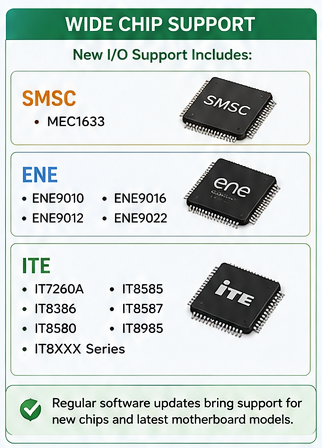
One of the strongest advantages of the RT809F Programmer Software is its continuously expanding chip support. New software updates regularly add compatibility for modern laptop motherboards, Embedded Controllers, EEPROMs, SPI Flash memory, and Super I/O chips used in the latest devices.
Recent software releases include support for additional controller families such as:
SMSC Controllers
- MEC1633
ENE Controllers
- ENE9010
- ENE9012
- ENE9016
- ENE9022
ITE Controllers
- IT7260A
- IT8386
- IT8580
- IT8585
- IT8587
- IT8985
- IT8XXX Series
Regular software updates ensure that technicians can work with newer motherboard revisions without purchasing another programmer.
Supported Devices
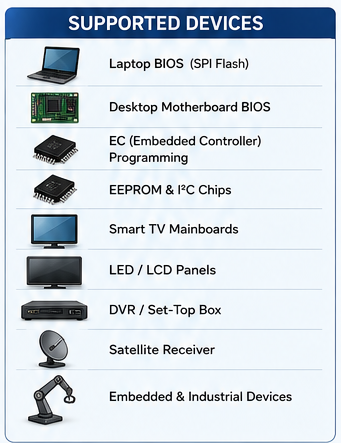
The RT809F Programmer is much more than a simple BIOS programmer. It supports a wide range of electronic devices commonly found in repair shops.
Laptop Motherboards
The programmer can read, erase, verify, and write:
- Main BIOS
- EC BIOS
- UEFI BIOS
- SPI Flash ROM
- EEPROM chips
This makes it an excellent choice for repairing laptops that fail to boot after a corrupted BIOS update.
Desktop Motherboards
Technicians frequently use the RT809F to recover desktop systems suffering from:
- Failed BIOS updates
- Corrupted firmware
- Boot loop problems
- No display after BIOS flashing
Instead of replacing the motherboard, the firmware can often be restored within minutes.
Smart TVs and LED TVs
The RT809F also supports firmware programming for many television mainboards.
It can:
- Flash Smart TV firmware
- Program EEPROM memory
- Repair startup failures
- Recover software corruption
- Restore factory firmware
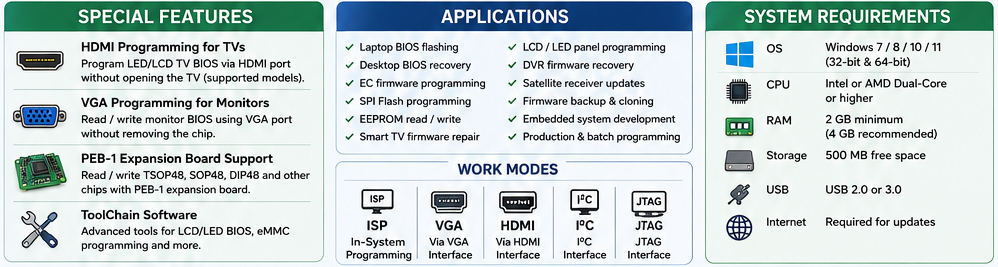
Special HDMI Programming Feature
One feature that separates the RT809F Programmer from many competitors is its HDMI programming capability.
Instead of opening the television and removing the BIOS chip, technicians can program firmware directly through the HDMI interface on supported LCD and LED televisions.
This significantly reduces repair time while minimizing the risk of motherboard damage.
For computer monitors, the programmer also supports firmware programming through the VGA interface, allowing BIOS reading and writing without complex soldering procedures.
This unique functionality makes the RT809F especially valuable for LCD repair technicians and service centers handling high volumes of monitor and television repairs.
RT809F Programmer Software Features
The RT809F Programmer Software is built for both beginners and professional electronics repair technicians. It combines a clean interface with powerful programming functions, allowing users to work with thousands of supported chips efficiently.
Here are some of the standout features:
- Automatic Chip Detection – Identifies many supported chips automatically, reducing setup time.
- Read, Write, Verify, and Erase – Perform complete firmware programming with built-in verification to help ensure data integrity.
- Real-Time Pin Status Monitoring – Detects connection issues before programming begins, minimizing the risk of write errors.
- In-System Programming (ISP) – Program compatible chips without desoldering by using supported interfaces such as ISP, HDMI, VGA, and I²C.
- Large Chip Database – Supports over 190,000 devices, including BIOS, EEPROM, SPI Flash, and Embedded Controller (EC) chips.
- Batch Programming – Program multiple chips efficiently for repair shops and production environments.
- Detailed Error Logs – Displays programming errors and diagnostic information to simplify troubleshooting.
- Firmware Backup – Create a backup of the original firmware before writing a new BIOS image.
- Custom Script Support – Advanced users can automate programming tasks for repetitive workflows.
- Regular Software Updates – New releases continually add support for the latest BIOS chips, EC controllers, and memory devices.
RT809F ToolChain Software
Along with the main application, the RT809F ToolChain Software expands the programmer’s capabilities.
It provides additional support for:
- LED TV firmware programming
- LCD panel BIOS programming
- eMMC programming
- Advanced chip management
- Engineering-level repair functions
The ToolChain package also supports expansion boards such as the PEB-1 Expansion Board, enabling programming of TSOP48, SOP48, DIP48, and other specialized packages commonly used in television and industrial electronics.
For repair technicians who work on televisions, monitors, and embedded systems, the ToolChain software makes the RT809F a more complete repair solution.
Best BIOS Programmers for Laptop Repairing
System Requirements
Before installing the RT809F Programmer Software, make sure your computer meets these basic requirements.
| Requirement | Specification |
|---|---|
| Operating System | Windows 7, Windows 8, Windows 10, Windows 11 |
| Processor | Intel or AMD Dual-Core or higher |
| RAM | 2 GB minimum (4 GB recommended) |
| Storage | At least 500 MB of free space |
| USB Port | USB 2.0 or USB 3.0 |
| Internet | Required for downloading updates |
Installing the latest USB drivers before connecting the programmer helps avoid driver recognition issues.
How to Install RT809F Programmer Software
Installing the software is straightforward if you follow these steps.
Step 1: Download the Software
Download the latest RT809F Programmer Software package from a trusted source such as LabOneInside.
Step 2: Extract the Files
Extract the downloaded ZIP or RAR archive using software such as WinRAR or 7-Zip.
Step 3: Install the USB Driver
Run the included USB driver installer and restart your computer if prompted.
Step 4: Connect the Programmer
Connect the RT809F programmer using the supplied USB cable.
Windows should detect the hardware automatically after the driver installation.
Step 5: Launch the Software
Open the RT809F application.
If prompted, allow the software to update the programmer firmware to the latest supported version.
Step 6: Verify Device Detection
Connect a supported chip or board and verify that the programmer recognizes it correctly before starting any read or write operation.
Tip: Always read and save the original BIOS or firmware before writing a replacement image. A backup can be invaluable if something goes wrong.

Common Uses of the RT809F Programmer
The RT809F is widely used in electronics repair because it supports many different programming tasks.
Common applications include:
- Laptop BIOS flashing
- Desktop motherboard BIOS recovery
- UEFI firmware programming
- Embedded Controller (EC) programming
- SPI Flash programming
- EEPROM reading and writing
- Smart TV firmware repair
- LCD and LED panel firmware programming
- Digital Video Recorder (DVR) firmware recovery
- Satellite receiver firmware updates
- Firmware backup and cloning
- Repairing devices with corrupted BIOS firmware
Its versatility makes it a valuable tool for repair shops that service multiple categories of electronic equipment.
Troubleshooting Common RT809F Software Issues
Programmer Not Detected
- Reinstall the USB driver.
- Try a different USB port.
- Use the original USB cable if available.
- Check Device Manager for driver errors.
Chip Detection Failed
- Verify the chip orientation.
- Clean the chip contacts.
- Ensure the selected chip matches the actual part number.
- Check that the adapter is seated correctly.
Verification Failed After Writing
- Read the chip again and compare it with the source file.
- Lower the programming speed if the software allows.
- Check for poor clip or socket contact.
- Confirm that the firmware file is compatible with the motherboard or device.
Software Crashes
- Run the application as Administrator.
- Temporarily disable antivirus software if it is interfering with installation.
- Download a fresh copy of the software if files appear corrupted.
Technician’s Best Practices
At LabOneInside, we recommend following these professional practices when working with firmware programmers:
- Always create a backup of the original BIOS before making changes.
- Verify the motherboard model and BIOS version before flashing new firmware.
- Use a stable USB connection throughout the programming process.
- Avoid interrupting power while writing firmware.
- Inspect clips, adapters, and sockets for poor contact, as many programming errors are caused by connection issues rather than software problems.
- After programming, perform a verification check to confirm that the written data matches the source file.
These habits reduce the risk of corrupted firmware and improve repair success rates.
Is CH341A BIOS Programmer Worth Buying
Frequently Asked Questions (FAQ)
Is RT809F Programmer Software free to download?
Yes. The software itself is available for download. However, you need the RT809F programmer hardware to use its programming functions.
Can the RT809F program laptop BIOS chips?
Yes. It supports a wide range of SPI Flash, EEPROM, and BIOS chips used in laptops and desktop motherboards.
Does RT809F support EC programming?
Yes. It supports many ITE, ENE, and SMSC Embedded Controller chips, with new devices added through software updates.
Can I program a TV BIOS without removing the chip?
For many supported models, the RT809F offers In-System Programming (ISP), allowing firmware programming without desoldering the chip.
Should I update the software regularly?
Yes. Keeping the software up to date ensures compatibility with newly released chips and improves stability.
Conclusion
The RT809F Programmer Software Free Download is an essential resource for technicians who repair laptops, desktop motherboards, Smart TVs, monitors, and embedded electronic devices. With its extensive chip support, user-friendly interface, advanced ISP capabilities, and regular software updates, it remains one of the most capable universal programmer solutions available.
Whether you are recovering a corrupted BIOS, programming an Embedded Controller, or repairing television firmware, the RT809F provides the flexibility and reliability needed for professional repair work. Remember to keep the software updated, back up original firmware before programming, and follow safe programming practices to achieve the best results.
RT809F Programmer Software Latest Version Download
There are two buttons given below for downloading it. One is the download button has the new version of RT809F software. And, the other button has the Toolchain. You have to install RT809F software first, then install the Toolchain. After that, you have to install the RT809F application in the Toolchain folder and you can use this software. If you appreciate our work, please share the BIOS files with us.
The official website For This Software: http://www.ifix.net.cn/