How to Protect Personal Data Online. Every day, we share personal information online without giving it much thought. We sign into social media, shop on e-commerce websites, store photos in the cloud, and pay bills through banking apps. It all feels routine—until something goes wrong.
A single weak password or careless click on a phishing email can expose sensitive information within minutes. Unfortunately, cybercriminals are becoming smarter, and data breaches have become more common than ever. The good news? Protecting your personal data doesn’t require advanced technical skills. A few smart habits can dramatically reduce your risk.
In this guide, you’ll learn How to Protect Personal Data Online using practical, beginner-friendly techniques that also work for experienced users. Whether you’re browsing on a computer or smartphone, these proven strategies will help keep your digital life secure.
Quick Answer: How Can You Protect Personal Data Online?
If you’re looking for the fastest answer, follow these essential steps:
- Use strong, unique passwords for every account.
- Enable two-factor authentication (2FA).
- Keep your operating system and apps updated.
- Avoid clicking suspicious links or email attachments.
- Use secure Wi-Fi or a trusted VPN.
- Review privacy settings regularly.
- Back up important files.
- Install reputable antivirus software.
These habits form the foundation of effective online privacy and cybersecurity.
Why Personal Data Protection Matters
Many people believe hackers only target businesses or wealthy individuals. That’s rarely true.
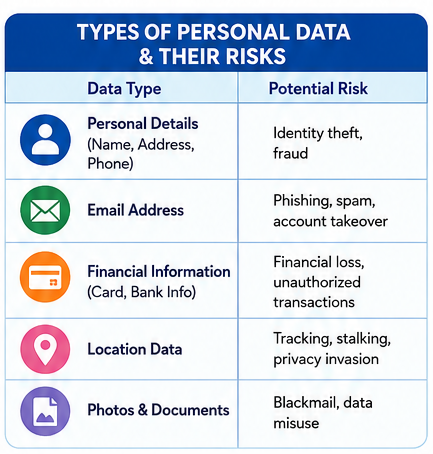
Personal information such as your email address, phone number, passwords, banking details, browsing history, and even location data has value. Criminals can use this information for identity theft, financial fraud, account takeovers, or phishing attacks.
Learning How to Protect Personal Data Online isn’t just about preventing hacking—it’s about protecting your privacy, finances, and reputation.
Types of Personal Data and Their Risks
| Personal Data | Potential Risk | Protection Method |
|---|---|---|
| Email Address | Phishing attacks | Enable spam filtering and 2FA |
| Passwords | Account takeover | Use a password manager |
| Credit Card Information | Financial fraud | Shop only on HTTPS websites |
| Home Address | Identity theft | Share only when necessary |
| Phone Number | SIM swap attacks | Avoid posting publicly |
| Photos & Documents | Privacy breaches | Encrypt cloud storage |
| Social Media Profiles | Fake accounts | Limit profile visibility |
Common Ways Personal Information Gets Stolen
Understanding the risks makes it much easier to avoid them.
Phishing Emails
One convincing email can trick someone into entering login credentials on a fake website. Even experienced users occasionally pause and wonder, “Is this real?” That’s exactly what attackers count on.
Weak Passwords
Using the same password across multiple accounts is still surprisingly common. If one website suffers a breach, every other account using that password becomes vulnerable.
Public Wi-Fi
Coffee shops, airports, and hotels offer convenient internet access, but unsecured public networks can expose your browsing activity to attackers.
Fake Apps
Downloading software from unofficial sources can install malware that quietly steals passwords, banking information, or personal files.
Best Ways to Protect Your Personal Information Online
Protecting yourself doesn’t require expensive software. In many cases, changing everyday habits has the biggest impact.
1. Create Strong, Unique Passwords
A password should never be easy to guess.
Avoid names, birthdays, or simple combinations like:
- 123456
- password
- qwerty
Instead, create long passwords using letters, numbers, and symbols.
Better yet, use a password manager. It creates and remembers complex passwords so you don’t have to.
This remains one of the Best Ways to Protect Your Personal Information Online.
2. Turn On Multi-Factor Authentication
Even if someone steals your password, they still can’t access your account without the second verification step.
Most major platforms now support:
- Authentication apps
- Security keys
- SMS verification
- Email verification
Whenever possible, choose an authentication app instead of text messages.
3. Keep Everything Updated
Software updates often fix security vulnerabilities before hackers can exploit them.
Always update:
- Windows
- macOS
- Android
- iPhone
- Browsers
- Antivirus software
- Banking apps
Delaying updates may seem harmless, but it leaves known security holes open.
Online Privacy Protection Tips Everyone Should Follow
Privacy isn’t just about hiding information—it’s about controlling who can access it.
Review Privacy Settings
Most apps collect more information than necessary by default.
Take five minutes to review:
- Location access
- Camera permissions
- Microphone permissions
- Contact sharing
- Advertising preferences
You might be surprised by how much data you’re already sharing.
Think Before Posting
Vacation photos are fun.
Posting them while you’re away? Not always a great idea.
Oversharing on social media gives scammers valuable information for phishing attacks and identity theft.
These simple Online Privacy Protection Tips often make a bigger difference than expensive security software.
Daily Online Habits vs Secure Alternatives
| Risky Habit | Better Practice |
|---|---|
| Reusing passwords | Use unique passwords |
| Clicking every email link | Verify sender first |
| Saving passwords in browser | Use a password manager |
| Ignoring software updates | Enable automatic updates |
| Using public Wi-Fi without protection | Connect through a VPN |
| Downloading unknown apps | Install only from official stores |
How to Keep Personal Information Safe on the Internet
Many privacy problems start with everyday browsing habits.
Whenever you visit a website:
- Look for HTTPS encryption.
- Check the website address carefully.
- Avoid downloading unknown files.
- Never enter passwords on suspicious pages.
- Log out from shared computers.
These small actions quickly become habits and significantly improve online safety.
Step-by-Step Guide to Strengthen Online Privacy
Here’s a practical step-by-step guide to online privacy you can complete in less than an hour:
Step 1
Update your operating system.
Step 2
Install all browser updates.
Step 3
Replace weak passwords.
Step 4
Enable two-factor authentication.
Step 5
Review privacy settings on major social media accounts.
Step 6
Delete apps you no longer use.
Step 7
Back up important files.
By following this routine every few months, you’ll stay ahead of many common online threats.
How to Prevent Identity Theft Online
Identity theft rarely happens overnight. Criminals usually collect small pieces of information over time until they have enough to impersonate someone.
Be especially cautious when sharing:
- Government ID numbers
- Banking information
- Credit card details
- Tax records
- Medical documents
Another helpful habit is checking your financial accounts regularly. Spotting unusual activity early can prevent much larger problems later.
Advanced Privacy Strategies for Long-Term Security
Once you’ve covered the basics, it’s worth taking your online privacy a step further. These habits don’t take much effort, but they provide an extra layer of protection that’s increasingly valuable in today’s connected world.
Strong security isn’t built around a single tool. It’s a combination of smart habits that work together.
Encrypt Sensitive Files
If you store financial documents, tax records, or personal photos on your computer or cloud storage, consider encrypting them. Even if someone gains access to your device, encrypted files remain unreadable without the correct password.
Back Up Your Data Regularly
Imagine losing years of family photos or important work documents because of ransomware or a hard drive failure. Regular backups can save you from that nightmare.
A practical approach is the 3-2-1 backup rule:
- Keep 3 copies of your data.
- Store them on 2 different types of media.
- Keep 1 copy offsite, such as encrypted cloud storage.
Use a VPN on Public Networks
Public Wi-Fi is convenient, but it isn’t always secure. A trusted Virtual Private Network (VPN) encrypts your internet connection, making it much harder for attackers to intercept your data.
This is especially useful when traveling or working remotely.
How to Secure Your Digital Identity
Your digital identity includes far more than your social media accounts. It also covers your email addresses, online banking profiles, shopping accounts, cloud storage, and even your browsing history.
Here are a few habits that help secure your online identity:
- Use a different password for every important account.
- Remove old accounts you no longer use.
- Enable login alerts whenever available.
- Monitor your email for unexpected password reset requests.
- Review account activity every few weeks.
These simple checks often catch suspicious activity before it becomes a serious problem.
Privacy Checklist for Everyday Internet Users
| Security Task | Recommended Frequency | Why It Matters |
|---|---|---|
| Change weak passwords | Immediately | Prevent unauthorized access |
| Review privacy settings | Every 3 months | Reduce unnecessary data sharing |
| Update operating system | As updates become available | Fix security vulnerabilities |
| Back up important files | Weekly | Protect against data loss |
| Scan device with antivirus | Weekly | Detect malware early |
| Check account login history | Monthly | Identify suspicious activity |
| Remove unused apps | Every few months | Minimize privacy risks |
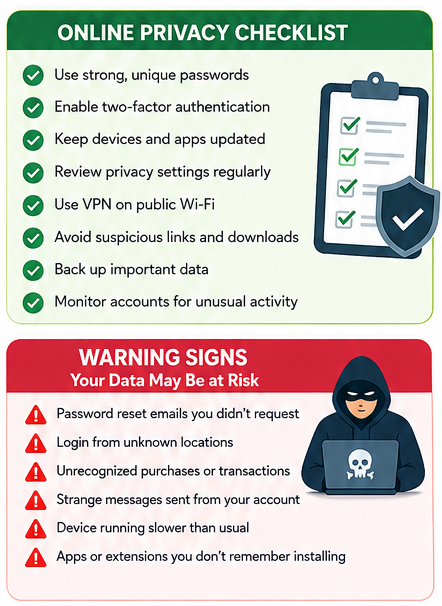
Warning Signs That Your Personal Data May Be at Risk
Sometimes, your accounts give subtle clues before a major security issue develops.
Watch for these warning signs:
- Password reset emails you didn’t request.
- Login notifications from unfamiliar locations.
- Unrecognized purchases or bank transactions.
- Friends receiving strange messages from your account.
- Browser extensions appearing without your permission.
- Devices suddenly running much slower than usual.
If you notice any of these, act quickly. Change your passwords, enable multi-factor authentication, and scan your devices for malware.
Expert Tip: Never ignore unusual account activity, even if it seems minor. Early action can prevent significant financial and personal damage.
Internet Privacy and Data Security Guide for Everyday Users
Good privacy isn’t about avoiding technology—it’s about using it wisely.
A few practical habits can make a noticeable difference:
Keep Your Browser Secure
Choose a reputable browser, enable security features, and regularly clear unnecessary cookies and cached data. Browser extensions should only come from trusted developers.
Be Careful With App Permissions
Many apps request access to your camera, contacts, microphone, or location even when they don’t need it.
Ask yourself one simple question:
“Does this app genuinely need this permission?”
If the answer is no, deny the request.
Think Before You Click
Phishing websites are becoming increasingly convincing.
Before entering personal information:
- Double-check the website address.
- Look for HTTPS encryption.
- Avoid clicking shortened or suspicious links.
- Verify unexpected emails directly with the sender.
Online Data Privacy Tips for Beginners
If you’re just starting to improve your online security, don’t feel overwhelmed. Begin with the basics and build from there.
A good starting checklist includes:
- Enable two-factor authentication.
- Install reputable antivirus software.
- Use a password manager.
- Update your devices automatically.
- Avoid public USB charging stations when possible.
- Lock your phone with biometric authentication or a strong PIN.
These Online Data Privacy Tips for Beginners require very little technical knowledge but provide significant protection.
Practical Ways to Protect Sensitive Information Online
Sensitive information deserves extra care.
Examples include:
- Passport details
- Driver’s license information
- Medical records
- Banking credentials
- Tax documents
- Business files
Whenever possible:
- Store them in encrypted locations.
- Share them only through secure platforms.
- Avoid sending confidential documents over unsecured email.
- Delete files you no longer need.
Learning to Protect Sensitive Information Online is becoming just as important as locking your front door.
Quick Summary
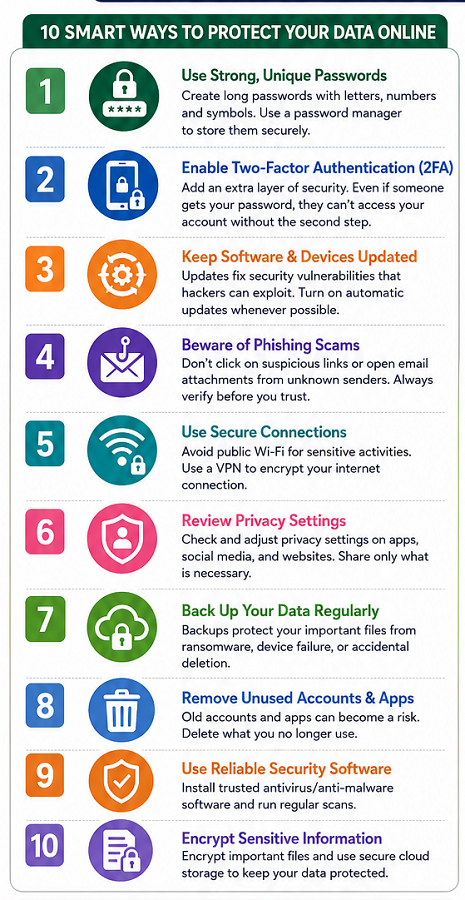
If you remember only a few things from this guide, make them these:
- Use unique passwords for every account.
- Turn on multi-factor authentication.
- Keep software updated.
- Think carefully before clicking links.
- Review privacy settings regularly.
- Back up important files.
- Use secure internet connections.
- Monitor your accounts for unusual activity.
These habits form the foundation of How to Protect Personal Data Online and significantly reduce your risk of becoming a victim of cybercrime.
Conclusion
The internet offers incredible convenience, but it also requires a certain level of responsibility. Fortunately, protecting your information doesn’t mean becoming a cybersecurity expert. Small, consistent actions often provide the greatest benefits.
Whether you’re shopping online, managing your finances, or simply chatting with friends, taking a few extra moments to think about security can prevent major headaches later. As cyber threats continue to evolve, staying informed and adopting smart habits is the best defense.
If there’s one takeaway from this guide, it’s this: How to Protect Personal Data Online isn’t about fear—it’s about preparation. By following the strategies discussed here, you’ll be far better equipped to safeguard your privacy, secure your digital identity, and browse the web with greater confidence.
Frequently Asked Questions (FAQ)
1. What is the easiest way to protect personal data online?
Use strong, unique passwords, enable two-factor authentication, and keep your devices updated. These three steps provide excellent protection against many common cyber threats.
2. Why is two-factor authentication important?
It adds a second verification step, making it much harder for attackers to access your accounts even if they know your password.
3. Is public Wi-Fi safe?
Public Wi-Fi can expose your data if it’s unsecured. When possible, use a trusted VPN or wait until you’re on a secure network before accessing sensitive accounts.
4. How often should I change my passwords?
Rather than changing strong passwords on a schedule, replace them immediately if they’re weak, reused, or involved in a known data breach.
5. Can antivirus software protect all my personal data?
Antivirus software is helpful, but it isn’t enough on its own. Good security also depends on safe browsing habits, software updates, and strong account protection.
6. What should I do if I think my account has been hacked?
Change your password immediately, enable two-factor authentication, review recent account activity, and contact the service provider if necessary.
7. Are password managers safe?
Yes. Reputable password managers use strong encryption and are generally much safer than reusing simple passwords across multiple websites.
8. Why should I review privacy settings regularly?
Apps and online services frequently update their policies and permissions. Reviewing your privacy settings helps ensure you’re only sharing the information you’re comfortable with.