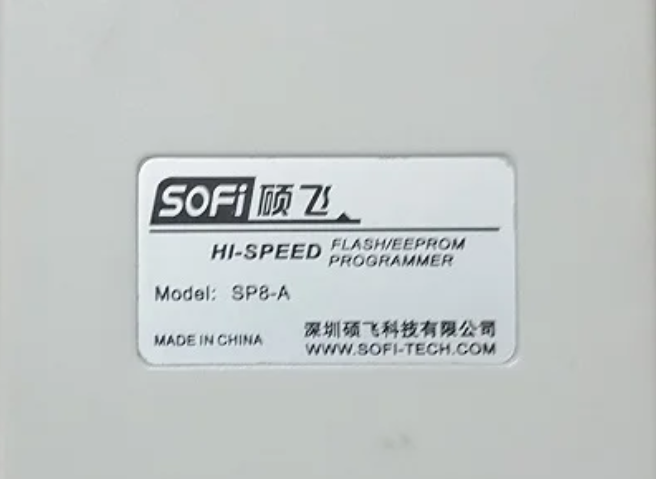
SOFI SP8-A Programmer Software Latest Version. If you own a SOFI SP8-A EEPROM/Flash programmer, installing the correct software is the first step toward reliable chip programming. The SOFI SP8-A Programmer Software Latest Version includes bug fixes, improved chip compatibility, better performance, and support for newer EEPROM and BIOS chips.
Whether you’re repairing laptops, recovering corrupted BIOS firmware, or programming SPI Flash memory, using the latest software helps avoid compatibility issues and programming errors.
In this guide, you’ll learn where to download SOFI SP8-A Programmer Software, how to install it, and why keeping it updated is important.
TL866II Plus Programmer Software Latest Version
Features Of SOFI SP8-A Programmer:
- USB2.0 communication interfaces
- Small in size. (103x71x23mm) Easy to use and carry
- Chinese/English interface
- Supports WinXP/Vista/Win7/Win10 and both 32-bit and 64-bit operating systems.
- 32-bit high-speed processors.
- Supports 93/24/25/BR90 memories, and more chips with a software upgrade.
- Standard 40Pin locking beds with zero insertion force.
- Supports contact detection for pins, hence improving the reliability of programming
- Perfect over-current and ESD protection that protects against accidental damage to programmers and computer USB ports
- It automatically detects the position of chips and then starts programming
- Has the facility of offline programming: Now you can programme without connection to a computer.
- LED and buzzer present give signals of success or failure
- It operates easily
- Supports low-voltage (3.3V) and 5V chips
- Provides self-detection for all devices
Why Download the SOFI SP8-A Programmer Software Latest Version?
Using outdated programmer software can cause failed reads, write errors, or unsupported chip detection. The latest release improves communication between the programmer and supported ICs.
Some benefits include:
- Better support for modern BIOS and EEPROM chips
- Improved chip detection
- Faster read and write speeds
- Bug fixes for previous software versions
- More stable programming performance
If you regularly repair motherboards or laptops, updating your software is highly recommended.
Download SOFI SP8-A Programmer Software
Many users search for download SOFI SP8-A Programmer Software after purchasing the programmer because some devices ship with outdated CDs.
Before installing the software:
- Download the latest software package from a trusted source.
- Extract the compressed ZIP or RAR file.
- Install the USB driver if required.
- Restart your computer after installation.
- Connect the programmer only after the software setup is complete.
Always scan downloaded files with antivirus software before opening them.
RT809F Programmer Software Latest Version Download
FlyPRO SOFI SP8-A Software Download
The FlyPRO SOFI SP8-A software download package normally includes:
- SOFI SP8-A programming software
- USB drivers
- Firmware update utility (if available)
- Supported chip database
- User manual
Installing the complete package ensures that Windows correctly recognizes the programmer and allows stable communication with supported memory chips.
SOFI SP8-A Programmer New Software Features
The SOFI SP8-A Programmer New Software offers several improvements that make daily repair work easier.
Key features include:
- Automatic chip identification
- BIOS and SPI Flash programming
- EEPROM reading and writing
- Verify function after programming
- Backup existing firmware before writing
- User-friendly interface
- Support for multiple chip manufacturers
These features help technicians reduce programming errors and improve repair success rates.
Installation Tips
For a smooth installation:
- Run the installer as Administrator.
- Install the USB driver before connecting the programmer.
- Disable driver signature enforcement if required on older Windows versions.
- Update the firmware only if recommended by the software developer.
- Always create a backup of the original BIOS before writing a new firmware file.
Following these steps minimizes the risk of failed programming.
CH341A Programmer Software Free Download Latest Version
Frequently Asked Questions
Is the SOFI SP8-A Programmer Software Latest Version free?
Many distributors provide the software free with the programmer. Always download it from a trusted source to avoid modified or infected files.
Does the software support Windows 10 and Windows 11?
Most recent versions work with Windows 10 and Windows 11, provided the correct USB drivers are installed.
Can I use older software versions?
Yes. Older releases such as the 2019 version still work with many chips, but the latest version generally offers better compatibility and stability.
Why isn’t my programmer detected?
This is usually caused by missing USB drivers, a faulty USB cable, or an incomplete software installation.
Final Thoughts
Keeping the SOFI SP8-A Programmer Software Latest Version installed is one of the easiest ways to improve programming reliability and chip compatibility. Whether you’re looking to download SOFI SP8-A Programmer Software, searching for the FlyPRO SOFI SP8-A software download, using the SOFI SP8-A Programmer 2019 latest Software free Download, or exploring the SOFI SP8-A Programmer New Software, always choose a trusted download source and keep both the software and drivers up to date.
With the correct installation and proper backup practices, the SOFI SP8-A programmer becomes a dependable tool for BIOS recovery, EEPROM programming, and motherboard repair.
EZP2010 Hi-Speed Programmer Software
SOFI SP8-A Programmer Latest Software Free Download
Many technicians still look for the SOFI SP8-A Programmer latest Software free Download because some older programmer units were designed around that release.
While the 2019 version remains compatible with many EEPROM and SPI Flash chips, newer software versions usually provide:
- Expanded chip database
- Better Windows compatibility
- Performance improvements
- Stability updates
Unless your hardware specifically requires the older release, using the newest available version is generally the better option.