Is CH341A BIOS Programmer Worth Buying? This is the common question in the tech repair and motherboard diagnostics world. This question continues to show up frequently, especially among laptop technicians, PC builders, and DIY repair enthusiasts. With the rise of cheap BIOS programmer tools, many wonder whether the CH341A USB programmer still holds its value or if better options now exist.
This detailed guide explores Is CH341A BIOS Programmer Worth Buying in 2025, comparing its performance, safety, compatibility, alternatives, pros, cons, and real-world use cases. We also analyze the growing debate around CH341A black vs green edition, CH341A compatibility issues, and whether it remains the best budget BIOS programmer available today.
Best BIOS Programmers for Laptop Repairing
What Is the CH341A Programmer?
If you’re new to BIOS flashing, the CH341A is a small USB-based device used as a BIOS chip flashing tool and SPI flash programmer. It allows users to:
- Recover corrupted BIOS
- Flash new firmware
- Remove BIOS passwords
- Repair boot failures
- Work on EEPROM and SPI chips
Because of its affordability and simple design, the CH341A quickly became one of the most widely used laptop BIOS programmer tools.
How to Read And Flash BIOS Bin Using CH341A
Is CH341A BIOS Programmer Worth Buying in 2025?
This year, the tech community continues revisiting the question: Is the CH341A BIOS Programmer Still Worth Buying. The short answer—yes, but with some important warnings and expectations.
Why People Still Prefer It
- It’s extremely cost-effective
- Works for common 24/25 series chips
- Ideal for BIOS recovery and firmware repair
- Small, portable, and USB powered
- Supported widely in forums and tutorials
But newer users often ask: Is CH341A BIOS Programmer Worth It for modern laptops and motherboards? Let’s dive deeper.
CH341A Programmer Software Free Download Latest Version
CH341A Programmer Review: Strengths, Weaknesses & Real Performance
This section provides a practical CH341A programmer review based on technician experience, testing results, and community feedback.
Pros & Cons of the CH341A Programmer
| Pros | Cons |
|---|---|
| Very affordable (best budget BIOS programmer) | Limited support for advanced modern chips |
| Easy to use for beginners | Voltage risks on some versions |
| Works as a BIOS recovery tool | Requires external clips/adapters |
| Portable and USB powered | Possible CH341A compatibility issues |
| Supports SPI and EEPROM chips | Some variants output incorrect voltages |
CH341A Black vs Green Edition – Which One Is Better?
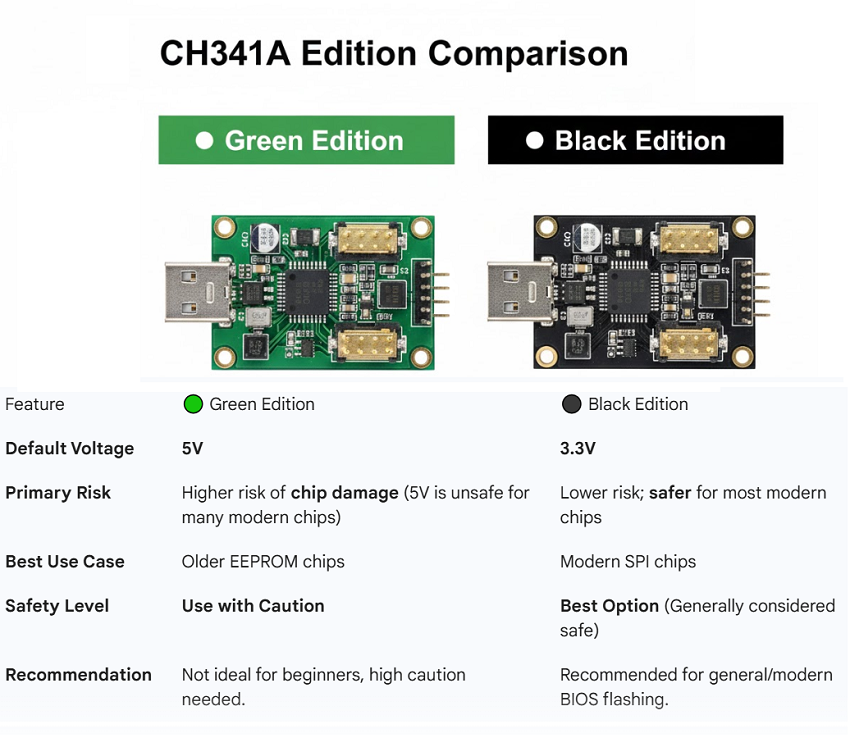
One of the most discussed comparisons is CH341A black vs green edition. Both versions work, but they differ significantly in voltage output and stability.
CH341A Black Edition vs Green Edition
| Feature | Green Edition | Black Edition |
|---|---|---|
| Default voltage | 5V (unsafe for some chips) | 3.3V (safer) |
| Best use case | Old EEPROM chips | Modern SPI chips |
| Beginner friendly | Moderate | High |
| Risk of chip damage | Higher | Lower |
| Recommendation | Use with caution | Best option |
The black edition is generally considered is CH341A safe for BIOS flashing due to its safer voltage output.
How to Use CH341A Programmer – Basic Overview
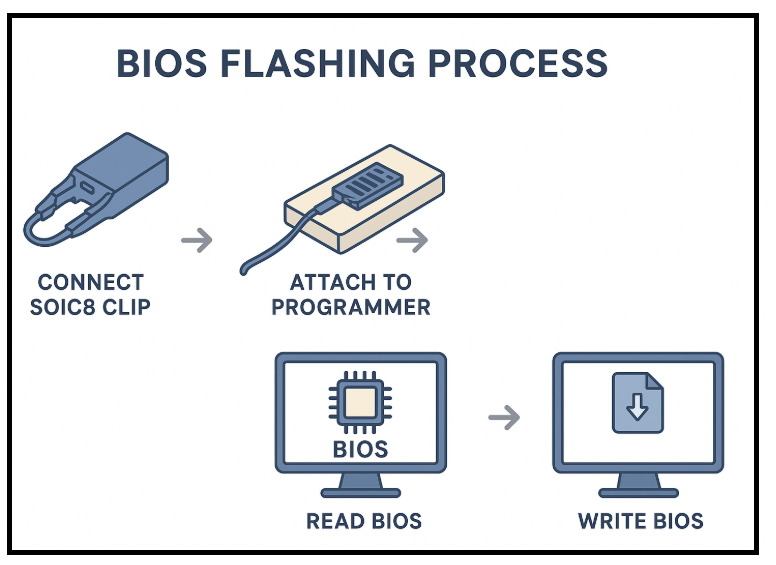
Many users wonder how to use CH341A programmer safely. The basic process is:
- Connect SOIC8 clip or adapter to BIOS chip
- Attach it to the programmer
- Plug the programmer into a USB port
- Use software like AsProgrammer or CH341A Programmer
- Read, back up, erase, write, and verify BIOS
Because this process is simple, the CH341A has become popular in BIOS recovery tools guides.
Is CH341A BIOS Programmer Worth Buying – Real-World Use Cases
Technicians commonly use the CH341A for:
- Removing BIOS admin passwords
- Fixing laptops that don’t turn on
- Recovering corrupted firmware after an update
- Repairing bricked motherboards
- Flashing modded BIOS
- Updating EC firmware (with caution)
These multiple use cases explain why many still believe Is CH341A BIOS Programmer Worth Buying even in 2025.
RT809F Programmer Software Latest Version Download
CH341A Alternative Options
While the CH341A is popular for its price, there are better CH341A alternative tools if you need more stability or advanced functions.
CH341A vs Popular Alternatives
| Feature | CH341A | TL866 II Plus | RT809H |
|---|---|---|---|
| Price | Very cheap | Medium | High |
| Chip support | Limited | Very wide | Extremely wide |
| Safety | Moderate | Safe | Very safe |
| Best for | Budget repairs | Professional workshops | Advanced repairs |
| Recommended for beginners | Yes | Yes | Not ideal |
This comparison shows that while high-end tools are superior, the CH341A still stands strong for entry-level and DIY use.
Is CH341A BIOS Programmer Worth It for Modern Laptops?
Modern BIOS chips (Winbond, MXIC, GigaDevice) mostly still work well with the CH341A. However:
Potential issues:
- Voltage mismatch
- Cheap SOIC8 clips may cause connection failures
- Not ideal for large-capacity ICs
- Some laptops have locked BIOS regions
Still, for basic flashing jobs and troubleshooting, it remains one of the best BIOS programmer options for beginners.
CH341A USB Programmer For Sale
CH341A Compatibility Issues to Be Aware Of
These problems are commonly reported:
- Poor-quality clips
- Wrong orientation of BIOS chip
- Outdated software
- Green edition voltage damage
- Laptop models with protected BIOS
Most issues can be fixed using the black edition and updated software versions.
Is the CH341A BIOS Programmer Still Worth Buying in 2025?
Considering features, performance, community support, and pricing, the answer is yes—but with realistic expectations.
Conclusion: Is CH341A BIOS Programmer Worth Buying?
If your question is Is CH341A BIOS Programmer Worth Buying, the detailed evaluation shows:
- It is an excellent tool for beginners
- It works perfectly as a BIOS chip flashing tool
- The black edition is safe for modern chips
- It is still the best budget BIOS programmer available
- Despite some limitations, it offers immense value for its price
If you’re a technician, student, or DIY repairer working on BIOS-related issues, then Is CH341A BIOS Programmer Worth It—absolutely yes, provided you take the necessary precautions and use the correct version.
FAQ: CH341A BIOS Programmer
1. Is CH341A safe for BIOS flashing?
Yes, especially the black edition operating at 3.3V, which reduces risk to modern SPI chips.
2. What is the best CH341A alternative?
The TL866 II Plus is the best combination of price, versatility, and reliability.
3. Can CH341A recover bricked laptops?
Yes, it is widely used as a BIOS recovery tool for dead laptops and desktops.
4. Does CH341A support all BIOS chips?
No. It supports most 24/25 series chips but may not work with larger or protected chips.
5. Is the CH341A the best budget BIOS programmer?
Yes, it remains the most affordable, widely supported, and beginner-friendly tool in 2025.