Best Encrypted Email Services for Privacy. Your email account probably contains more personal information than you realize. From password-reset links and financial statements to private conversations and work documents, your inbox can reveal a lot about your digital life. If you’re using a regular email provider, you might wonder who can access that information and how well it’s protected.
The Best Encrypted Email Services for Privacy help protect your messages through encryption, stronger account security, and privacy-focused policies. However, not every provider offers the same level of protection. Some encrypt messages automatically between their own users, while others require you to enable encryption or exchange keys.
In this guide, we’ll compare seven privacy-focused email services, explain their security differences, and help you choose one that fits your needs.
How to Secure Cloud Storage from Hackers
Quick Summary: Best Encrypted Email Services for Privacy
- Best overall for most privacy-conscious users: Proton Mail
- Best for automatic encryption: Tuta Mail
- Best for customizable email hosting: Mailbox.org
- Best for email aliases and everyday privacy: StartMail
- Best for minimal-data email: Posteo
- Best for OpenPGP-based secure communication: Mailfence
- Best for privacy-focused business communication: Proton Mail or Mailbox.org, depending on your requirements
These recommendations are based on encryption features, usability, privacy controls, and practical use cases rather than an independent security audit.
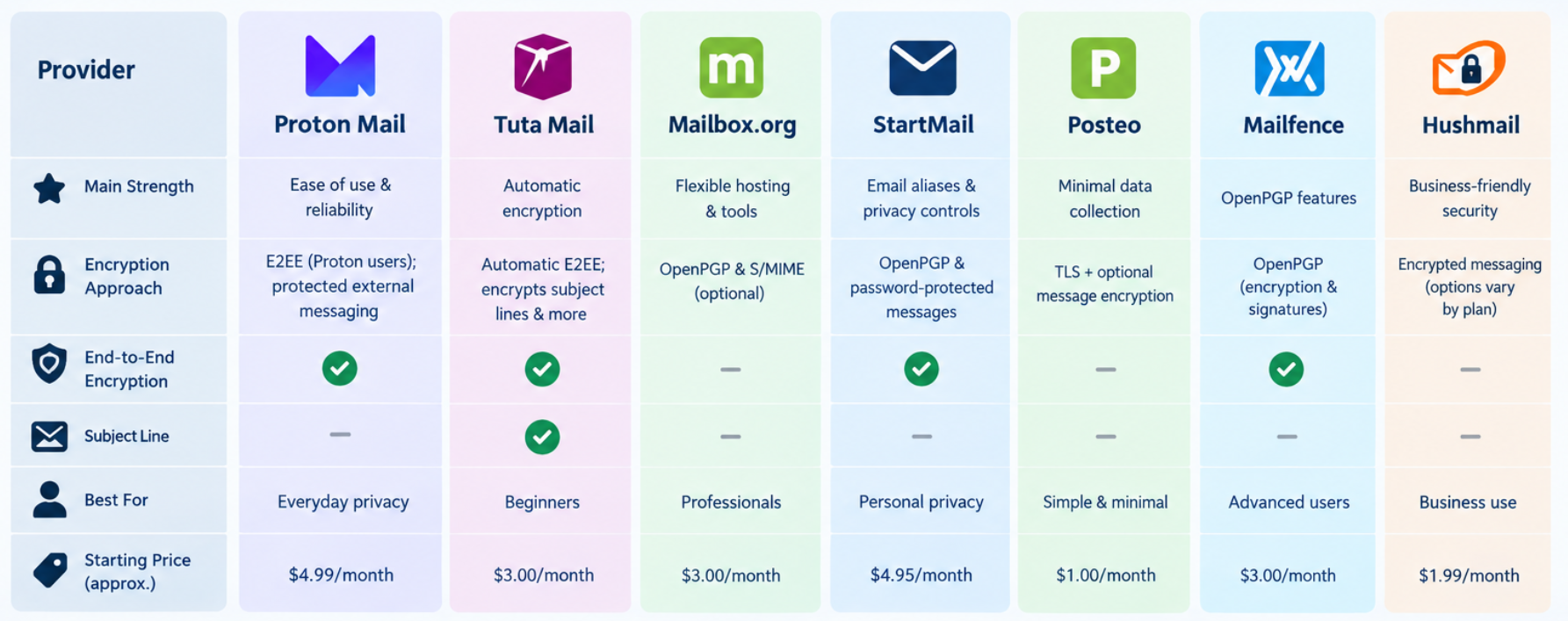
1. Proton Mail – Best Overall for Privacy
Proton Mail is a strong starting point for anyone looking for a private alternative to mainstream email providers. It offers end-to-end encryption between Proton Mail users and supports encrypted communication with external recipients through protected-message features.
Its interface is relatively beginner-friendly, making it easier to adopt without learning complicated encryption procedures.
Key features:
- End-to-end encryption between Proton Mail users.
- Encrypted mailbox storage.
- Two-factor authentication.
- Privacy-focused apps for desktop and mobile.
- Support for custom domains on eligible paid plans.
Best for: Everyday personal email, private conversations, and users moving away from Gmail.
One important limitation is that messages sent to ordinary email accounts aren’t automatically end-to-end encrypted just because you use Proton Mail. You need to use an appropriate encryption method when communicating outside its encrypted ecosystem.
2. Additionally, Tuta Mail stands out for automatic encryption.
Tuta Mail takes a different approach to protecting email. It automatically encrypts messages between Tuta users and also encrypts additional mailbox information, including subject lines, contacts, and calendar data.
This makes it particularly appealing to users who want strong privacy without managing OpenPGP keys themselves.
Key features:
- Automatic end-to-end encryption between Tuta users.
- Encryption of email subject lines and attachments.
- Encrypted contacts and calendar information.
- Desktop and mobile applications.
- Password-protected encrypted messages for external recipients.
Best for: Privacy-conscious beginners and users who want extensive built-in encryption.
Tuta uses its own encryption architecture rather than standard OpenPGP. That can make the experience simpler, but users should consider compatibility requirements if they need to work with existing encrypted-email systems.
3. Mailbox.org – Best for Flexible Email Hosting
Mailbox.org is worth considering if you want private email alongside traditional productivity features. It supports encryption options including OpenPGP and S/MIME, making it useful for people who need more control over how messages are secured.
Its security tools also include two-factor authentication and protections for encrypted connections.
Key features:
- Optional OpenPGP and S/MIME email encryption.
- Encrypted connections using TLS.
- Productivity tools alongside email.
- Custom-domain support on suitable plans.
- Additional security controls for experienced users.
Best for: Professionals, custom-domain users, and people comfortable configuring encryption.
Keep in mind that TLS protects messages in transit between systems; it does not provide the same protection as end-to-end encryption. For sensitive messages, configure and verify the appropriate message-encryption method.
4. StartMail – Best for Email Aliases
StartMail focuses on privacy, reducing unwanted tracking, and giving users greater control over their email identities. Its aliases are especially useful when signing up for websites, newsletters, and online services.
It also supports OpenPGP encryption and password-protected messages for recipients who don’t use compatible encryption tools.
Key features:
- Multiple email aliases.
- OpenPGP encrypted communication.
- Password-protected messages for external recipients.
- Tracking-pixel protection.
- Support for custom domains on eligible plans.
Best for: Users who want to reduce spam and separate online accounts from their main email address.
StartMail is a paid service, so check its current pricing and features before switching.
5. Posteo – Best for Minimal-Data Email
Posteo is a privacy-focused email provider known for its emphasis on data minimization and sustainability. It offers encrypted connections and supports additional email encryption options, including OpenPGP.
It’s a practical option if you prefer a straightforward mailbox rather than a large suite of cloud services.
Key features:
- Privacy-oriented account policies.
- Encrypted connections.
- Optional email encryption features.
- Calendar and address-book functionality.
- Focus on reducing unnecessary personal-data collection.
Best for: Users who value simplicity, privacy, and minimal-data practices.
Remember that privacy-focused policies and encryption solve different problems. Review the provider’s current documentation to understand what is encrypted automatically and what requires additional setup.
6. Mailfence – Best for OpenPGP Features
Mailfence is another option for people who want encrypted email alongside productivity tools. Its approach supports OpenPGP-based communication, giving users flexibility when exchanging protected messages.
However, the actual protection depends on how encryption is configured and whether the recipient can handle encrypted messages.
Key features:
- OpenPGP email encryption.
- Digital signatures.
- Calendar and contact tools.
- Secure communication features.
- Options for managing encryption keys.
Best for: Users who need more control over encrypted communication and are comfortable learning the basics of public-key cryptography.
7. Hushmail – Best for Certain Professional Workflows
Hushmail provides encrypted email options and business-oriented features. It may be worth evaluating for professional environments that need secure communication workflows, particularly where sensitive client information is involved.
Key features:
- Encrypted email capabilities.
- Secure message delivery options.
- Business-focused plans.
- Features intended for particular professional use cases.
Best for: Organizations evaluating secure communication for specialized workflows.
Before choosing Hushmail or any provider for regulated information, confirm its current compliance terms, contractual protections, and suitability for the specific legal requirements of your organization.
How to Protect Personal Data Online
Comparison Table: Best Encrypted Email Services
| Provider | Main strength | Encryption approach | Best suited for |
|---|---|---|---|
| Proton Mail | Ease of use | Automatic between Proton users; protected external messaging | Everyday privacy |
| Tuta Mail | Broader mailbox encryption | Automatic between Tuta users; protected external messaging | Beginners |
| Mailbox.org | Flexibility | Optional OpenPGP and S/MIME | Professionals |
| StartMail | Aliases and privacy controls | OpenPGP and password-protected messages | Personal privacy |
| Posteo | Data minimization | TLS and optional message encryption | Simple private email |
| Mailfence | OpenPGP features | Configurable encrypted communication | Experienced users |
| Hushmail | Professional workflows | Encrypted messaging options | Business use cases |
Features and plan availability can change. Check each provider’s official documentation before purchasing.
How to Choose the Best Encrypted Email Services for Privacy
The right choice depends on what you’re protecting and whom you communicate with. Here’s what to check before creating an account.
| Email security feature | Why it matters | What to check |
|---|---|---|
| End-to-end encryption | Protects message content from intermediary access | Is it automatic or optional? |
| Subject-line protection | Subject lines can expose sensitive details | Are subjects encrypted? |
| Two-factor authentication for email | Adds protection if your password is stolen | Which authentication methods are supported? |
| Recovery options | Helps prevent permanent account loss | Can you securely recover your keys or account? |
| Email aliases | Helps limit spam and linkable identities | Can you create and disable aliases? |
| Open-source software | Allows public inspection of code | Which components are open source? |
| Business controls | Supports organizational security needs | Are custom domains and administrative controls available? |
When considering which email service offers the best privacy, don’t look at encryption alone. Account recovery, metadata exposure, security updates, and your recipient’s email provider all matter.
Difference Between Encryption And Hashing
How to Set Up a Private Email Account
Follow these steps to strengthen your email privacy.
- Choose a provider. Compare its encryption model, privacy policy, and available plans.
- Create a strong password. Use a unique password stored in a reputable password manager.
- Enable two-factor authentication. Prefer a passkey or authenticator method when supported.
- Save recovery information. Store recovery codes or encryption keys securely and separately from your account.
- Test encrypted messaging. Send a test message and confirm that the recipient can access it securely.
- Review connected devices. Remove unfamiliar sessions and revoke access for applications you no longer use.
- Check tracking and forwarding settings. Disable unnecessary integrations and review automatic forwarding rules.
Warning: Never share an encryption password through the same channel you’re trying to protect. If you send a password-protected email, communicate its password through a separate, trusted channel.
Best Two-Factor Authentication Apps
Troubleshooting Common Encrypted Email Problems
| Problem | Possible reason | What to do |
|---|---|---|
| Recipient cannot open a message | Incorrect password or unsupported encryption | Verify the method and share instructions securely |
| Email arrives unencrypted | Message encryption wasn’t enabled | Check the encryption setting before resending |
| Attachments aren’t protected | The chosen method doesn’t encrypt them as expected | Verify attachment encryption before sending |
| You cannot restore old messages | A recovery key or password is missing | Check the provider’s official recovery guidance |
| Encrypted email won’t work in another app | The client lacks compatible encryption support | Use a supported app or configure the required keys |
Frequently Asked Questions
1. What is the best encrypted email service for privacy?
Proton Mail is a strong general-purpose choice, while Tuta Mail is especially appealing for automatic encryption of more mailbox information. The best option depends on your compatibility, usability, and privacy requirements.
2. Which email provider has the strongest encryption?
There isn’t one universally strongest provider for every situation. Compare what is encrypted, how keys are managed, whether encryption is enabled by default, and how the service handles account recovery.
3. What is the most private alternative to Gmail?
Proton Mail and Tuta Mail are popular privacy-focused alternatives. Both offer encryption features and are designed to reduce reliance on advertising-based email models.
4. Is Proton Mail more secure than Tuta Mail?
Neither is automatically more secure in every respect. Proton Mail offers a familiar encrypted-email experience, while Tuta encrypts additional mailbox elements, including subject lines. Your requirements determine which approach fits better.
5. Which encrypted email service is best for beginners?
Proton Mail and Tuta Mail are good starting points because their built-in encryption reduces the need to manage keys manually.
6. Can encrypted email providers read your messages?
With properly implemented end-to-end encryption, the provider should not be able to read the protected message content. However, ordinary messages sent without end-to-end encryption may be accessible to systems processing them, depending on the provider’s architecture.
7. Are encrypted email services completely private?
No. Email addresses, delivery timestamps, account information, and other metadata may remain visible. Encryption also cannot prevent someone from reading a message after accessing an unlocked device or compromised account.
How to Encrypt Files on Windows
Final Verdict
The Best Encrypted Email Services for Privacy offer more than a secure login. They combine appropriate encryption, sensible account protection, transparent policies, and features that match your communication habits.
For most individuals, Proton Mail and Tuta Mail are sensible starting points. Professionals who need greater control over encryption or custom email hosting should also consider Mailbox.org, StartMail, and Mailfence.
Before switching, test how messages are encrypted, confirm that your recipients can open them, and secure your recovery information. A private email account is an important step toward better digital privacy, but your everyday security habits matter just as much.